
Getting Started Guide Manual
1 Unboxing the Development Kit
The items included when purchasing all optional accessories are as follows.
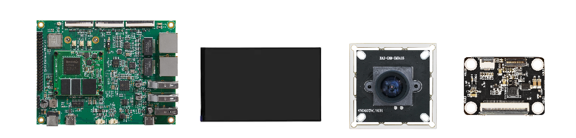
Unboxing the Development Kit
2 Power On/Off Operation
Since RV1126B Nano-TB is a bare-board product without enclosure protection, special care is required when plugging or unplugging cables while it is powered on.
2.1 Startup Method
As shown in the figure below, the device can be started simply by connecting DC12V to the power terminal.
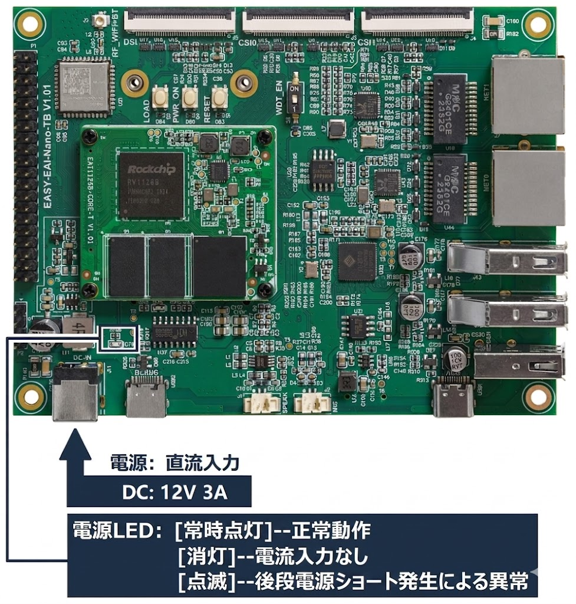
Startup Method
2.2 Shutdown Method
You can shut down the device by 【long-pressing】 the 【PWR_ON button】 on the baseboard, or by 【directly unplugging the switching power supply】. However, to prevent data loss, it is recommended to synchronize the file cache to non-volatile memory (such as eMMC) 【before shutting down】.
For example, run the following shell command:
sync3 Power On/Off Buttons
The power on/off related buttons are described in the following figure.
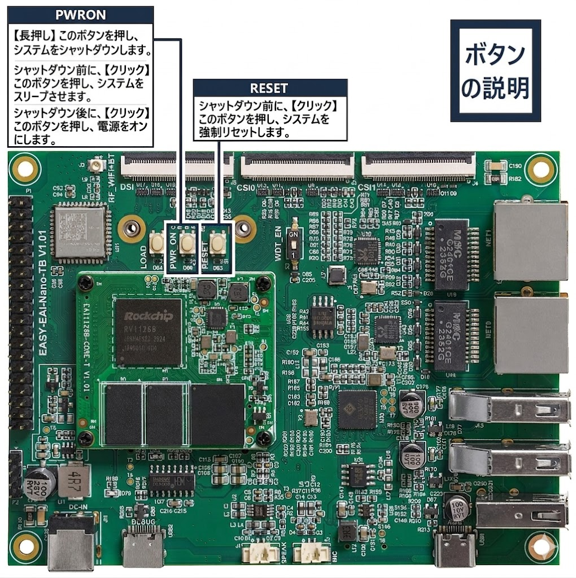
Power On/Off Buttons