
PP-OCRv6 OCR Execution Guide for RV1126B
Document Information
| Item | Description |
|---|---|
| Document name | PP-OCRv6 OCR Execution Guide for RV1126B |
| Version | v1.0 |
| Target board | RV1126B development board |
| Target algorithm | PP-OCRv6 OCR |
| Target features | Japanese image OCR |
| Development environment | Ubuntu 22.04 Docker, RKNN Toolkit2 Docker, RV1126B board |
| Recommended models | PP-OCRv6_small_det, PP-OCRv6_small_rec |
| Board IP | 192.168.10.85 |
| Board deployment path | /userdata/ppocrv6_ocr_demo/ |
Revision History
| Version | Date | Description |
|---|---|---|
| v1.0 | 2026-06-27 | Initial version. Organized PP-OCRv6 Japanese OCR, ONNX/RKNN conversion, and RV1126B deployment flow. |
Download All Sample-Related Materials
The sample code, models, test images, and other related resources used in this tutorial can be downloaded from the following link.
1. Overview
This guide describes how to run PP-OCRv6 OCR on the RV1126B development board. The PaddleOCR models are prepared on the PC or in Docker, converted to ONNX, and then converted to RKNN models with RKNN Toolkit2. On the board side, RKNN Runtime and a C++ program perform text detection, text crop extraction, text recognition, CTC decoding, and result saving.
The overall workflow is shown below.
Verify Japanese OCR with PP-OCRv6 small models ↓Fix Paddle inference model paths ↓Paddle model → ONNX ↓ONNX → RKNN with target_platform=rv1126b ↓Deploy models, dictionary, and C++ executables to RV1126B ↓Run det / rec with RKNN C API ↓Save OCR result image and text outputThe full PaddleOCR Python package is not run on RV1126B. The board-side application uses RKNN Runtime only.
2. Models
| Purpose | Model | Board-side RKNN file | Description |
|---|---|---|---|
| Text detection | PP-OCRv6_small_det | ppocrv6_small_det_rv1126b_i8.rknn | Detects text regions in the input image. |
| Text recognition | PP-OCRv6_small_rec | ppocrv6_small_rec_rv1126b_fp_no_softmax.rknn | Recognizes text-line crops as Japanese text. |
The rec model uses an RKNN model with the final Softmax removed. CTC decoding only requires the maximum class at each time step, so using logits before Softmax gives the same argmax result as using probabilities after Softmax.
3. Workspace
Example workspace:
/opt/linuxshare/work/rv1126b/jp/AI/demo/ai-algorithm/04_ocr/ppocrv6_jp_demoExample directory layout:
ppocrv6_jp_demo/├── samples/├── output/├── models/│ ├── paddle/│ ├── onnx/│ ├── rknn/│ └── rec/├── scripts/├── logs/└── rv1126b-src/4. Conda Environment and PaddleOCR Setup
Create a dedicated environment for PP-OCRv6.
conda create -n ppocrv6 python=3.10 -yconda activate ppocrv6Install PaddlePaddle and PaddleOCR.
python -m pip install --upgrade pip setuptools wheelpython -m pip install paddlepaddle==3.3.0 -i https://www.paddlepaddle.org.cn/packages/stable/cpu/python -m pip install paddleocr==3.7.0Verify the installation.
python - <<'PY'import paddleimport paddleocrimport sys
print("Python:", sys.version)print("Paddle:", paddle.__version__)print("PaddleOCR:", paddleocr.__version__)print("CUDA:", paddle.is_compiled_with_cuda())PY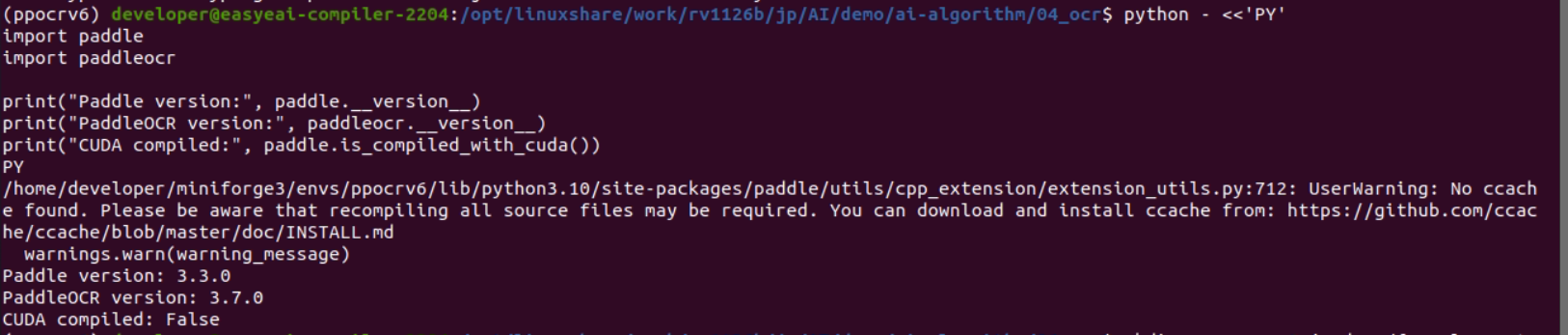
5. Japanese OCR Test Image
The Japanese test image used in this guide is shown in Figure 2.
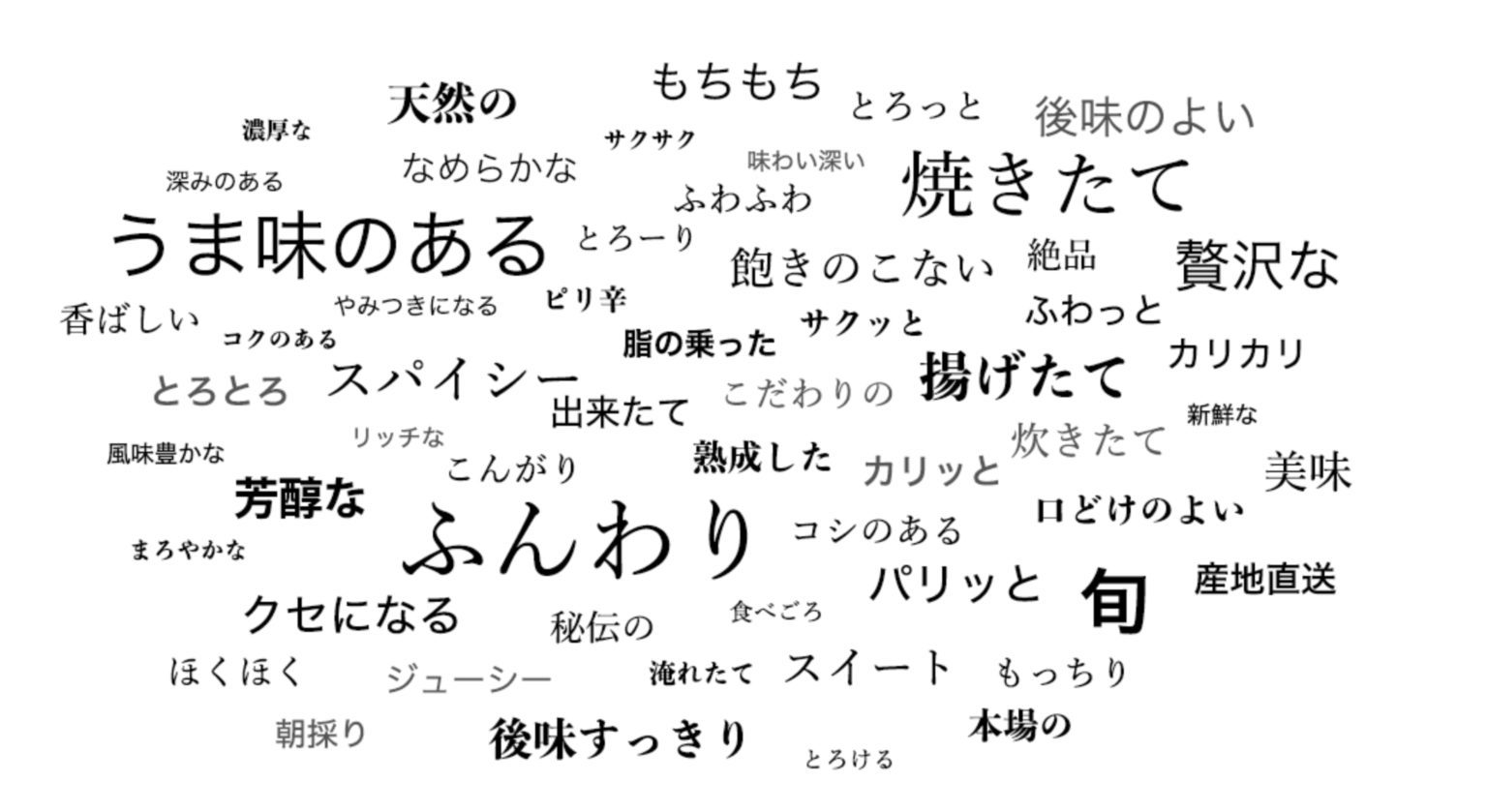
Place the test image as follows.
mkdir -p samplescp /path/to/jp_001.jpg ./samples/jp_001.jpg6. Japanese OCR Verification with PaddleOCR
Create scripts/test_ppocrv6_jp.py.
import os
os.environ["FLAGS_use_mkldnn"] = "0"os.environ["FLAGS_use_onednn"] = "0"os.environ["PADDLE_PDX_ENABLE_MKLDNN_BYDEFAULT"] = "0"os.environ["PADDLE_PDX_DISABLE_MODEL_SOURCE_CHECK"] = "True"
from paddleocr import PaddleOCR

ocr = PaddleOCR(    text_detection_model_name="PP-OCRv6_small_det",    text_recognition_model_name="PP-OCRv6_small_rec",    use_doc_orientation_classify=False,    use_doc_unwarping=False,    use_textline_orientation=False,    text_det_limit_side_len=736,    text_det_limit_type="max",    text_recognition_batch_size=1,    device="cpu",)
results = ocr.predict("./samples/jp_001.jpg")
for res in results:    res.print()    res.save_to_img("./output")    res.save_to_json("./output")
Run the script.
python scripts/test_ppocrv6_jp.pyThe PaddleOCR Python visualization result is shown in Figure 3.
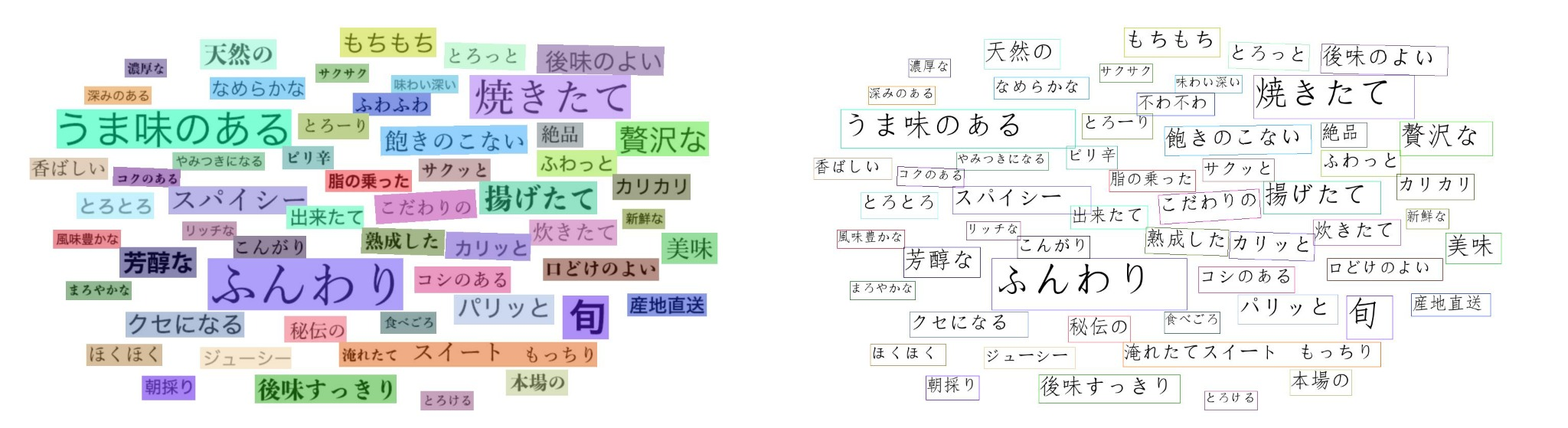
7. Fix Paddle Models and Export the Dictionary
Copy the automatically downloaded models into the project directory.
mkdir -p models/paddle
cp -r ~/.paddlex/official_models/PP-OCRv6_small_det \  models/paddle/PP-OCRv6_small_det
cp -r ~/.paddlex/official_models/PP-OCRv6_small_rec \  models/paddle/PP-OCRv6_small_rec
The character table for the rec model is stored in PostProcess.character_dict inside inference.yml, not as a standalone text file. For easier C++ loading on the board, export it as one character per line.
python - <<'PY'import yamlfrom pathlib import Path
yml_path = Path("./models/paddle/PP-OCRv6_small_rec/inference.yml")out_path = Path("./models/rec/ppocrv6_rec_dict.txt")out_path.parent.mkdir(parents=True, exist_ok=True)
cfg = yaml.safe_load(yml_path.read_text(encoding="utf-8"))chars = cfg["PostProcess"]["character_dict"]
out_path.write_text("\n".join(map(str, chars)) + "\n", encoding="utf-8")
print("dict:", out_path)print("chars:", len(chars))PY
The exported dictionary contains:
18708The rec model output class count is 18710. The two additional classes are used for CTC blank and space.
8. Paddle Model to ONNX
Use PaddleX paddle2onnx to convert the model.
paddlex \ --paddle2onnx \ --paddle_model_dir ./models/paddle/PP-OCRv6_small_rec \ --onnx_model_dir ./models/onnx/PP-OCRv6_small_rec \ --opset_version 11The execution result is shown in Figure 4.
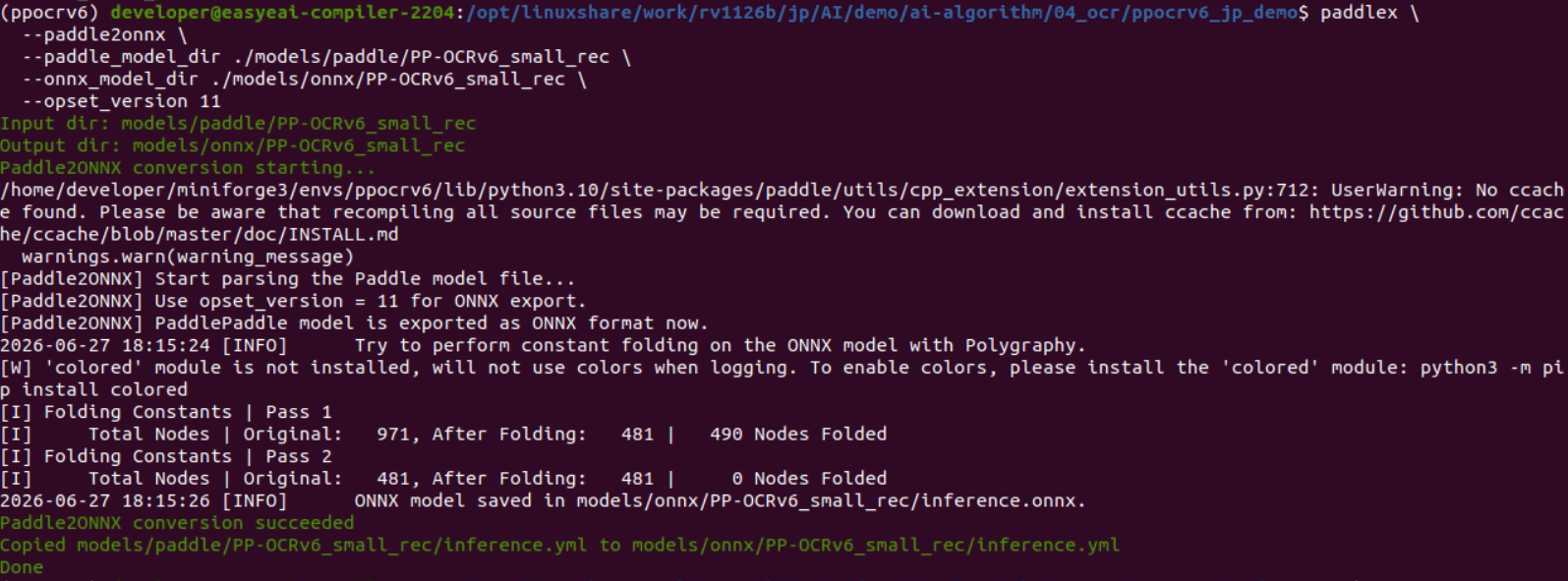
The ONNX file is generated at:
models/onnx/PP-OCRv6_small_rec/inference.onnxConvert the det model in the same way.
paddlex \ --paddle2onnx \ --paddle_model_dir ./models/paddle/PP-OCRv6_small_det \ --onnx_model_dir ./models/onnx/PP-OCRv6_small_det \ --opset_version 119. RKNN Conversion Environment
RKNN conversion is performed in the RKNN Toolkit2 Docker environment.
docker run -t -i --privileged \ -v /dev/bus/usb:/dev/bus/usb \ -v /data/project/sales/csun/rv1126b/jp/AI/demo:/test \ rknn-toolkit2:2.3.2-cp38 /bin/bashEnter the workspace.
cd /test/ai-algorithm/04_ocr/ppocrv6_jp_demoVerify RKNN Toolkit2.
python - <<'PY'from rknn.api import RKNNprint("RKNN Toolkit2 import OK")PY10. RKNN Conversion for the det Model
The det model uses INT8 quantization by default. The fixed input size is 1 x 736 x 736 x 3.
Create the quantization calibration list.
DATASET_ROOT=./datasets/japanese_ocr_synthetic_dataset_v1_0
sed "s#^#japanese_ocr_synthetic_dataset_v1_0/# \  "${DATASET_ROOT}/labels/image_list.txt" \  > ./datasets/ppocrv6_det_calib.txt
Because ppocrv6_det_calib.txt is stored under ./datasets/, paths inside the list must be relative to ./datasets/. Do not write ./datasets/japanese_ocr_synthetic_dataset_v1_0/...; otherwise RKNN Toolkit may resolve it as ./datasets/datasets/....
Fix the dynamic input in the det conversion script.
ret = rknn.load_onnx( model="./models/onnx/PP-OCRv6_small_det/inference.onnx", inputs=["x"], input_size_list=[[1, 3, 736, 736]],)Run the conversion.
python scripts/convert_ppocrv6_det_to_rknn.py 2>&1 \ | tee logs/convert_ppocrv6_det_to_rknn.logThe result is shown in Figure 5.
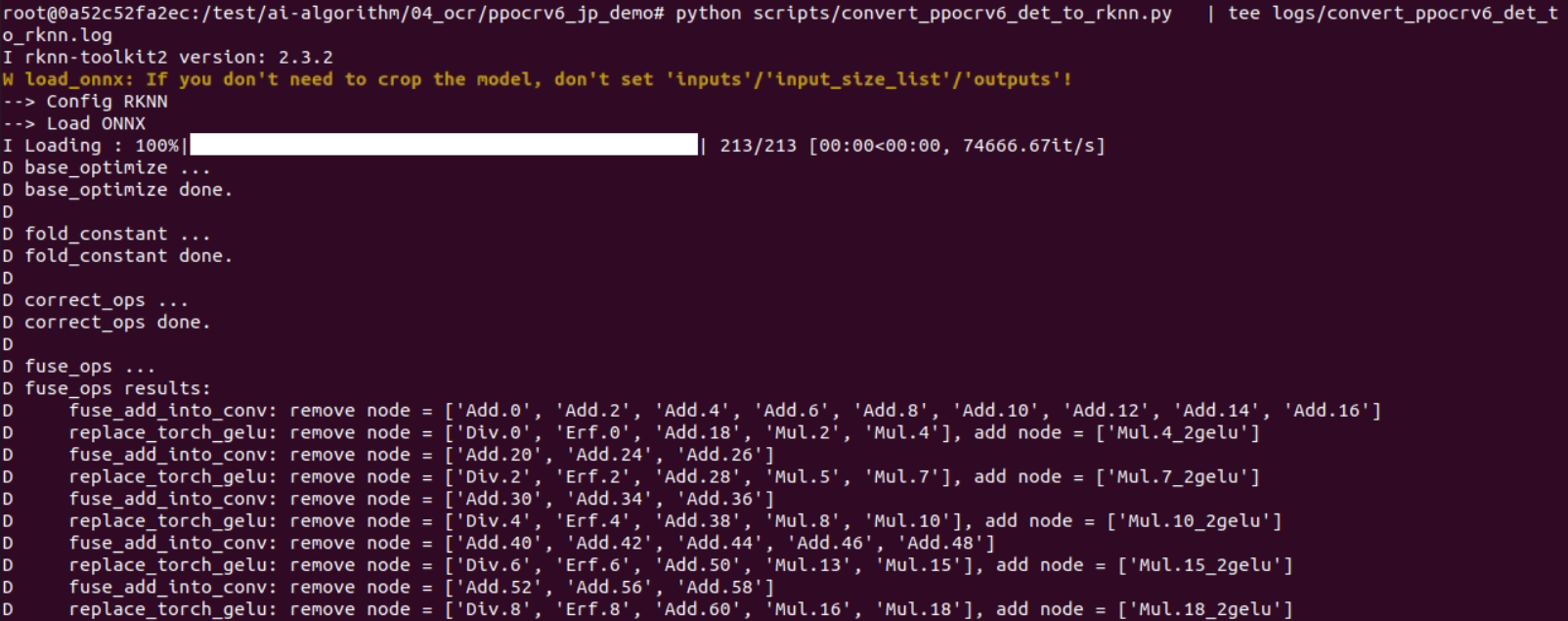
An FP model can also be generated for accuracy comparison.
python scripts/convert_ppocrv6_det_to_rknn_fp.py 2>&1 \ | tee logs/convert_ppocrv6_det_to_rknn_fp.log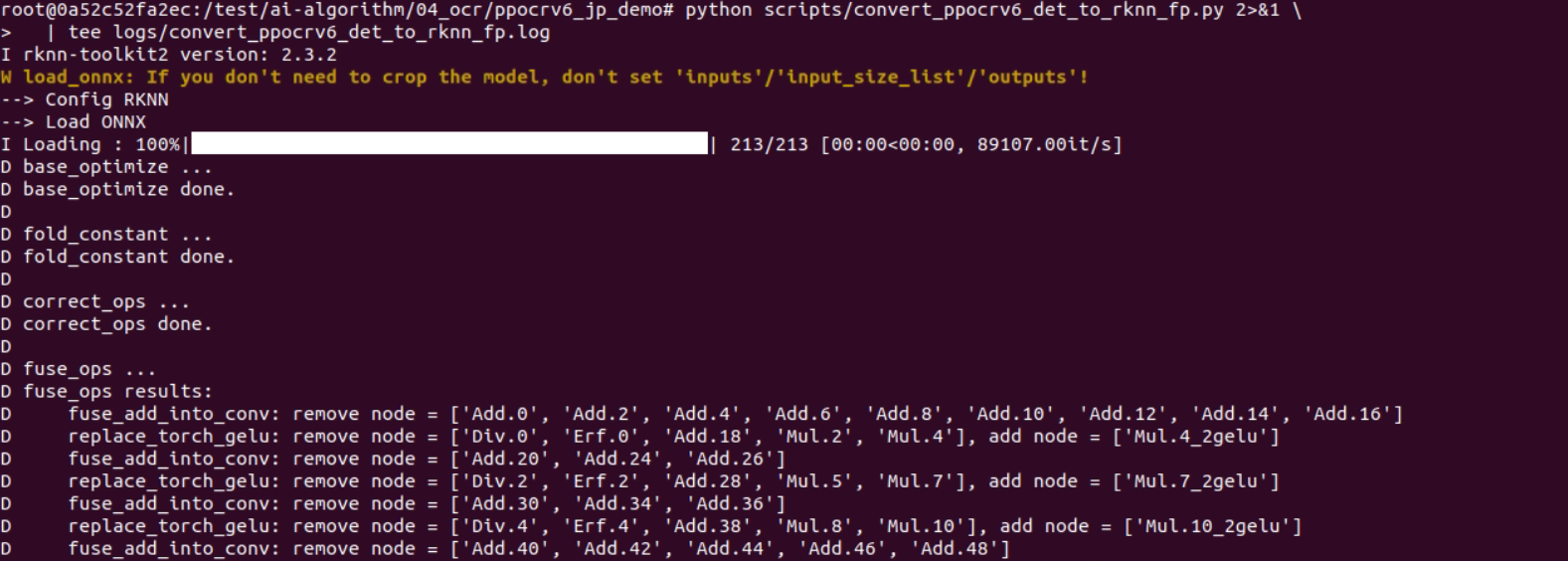
11. RKNN Conversion for the rec Model and Softmax Removal
When the rec model was converted normally, it failed at the final Softmax during board-side execution. The normal conversion log is shown in Figure 7.
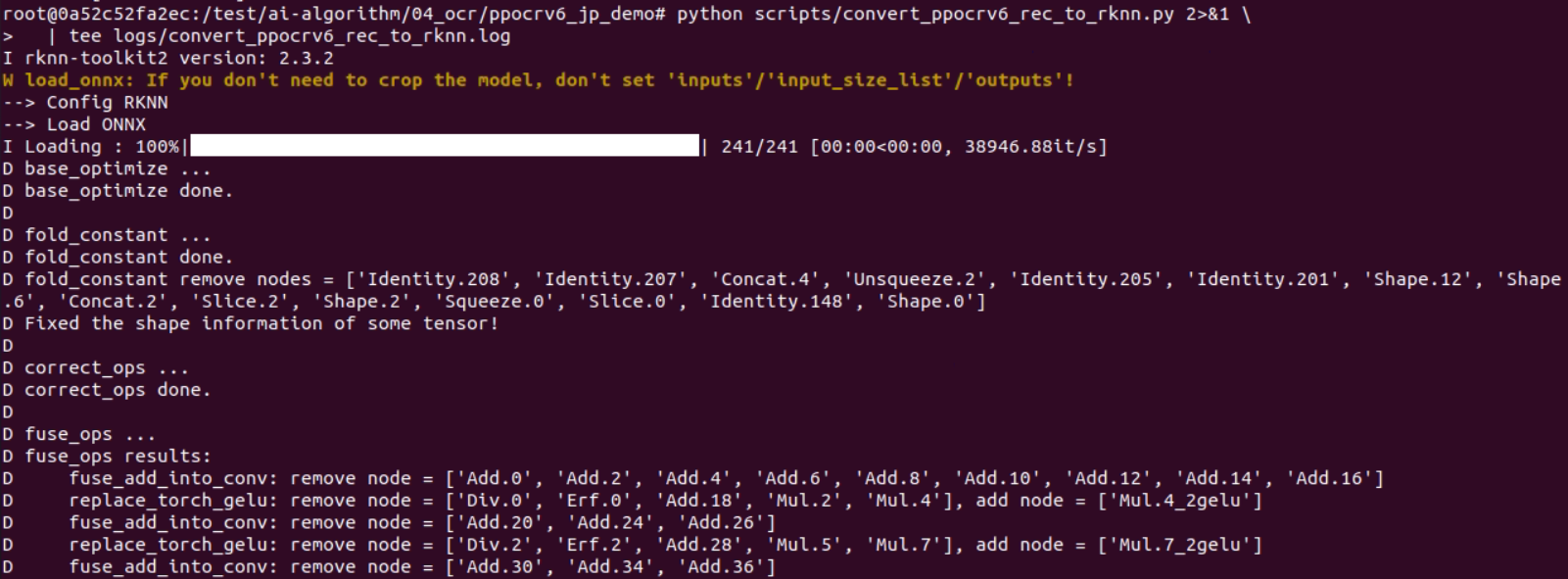
The board-side failure occurred at:
op name: exSoftmax13:Softmax.2rknn_run failedInspect the Softmax nodes in ONNX.
python - <<'PY'import onnx
model = onnx.load("./models/onnx/PP-OCRv6_small_rec/inference.onnx")
for i, node in enumerate(model.graph.node):    if node.op_type == "Softmax" or "Softmax" in node.name:        print("index:", i)        print("op_type:", node.op_type)        print("name:", node.name)        print("input:", list(node.input))        print("output:", list(node.output))        print("-" * 80)PY
The final Softmax is:
index: 480op_type: Softmaxname: Softmax.2input: ['p2o.pd_op.add.79.0']output: ['fetch_name_0']Therefore, set p2o.pd_op.add.79.0 as the RKNN output and remove the final Softmax.
from pathlib import Pathfrom rknn.api import RKNN

ONNX_MODEL = "./models/onnx/PP-OCRv6_small_rec/inference.onnx"RKNN_MODEL = "./models/rknn/ppocrv6_small_rec_rv1126b_fp_no_softmax.rknn"
REC_INPUT_SIZE = [1, 3, 48, 320]REC_OUTPUT_NAME = "p2o.pd_op.add.79.0"

def main():    Path("./models/rknn").mkdir(parents=True, exist_ok=True)
    rknn = RKNN(verbose=True)
    rknn.config(        target_platform="rv1126b",        mean_values=[[127.5, 127.5, 127.5]],        std_values=[[127.5, 127.5, 127.5]],        optimization_level=3,    )
    ret = rknn.load_onnx(        model=ONNX_MODEL,        inputs=["x"],        input_size_list=[REC_INPUT_SIZE],        outputs=[REC_OUTPUT_NAME],    )    if ret != 0:        raise RuntimeError("load_onnx failed")
    ret = rknn.build(do_quantization=False)    if ret != 0:        raise RuntimeError("build failed")
    ret = rknn.export_rknn(RKNN_MODEL)    if ret != 0:        raise RuntimeError("export_rknn failed")
    rknn.release()    print("done:", RKNN_MODEL)

if __name__ == "__main__":    main()
Run the conversion.
python scripts/convert_ppocrv6_rec_to_rknn_no_softmax.py 2>&1 \ | tee logs/convert_ppocrv6_rec_to_rknn_no_softmax.logThe result is shown in Figure 8.
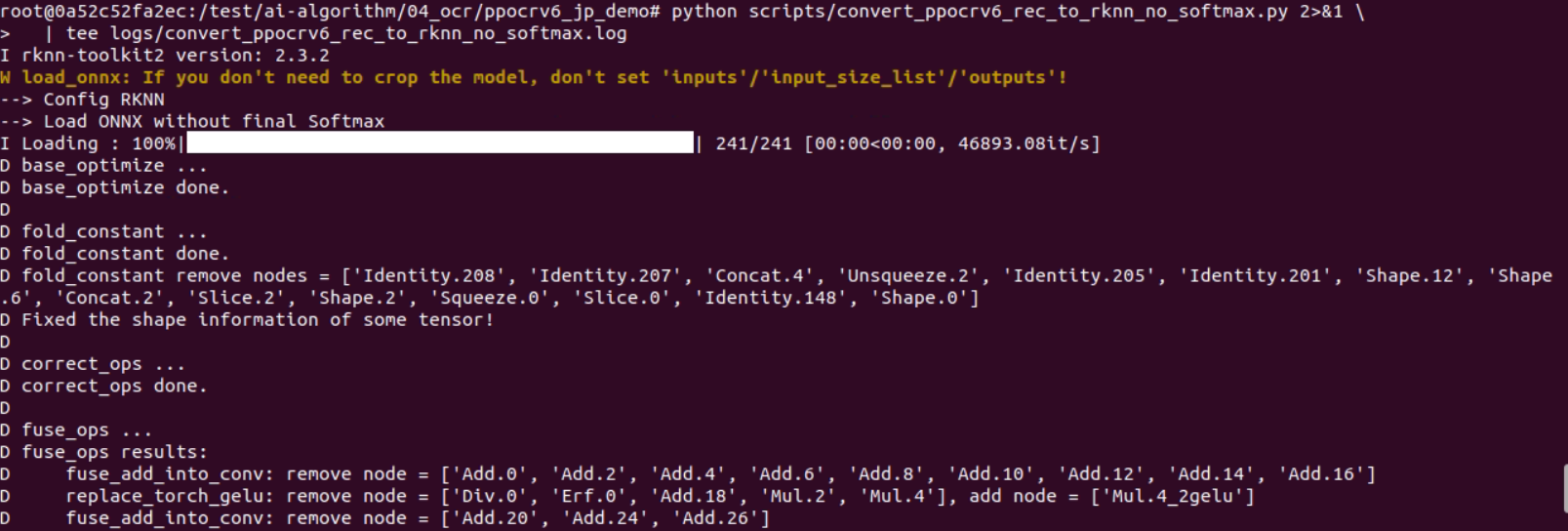
Generated model:
models/rknn/ppocrv6_small_rec_rv1126b_fp_no_softmax.rknn12. Mount the RV1126B Board
The RV1126B board IP is 192.168.10.85. Run the following command on the host.
sudo umount -l /mnt 2>/dev/null
sudo mount -t nfs \  -o vers=3,proto=tcp,mountproto=tcp,nolock,retrans=5,timeo=5 \  192.168.10.85:/ /mnt
After mounting, files can be copied to the board through /mnt/userdata/.
13. Board-side RKNN Runtime Policy
The board already has RKNN Runtime installed.
/usr/lib/librknnrt.so/usr/lib/librknn_api.soDo not copy librknnrt.so into the demo directory, and do not set LD_LIBRARY_PATH=./lib. An older runtime may be loaded first and break the working system environment.
Verify on the board:
find / -name 'librknn*.so*' 2>/dev/null14. Board-side Deployment Layout
The board-side directory layout is shown below.
/userdata/ppocrv6_ocr_demo/├── bin/│ ├── test-rknn-model-smoke│ └── test-ppocrv6-ocr├── model/│ ├── ppocrv6_small_det_rv1126b_i8.rknn│ └── ppocrv6_small_rec_rv1126b_fp_no_softmax.rknn├── dict/│ └── ppocrv6_rec_dict.txt└── test/ ├── jp_001.jpg ├── ocr_result.txt ├── ocr_result.jpg └── crops/Copy the models and dictionary.
sudo mkdir -p /mnt/userdata/ppocrv6_ocr_demo/{model,dict,test,bin}
sudo cp models/rknn/ppocrv6_small_det_rv1126b_i8.rknn \  /mnt/userdata/ppocrv6_ocr_demo/model/
sudo cp models/rknn/ppocrv6_small_rec_rv1126b_fp_no_softmax.rknn \  /mnt/userdata/ppocrv6_ocr_demo/model/
sudo cp models/rec/ppocrv6_rec_dict.txt \  /mnt/userdata/ppocrv6_ocr_demo/dict/
sudo cp samples/jp_001.jpg \  /mnt/userdata/ppocrv6_ocr_demo/test/
15. C++ Executable Structure
The board-side C++ project builds two executables with one build.sh.
rv1126b-src/├── build.sh├── CMakeLists.txt└── src/ ├── rknn_model_smoke_test.cc └── ppocrv6_ocr_demo.cc| Executable | Purpose |
|---|---|
test-rknn-model-smoke | Verifies that a .rknn model can run rknn_init and rknn_run on the board. |
test-ppocrv6-ocr | Performs image loading, det inference, crop, rec inference, CTC decode, and result saving. |
build.sh uses CURRENT_FOLDER=bin and copies outputs to $SYSROOT/userdata/ppocrv6_ocr_demo/bin/.
./build.sh16. Smoke Test for the det Model
Run the det model on the board.
cd /userdata/ppocrv6_ocr_demo
./bin/test-rknn-model-smoke \  ./model/ppocrv6_small_det_rv1126b_i8.rknn
The result is shown in Figure 9.
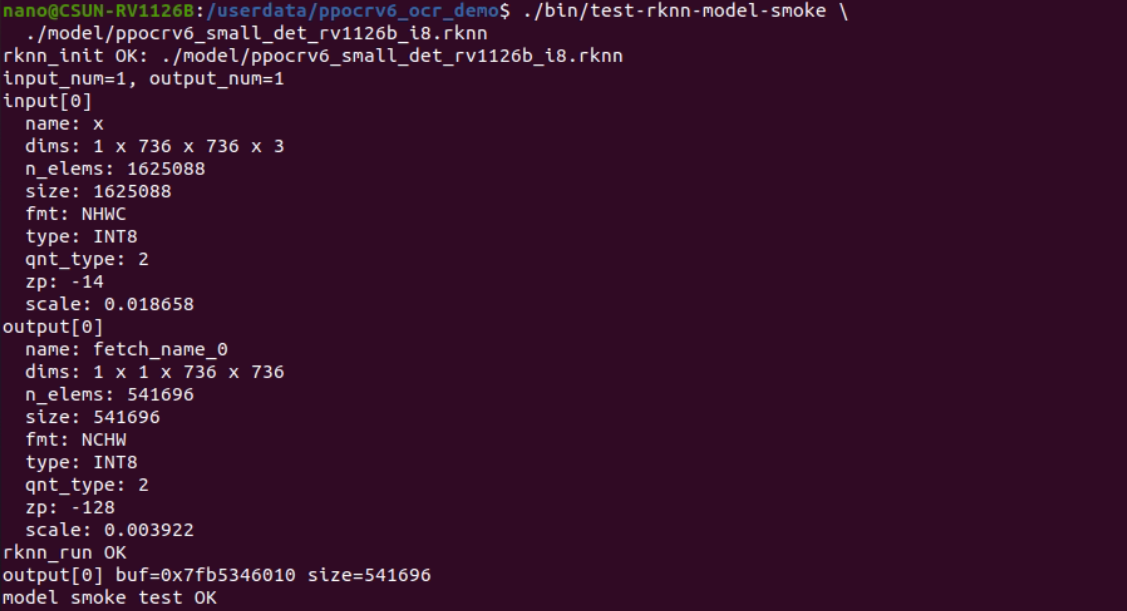
Verified input and output:
input: 1 x 736 x 736 x 3, INT8, NHWCoutput: 1 x 1 x 736 x 736, INT8, NCHWrknn_run OKmodel smoke test OK17. Smoke Test for the rec no-softmax Model
Run the rec no-softmax model on the board.
cd /userdata/ppocrv6_ocr_demo
./bin/test-rknn-model-smoke \  ./model/ppocrv6_small_rec_rv1126b_fp_no_softmax.rknn
The result is shown in Figure 10.
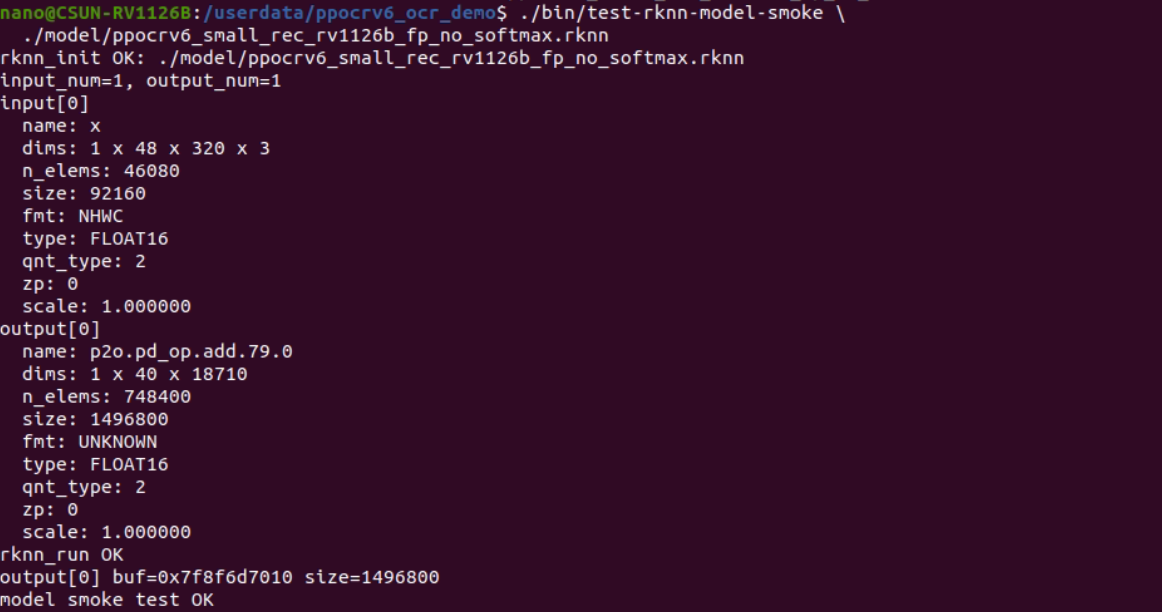
Verified input and output:
input: 1 x 48 x 320 x 3, FLOAT16, NHWCoutput: 1 x 40 x 18710, FLOAT16rknn_run OKmodel smoke test OK18. Board-side OCR Execution
Run the end-to-end OCR program on the board.
cd /userdata/ppocrv6_ocr_demo
./bin/test-ppocrv6-ocr \  ./model/ppocrv6_small_det_rv1126b_i8.rknn \  ./model/ppocrv6_small_rec_rv1126b_fp_no_softmax.rknn \  ./dict/ppocrv6_rec_dict.txt \  ./test/jp_001.jpg \  ./test
The execution logs are shown in Figure 11 and Figure 12.
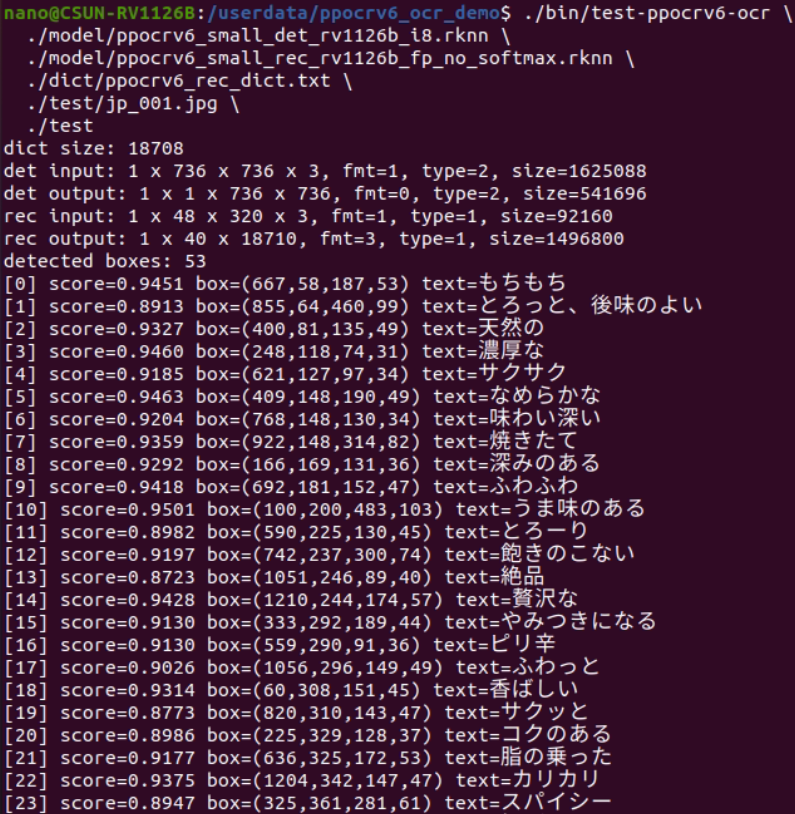
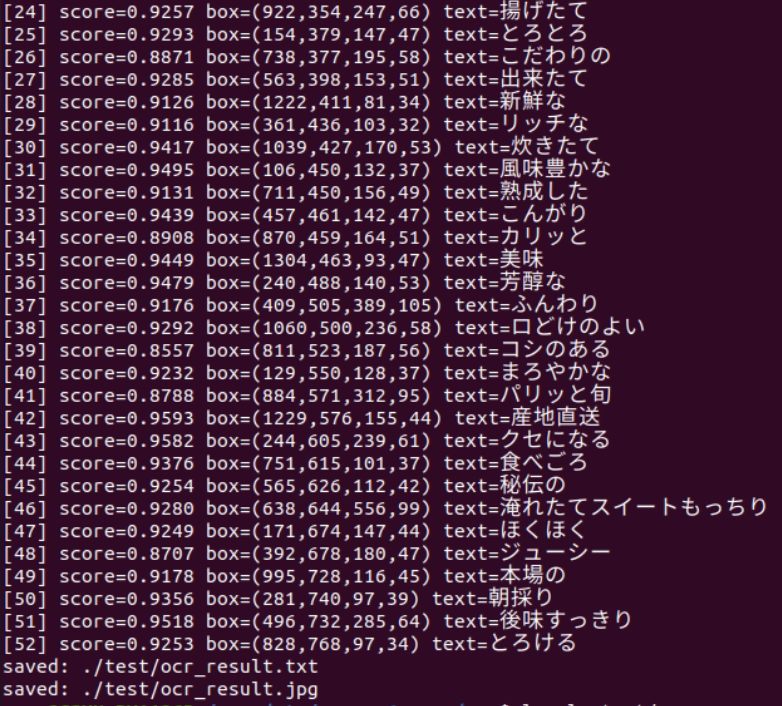
Output files:
/userdata/ppocrv6_ocr_demo/test/ocr_result.txt/userdata/ppocrv6_ocr_demo/test/ocr_result.jpg/userdata/ppocrv6_ocr_demo/test/crops/19. Japanese OCR Execution Result
The board-side execution detected 53 text regions. Representative recognition results are listed below.
| Index | Recognized text |
|---|---|
| 0 | もちもち |
| 1 | とろっと、後味のよい |
| 2 | 天然の |
| 7 | 焼きたて |
| 10 | うま味のある |
| 12 | 飽きのこない |
| 23 | スパイシー |
| 37 | ふんわり |
| 51 | 後味すっきり |
| 52 | とろける |
The OCR visualization saved on the board is shown in Figure 13.
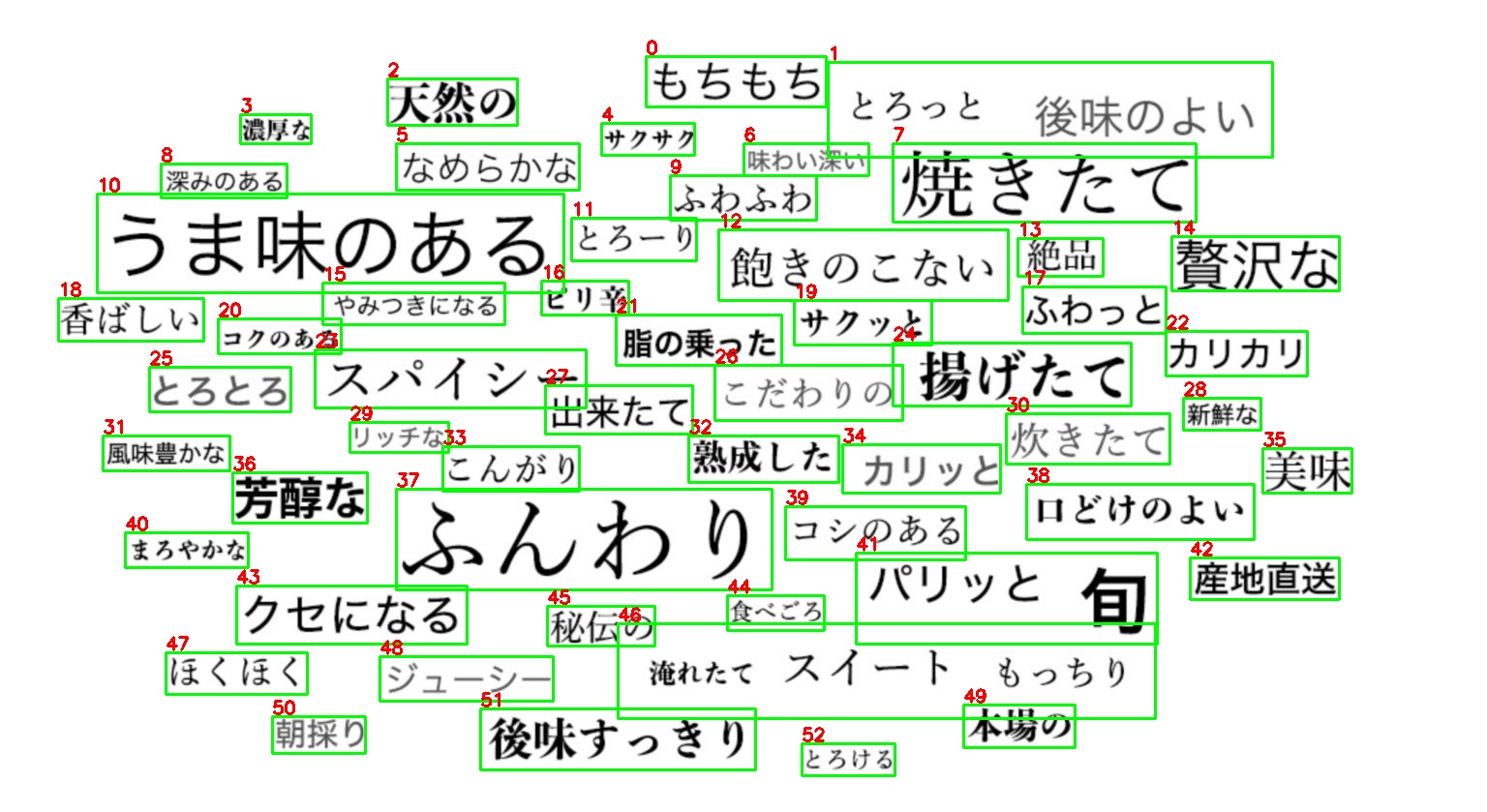
Excerpt from ocr_result.txt:
0 667 58 187 53 0.945086 もちもち1 855 64 460 99 0.891344 とろっと、後味のよい2 400 81 135 49 0.932682 天然の7 922 148 314 82 0.935921 焼きたて10 100 200 483 103 0.950072 うま味のある37 409 505 389 105 0.917636 ふんわり51 496 732 285 64 0.951753 後味すっきり52 828 768 97 34 0.925347 とろける20. Current Accuracy Evaluation
At v1.1, the board-side PP-OCRv6 execution chain is working.
det RKNN inference: OKrec no-softmax RKNN inference: OKCTC decode: OKresult text saving: OKresult image saving: OKKnown items for improvement:
| Item | Current behavior | Next action |
|---|---|---|
| Recognition | 口どけのよい may be recognized as ロどけのよい. | Check crop quality, recognition model behavior, and rule-based postprocessing. |
| Detection boxes | Adjacent words may be merged into one large box. | Replace the simplified postprocess with PaddleOCR-compatible DB postprocess. |
| Postprocess | The v1.1 C++ detection postprocess is simplified. | Add box_score_fast, unclip, and rotated box processing. |
21. Dataset and Fine-Tuning Strategy for Product-Level Accuracy
In v1.4, this guide goes beyond evaluation strategy and provides a practical workflow for preparing training data, annotating OCR samples, and fine-tuning PaddleOCR-style detection and recognition models.
Product-level accuracy should not rely on public datasets alone. Use the following three data groups together.
Public datasets  ↓Validate baseline Japanese and multilingual OCR capability
Synthetic data  ↓Cover missing characters, fonts, vertical text, low light, reflection, blur, and other weak cases
RV1126B real captured data  ↓Adapt the model to the real lens, exposure, focal distance, compression noise, mounting angle, and illumination
For an RV1126B product, final accuracy depends strongly on the actual camera, lighting, installation distance, and image compression. Public datasets are useful for baseline evaluation and auxiliary training, but final product acceptance must be based on images captured by the real RV1126B device.
21.1 Public Datasets and Download Links
The following datasets can be used for baseline evaluation, auxiliary training, or generalization checks. Before using them, always confirm the license, research/commercial usage conditions, and redistribution rules.
| Purpose | Dataset | Download or reference link | Recommended use |
|---|---|---|---|
| Multilingual scene OCR | ICDAR 2019 MLT | ICDAR 2019 RRC MLT Downloads | Detection and recognition evaluation under multilingual text, complex background, skew, and low-resolution text. RRC registration is required. |
| Japanese scene characters | JPSC1400 | JPSC1400 Dataset Page / JPSC1400-20201218.zip | Character-level evaluation using real Japanese scene character images. Useful for character confusion analysis. |
| Japanese document OCR | NDL Minhon OCR Training Dataset | ndl-lab/ndl-minhon-ocrdataset | Reference data for Japanese documents, vertical text, historical documents, and degraded scans. Use as evaluation or auxiliary data rather than mixing directly into the main product training set. |
| Japanese character classification | Kuzushiji / KMNIST series | Kuzushiji Dataset | Character-level evaluation for Hiragana and Kanji. Conversion is required before using it for PP-OCR line recognition training. |
| Japanese character images | ETL Character Database | ETL Character Database | Baseline evaluation for handwritten and printed Japanese characters, character confusion analysis, and reference data for synthetic data generation. |
When using public datasets, apply the following rules.
Do not select the final model using public datasets onlyUse public datasets for pre-evaluation, weakness analysis, and auxiliary trainingUse RV1126B real captured data for product acceptanceUse real captured images as the main source for quantization calibration21.2 RV1126B Real Image Collection Policy
The most important factor for product accuracy is collecting images that the product will actually see. At minimum, include the following conditions.
| Condition | Recommended coverage |
|---|---|
| Distance | Near distance, middle distance, maximum operating distance |
| Angle | Front view, vertical tilt, horizontal tilt, oblique view |
| Lighting | Bright scene, low light, backlight, reflection, local lighting |
| Text size | Large text, normal text, small text, thin text |
| Background | White background, colored background, food package, metal, transparent film, uneven printing |
| Blur | Defocus, motion blur, handheld blur |
| Compression | Camera JPEG output, frames extracted from video stream |
| Installation variance | Board variance, lens variance, focal distance variance, shooting through housing |
Recommended amounts are as follows.
| Purpose | Recommended amount |
|---|---|
| Initial verification | 200–500 images |
| det fine-tuning | 500+ images |
| rec fine-tuning | 5,000+ crop images |
| Product evaluation | 1,000+ images |
| Quantization calibration | 200–500 real captured images |
Store the real captured images in a directory such as:
datasets/ppocr_product/raw/rv1126b/├── train/│ ├── normal/│ ├── low_light/│ ├── reflection/│ ├── blur/│ └── small_text/├── eval/│ ├── normal/│ ├── low_light/│ ├── reflection/│ ├── blur/│ └── small_text/└── README.md22. Annotation Policy and Recommended Tools
22.1 Recommended Annotation Tools
For fine-tuning PaddleOCR-style models, PPOCRLabel is the first recommended annotation tool. It is a semi-automatic OCR annotation tool that can export detection labels as Label.txt, recognition labels as rec_gt.txt, and recognition crops under crop_img/.
| Tool | Use case | Notes |
|---|---|---|
| PPOCRLabel | OCR detection and recognition annotation | First choice. Its output is close to PaddleOCR / PaddleX training format and can organize detection and recognition data together. |
| labelme | Irregular regions or polygon correction | Useful for complex regions, but conversion to PaddleOCR format is required. |
| CVAT | Team annotation | Suitable for multi-user review, permission management, and quality control. |
| Internal web tool | Product-specific workflow | Suitable for continuous collection and correction of failure samples after product deployment. |
PPOCRLabel installation example:
conda activate ppocrv6
python -m pip install PPOCRLabelpython -m pip install trash-cli
Launch example:
PPOCRLabel --kie TrueAfter launching, open the image folder and correct the detection boxes and recognition text. When the annotation is complete, export both Label.txt for detection and rec_gt.txt for recognition.
22.2 PPOCRLabel Output Files
A PPOCRLabel project directory may look like this.
datasets/ppocr_product/label_projects/rv1126b_jp_001/├── images/│ ├── jp_000001.jpg│ ├── jp_000002.jpg│ └── ...├── Label.txt├── fileState.txt├── Cache.cach├── rec_gt.txt└── crop_img/ ├── jp_000001_crop_0.jpg ├── jp_000001_crop_1.jpg └── ...The detection label file Label.txt stores one image path and JSON detection result per line.
images/jp_000001.jpg [{"transcription":"後味すっきり","points":[[496,732],[781,732],[781,796],[496,796]],"difficult":false}]The recognition label file rec_gt.txt stores one crop image path and text label per line.
crop_img/jp_000001_crop_0.jpg 後味すっきりcrop_img/jp_000001_crop_1.jpg とろけるImportant rules:
Use tab as the separator between image path and labelSave Japanese labels in UTF-8Normalize spaces, long vowels, punctuation, and full-width/half-width variantsDo not guess unreadable text; mark it as difficult or exclude it from training23. Training Directory Structure
For PaddleOCR training, do not use the raw PPOCRLabel folder directly. Convert it into separate detection and recognition training directories.
train_data/japanese_ocr/├── det/│ ├── images/│ │ ├── train/│ │ └── val/│ ├── train_label.txt│ └── val_label.txt├── rec/│ ├── images/│ │ ├── train/│ │ └── val/│ ├── rec_gt_train.txt│ └── rec_gt_val.txt└── dict/ └── ppocr_japanese_product_dict.txtDetection training label example:
images/train/jp_000001.jpg [{"transcription":"後味すっきり","points":[[496,732],[781,732],[781,796],[496,796]],"difficult":false}]Recognition training label example:
images/train/jp_000001_crop_0.jpg 後味すっきりThe recognition dictionary ppocr_japanese_product_dict.txt must contain all characters used in the labels. If it is based on the existing PP-OCRv6_small_rec character_dict, keep the original character order and add only missing characters carefully. Changing the character order can break the correspondence between existing weights and class indices.
24. Creating Training Data from PPOCRLabel Output
The following script converts PPOCRLabel projects into detection labels, recognition labels, and a recognition dictionary. It is included in the package as training-scripts/prepare_ppocr_dataset.py.
python training-scripts/prepare_ppocr_dataset.py \ --ppocrlabel_dir datasets/ppocr_product/label_projects/rv1126b_jp_001 \ --out_dir train_data/japanese_ocr \ --val_ratio 0.1 \ --seed 42After generation, verify the output.
tree train_data/japanese_ocr -L 3
head -n 3 train_data/japanese_ocr/det/train_label.txthead -n 3 train_data/japanese_ocr/rec/rec_gt_train.txtwc -l train_data/japanese_ocr/dict/ppocr_japanese_product_dict.txt
Multiple annotation projects can be merged at once.
python training-scripts/prepare_ppocr_dataset.py \ --ppocrlabel_dir \ datasets/ppocr_product/label_projects/rv1126b_jp_001 \ datasets/ppocr_product/label_projects/rv1126b_jp_002 \ --out_dir train_data/japanese_ocr \ --val_ratio 0.125. Fine-Tuning the Detection Model
Fine-tune the detection model when text boxes are shifted, multiple words are merged, or small text is missed.
Prepare the PaddleOCR repository.
mkdir -p third_partycd third_party
git clone https://github.com/PaddlePaddle/PaddleOCR.gitcd PaddleOCR
python -m pip install -r requirements.txt
Check available detection configs.
find configs -iname "*det*.yml" | sort | grep -E "OCRv5|OCRv4|OCRv3|DB"If your PaddleOCR version provides PP-OCRv6 training configs, use them first. If not, use PP-OCRv5 or PP-OCRv4 DB detection configs as the fine-tuning base. Actual config names differ by PaddleOCR version, so always confirm with find.
Detection training command example:
cd third_party/PaddleOCR
DET_CONFIG=configs/det/PP-OCRv5/PP-OCRv5_server_det.yml \DATA_ROOT=../../train_data/japanese_ocr \SAVE_DIR=../../output/train/det_product \bash ../../training-scripts/train_det.sh
train_det.sh mainly overrides:
Global.save_model_dirTrain.dataset.data_dirTrain.dataset.label_file_listEval.dataset.data_dirEval.dataset.label_file_listOptimizer.lr.learning_rateFor single-GPU or small-data fine-tuning, use a small learning rate.
Initial candidate: 1e-4If unstable: 5e-5For very small datasets: 1e-5 to 2e-526. Fine-Tuning the Recognition Model
Fine-tune the recognition model when errors occur in characters such as 口 and ロ, long vowels, Hiragana/Katakana, thin fonts, small text, or decorative fonts.
Check available recognition configs.
cd third_party/PaddleOCR
find configs -iname "*rec*.yml" | sort | grep -E "OCRv5|OCRv4|OCRv3|SVTR"
Recognition training command example:
cd third_party/PaddleOCR
REC_CONFIG=configs/rec/PP-OCRv5/PP-OCRv5_server_rec.yml \DATA_ROOT=../../train_data/japanese_ocr \SAVE_DIR=../../output/train/rec_product \DICT_PATH=../../train_data/japanese_ocr/dict/ppocr_japanese_product_dict.txt \bash ../../training-scripts/train_rec.sh
Important recognition training parameters are:
| Item | Description |
|---|---|
character_dict_path | Training dictionary. It must contain all characters in the labels. |
use_space_char | Enable it when spaces need to be recognized. |
rec_image_shape | This project standardizes on 3,48,320. |
max_text_length | Set it high enough for long text strings. |
| Learning rate | Use a small value for fine-tuning. |
The current PP-OCRv6_small_rec model in this project has 18710 output classes. If the dictionary is changed significantly, the final classification layer dimension changes and existing weights may not be reusable. For product fine-tuning, first improve accuracy within the existing dictionary range and expand the dictionary only when necessary.
27. Evaluating the Trained Models
After training, evaluate the model both on PC and on RV1126B.
PC-side metrics:
det precision / recall / hmeanrec accuracyend-to-end OCR exact matchcharacter-level accuracyaccuracy by low-light, reflection, blur, and small-text conditionsPaddleOCR evaluation command example:
cd third_party/PaddleOCR
python tools/eval.py \  -c configs/rec/PP-OCRv5/PP-OCRv5_server_rec.yml \  -o Global.checkpoints=../../output/train/rec_product/best_accuracy
Recommended product evaluation sets:
| Evaluation set | Description |
|---|---|
public_eval | Evaluation set built from public datasets |
rv1126b_eval_normal | Real captured images under normal lighting |
rv1126b_eval_low_light | Dark or low-light scenes |
rv1126b_eval_reflection | Reflective or glossy surfaces |
rv1126b_eval_blur | Defocus or motion blur |
rv1126b_eval_small_text | Small text or long-distance capture |
28. Exporting Trained Models and Converting to RKNN
After fine-tuning, export the model as a Paddle inference model.
Detection model export example:
cd third_party/PaddleOCR
python tools/export_model.py \  -c configs/det/PP-OCRv5/PP-OCRv5_server_det.yml \  -o Global.checkpoints=../../output/train/det_product/best_accuracy \     Global.save_inference_dir=../../models/paddle/product_det
Recognition model export example:
python tools/export_model.py \ -c configs/rec/PP-OCRv5/PP-OCRv5_server_rec.yml \ -o Global.checkpoints=../../output/train/rec_product/best_accuracy \ Global.save_inference_dir=../../models/paddle/product_recThen convert to ONNX using the same flow described earlier in this guide.
paddlex \ --paddle2onnx \ --paddle_model_dir ./models/paddle/product_rec \ --onnx_model_dir ./models/onnx/product_rec \ --opset_version 11When converting to RKNN for RV1126B, follow these rules.
det: INT8 quantization with a dataset list mainly built from real captured imagesrec: First convert to FP no-softmax and verify runtime and accuracyrec quantization: Adopt it only after evaluating the accuracy drop29. Creating Quantization Calibration Data
det INT8 quantization is highly affected by calibration data. The calibration set must include RV1126B real captured images instead of public datasets only.
Recommended structure:
datasets/ppocr_product/calib/├── normal/├── low_light/├── reflection/├── blur/└── small_text/Create the RKNN dataset file.
find datasets/ppocr_product/calib -type f \ \( -iname "*.jpg" -o -iname "*.png" \) \ | sort \ | sed "s#^datasets/##" \ > datasets/ppocrv6_product_det_calib.txtIf datasets/ppocrv6_product_det_calib.txt is placed under ./datasets/, paths inside the file must be relative to ./datasets/. Avoid accidentally generating paths such as datasets/datasets/....
30. Product Accuracy Improvement Loop
After product deployment, continue collecting failure samples and feed them back into training.
Run OCR on RV1126B ↓Save low-confidence, wrong-recognition, and missed-detection images ↓Review and correct with PPOCRLabel ↓Add to train_data ↓Fine-tune det / rec ↓Convert to ONNX / RKNN ↓Evaluate on the real device ↓Release as a product modelFailure samples to save include:
missed detectionmerged wordstruncated text regionsconfusion such as 口 / ロ, 日 / 目, ー / 一small-text recognition errorserrors caused by reflection or low light31. Completion Criteria for This Document
The completion criteria for this document are defined as follows:
Public dataset download sources are documentedDetection and recognition labels can be created with PPOCRLabelPaddleOCR training directories can be generated from PPOCRLabel outputdet / rec fine-tuning commands can be executedTrained models can be exported as Paddle inference modelsThe exported models can be connected to the existing ONNX / RKNN conversion flowRV1126B real captured data can be used for evaluation and quantization calibration32. Areas for Improvement for Product Development
The following improvements will be implemented during product development:
| Priority | Item |
|---|---|
| 1 | Implement PaddleOCR-compatible DB postprocess |
| 2 | Add perspective crop and rotated text handling |
| 3 | Add recognition score calculation and low-confidence filtering |
| 4 | Add automatic quality checks for PPOCRLabel output |
| 5 | Generate real-device evaluation reports automatically |
| 6 | Add CI for trained model ONNX / RKNN conversion |
| 7 | Generate accuracy difference reports before and after INT8 quantization |
33. References
- PaddleOCR Documentation
- PaddleOCR GitHub Repository
- PaddleOCR Text Recognition Training
- PaddleOCR Fine-tune Guide
- PaddleX OCR Annotation Guide
- PPOCRLabel PyPI
- ICDAR 2019 MLT Downloads
- JPSC1400 Dataset Page
- NDL Minhon OCR Training Dataset
- Kuzushiji Dataset
- ETL Character Database
- RKNN Model Zoo GitHub Repository