
RKLLM AI Model Conversion Guide
Revision History
| NO | Version | Revision Details | Date |
|---|---|---|---|
| 1 | Ver1.0 | New document | 2026/06/21 |
The information in this document may be changed without prior notice for document improvement. Please refer to the company website for the latest version.
Reproduction in any form without written permission from Nissho Technology Co., Ltd. is strictly prohibited.
1. AImodel conversion
This chapter主に、Hugging Face形式のlarge language model(LLM)の実装methoddescribes。
also、それをRKLLMモデルに変換するmethodについてもdescriptionします。currentサポートされているモデルには、DeepSeek、LLaMA、Qwen、Qwen2、Phi-2、Phi-3、ChatGLM3、Gemma、InternLM2、MiniCPMなどがあります。This chapter、例asDeepSeek-R1をis used。
これfrom、DeepSeek-R1large language modelをRKLLMモデルに変換するmethoddescribes。
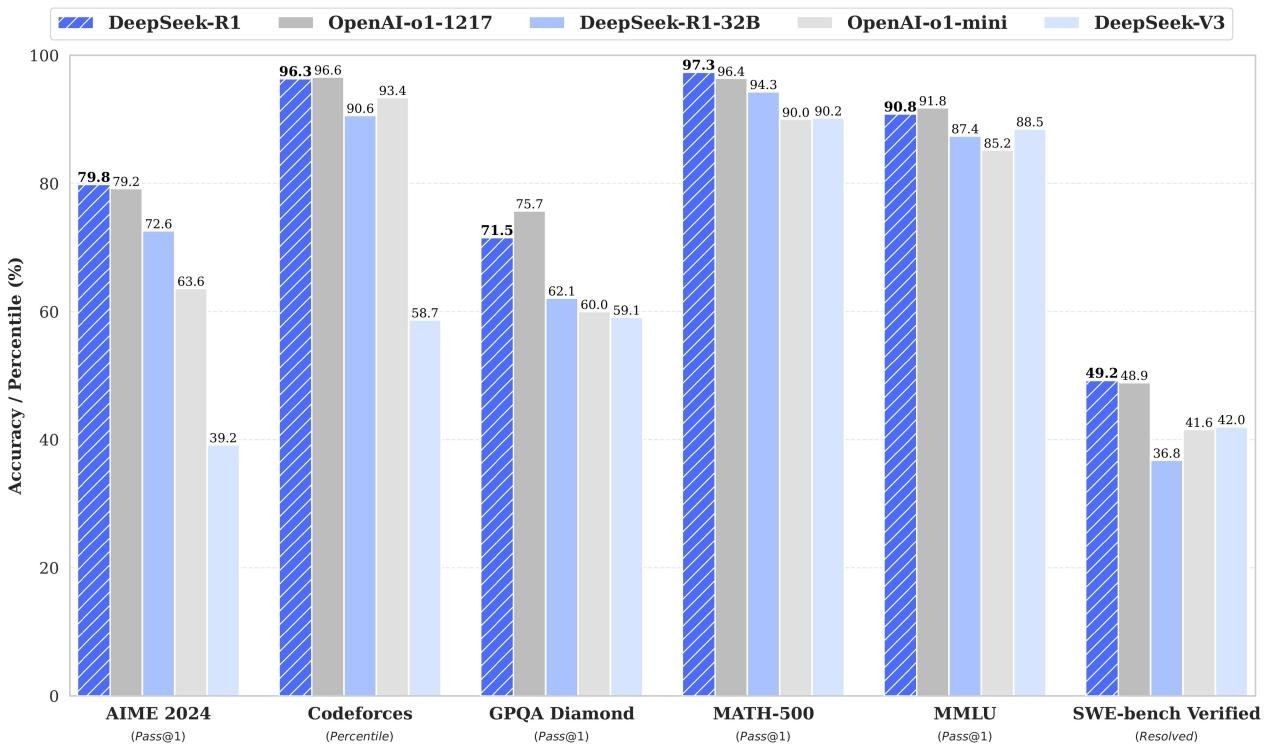
Figure:Benchmark comparison between DeepSeek-R1 and representative models
1.1 model download
This section、オリジナルのHugging faceモデルと変換されたNPUモデルの2つの大きなモデルfileを提供します。
Google Drivefolderfromダウンloadcan。
https://drive.google.com/drive/folders/1nsL3pk75dyZHF_39KCKVoSevMq2F6Be9?usp=sharing
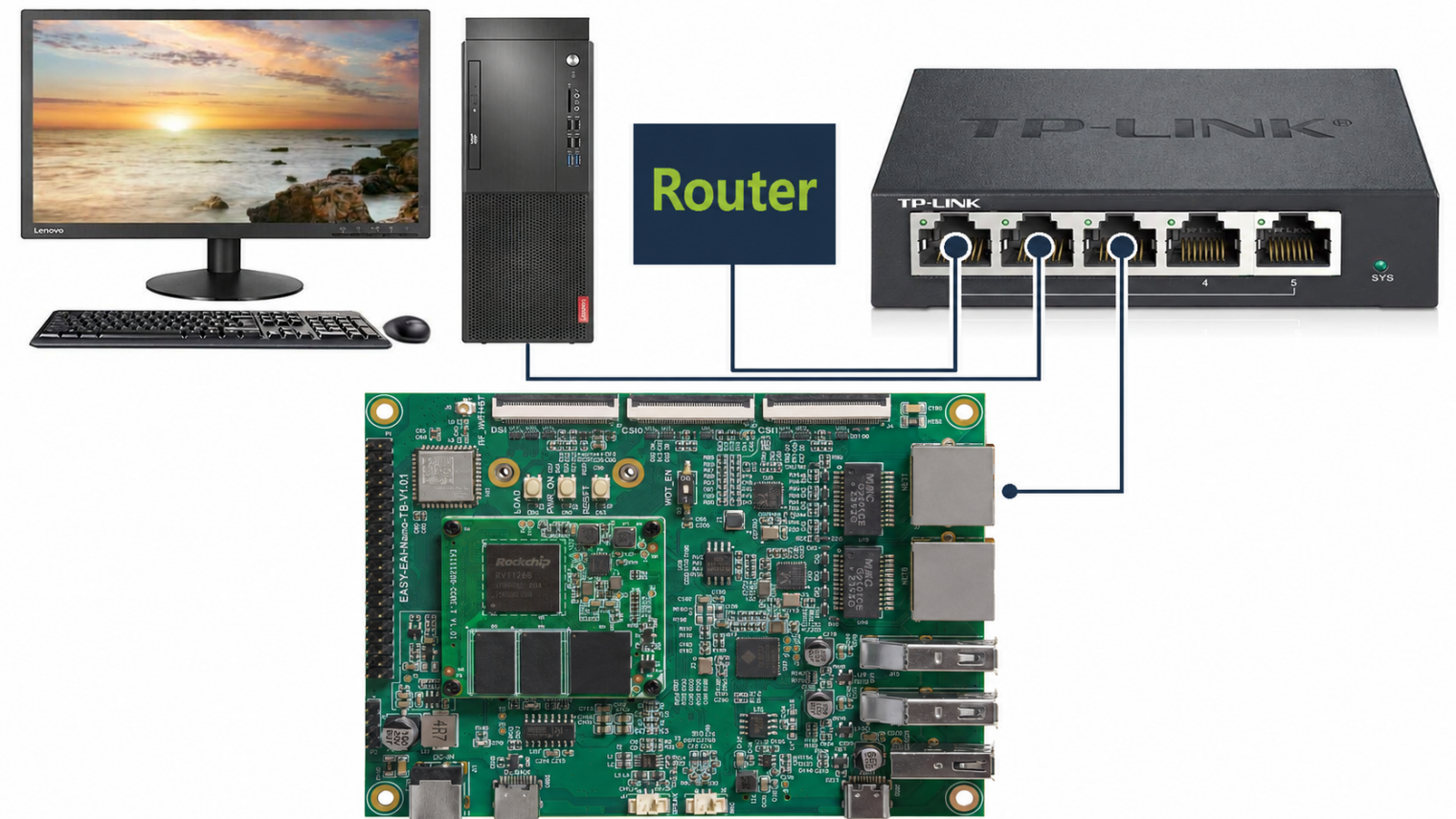
Figure:LAN connection topology for the RV1126B board
1.2 model conversion
モデルfileと変換用のPythonスクリプトは同じfolderにあります。
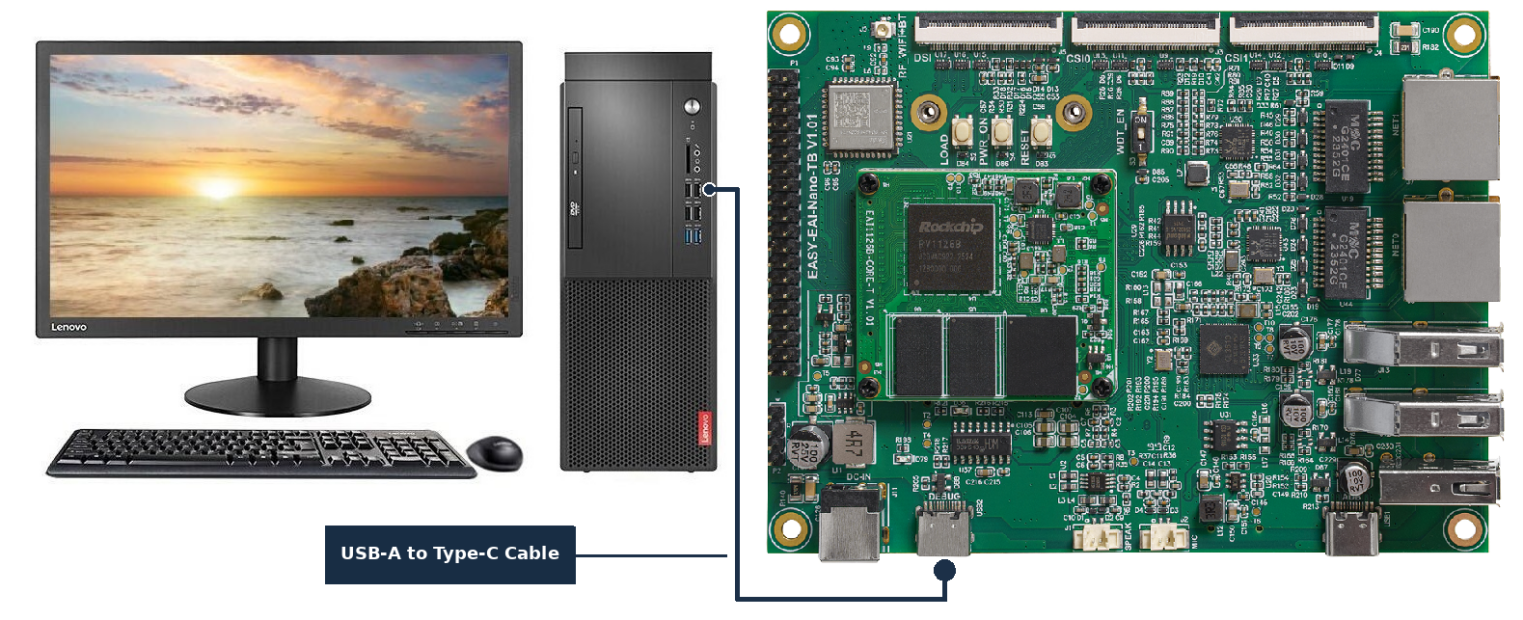
Figure:Type-C serial connection for the RV1126B board
RKLLM-Toolkit環境で、the followingのコマンドをexecutionしてmodel conversionをexecutionします。
| python test.py |
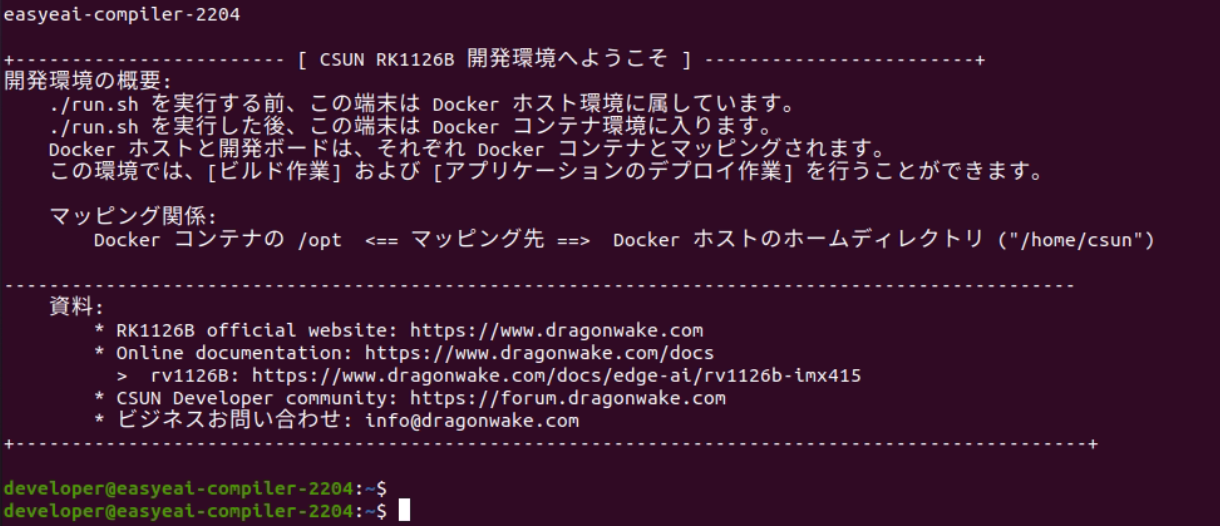
Figure:Terminal screen after entering the EASY-EAI development environment
model conversionは成功し、大きなNPUエンcodeモデルfiledeepseek_r1_rv1126b_w4a16.rkllmがgenerationされました。

Figure:Google Drive folder for the AI model deployment package
DeepSeek-R1-Distill-Qwen-1.5B モデルの変換に使用される変換スクリプト test.py をthe followingに示します。
from rkllm.api import RKLLMfrom datasets import load_datasetfrom transformers import AutoTokenizerfrom tqdm import tqdmimport torchfrom torch import nnimport os## os.environ['CUDA_VISIBLE_DEVICES']='1'modelpath = './DeepSeek-R1-Distill-Qwen-1.5B'llm = RKLLM()## Load model## Use 'export CUDA_VISIBLE_DEVICES=2' to specify GPU device## options ['cpu', 'cuda']ret = llm.load_huggingface(model=modelpath, model_lora = None,device='cpu')## ret = llm.load_gguf(model = modelpath)if ret != 0: print('Load model failed!') exit(ret)## Build modeldataset = "./data_quant.json"## Json file format, please note to add prompt in the input,likethis:## [{"input":"Human: !\nAssistant: ","target":"こんにちは!私はAIアシスタントKKです!"},...]qparams = None## qparams = 'gdq.qparams' # Use extra_qparamsret = llm.build(do_quantization=True, optimization_level=1,quantized_dtype='w4a16', quantized_algorithm='normal',target_platform='rv1126b', num_npu_core=1, extra_qparams=qparams,dataset=None)if ret != 0: print('Build model failed!') exit(ret)from rkllm.api import RKLLMfrom datasets import load_datasetfrom transformers import AutoTokenizerfrom tqdm import tqdmimport torchfrom torch import nnimport os## os.environ['CUDA_VISIBLE_DEVICES']='1'modelpath = './DeepSeek-R1-Distill-Qwen-1.5B'llm = RKLLM()## Load model## Use 'export CUDA_VISIBLE_DEVICES=2' to specify GPU device## options ['cpu', 'cuda']ret = llm.load_huggingface(model=modelpath, model_lora = None,device='cpu')## ret = llm.load_gguf(model = modelpath)if ret != 0: print('Load model failed!') exit(ret)## Build modeldataset = "./data_quant.json"## Json file format, please note to add prompt in the input,likethis:## [{"input":"Human: !\nAssistant: ","target":"こんにちは!私はAIアシスタントKKです!"},...]qparams = None## qparams = 'gdq.qparams' # Use extra_qparamsret = llm.build(do_quantization=True, optimization_level=1,quantized_dtype='w4a16', quantized_algorithm='normal',target_platform='rv1126b', num_npu_core=1, extra_qparams=qparams,dataset=None)if ret != 0: print('Build model failed!') exit(ret)## Chat with modelmessages = "<|im_start|>system You are a helpfulassistant.<|im_end|><|im_start|>userこんにちは!\n<|im_end|><|im_start|>assistant"kwargs = {"max_length": 128, "top_k": 1, "top_p": 0.8, "temperature": 0.8, "do_sample": True,"repetition_penalty": 1.1}## print(llm.chat_model(messages, kwargs))## Export rkllm modelret = llm.export_rkllm("./deepseek_r1_rv1126b_w4a16.rkllm")if ret != 0: print('Export model failed!') exit(ret)## Chat with modelmessages = "<|im_start|>system You are a helpfulassistant.<|im_end|><|im_start|>userこんにちは!\n<|im_end|><|im_start|>assistant"kwargs = {"max_length": 128, "top_k": 1, "top_p": 0.8, "temperature": 0.8, "do_sample": True,"repetition_penalty": 1.1}## print(llm.chat_model(messages, kwargs))## Export rkllm modelret = llm.export_rkllm("./deepseek_r1_rv1126b_w4a16.rkllm")if ret != 0: print('Export model failed!') exit(ret)