
Face 98-Keypoint Recognition
Revision History
| NO | Version | Description | Date |
|---|---|---|---|
| 1 | Ver1.0 | Initial creation | 2026/06/30 |
The information in this document may be changed without prior notice for the purpose of improving the document. Please refer to our website for the latest version.
Reproduction in any form without the written permission of Nissho Technology Co., Ltd. is strictly prohibited.
1. Face KeypointOverview
Face keypoint localization is also called face keypoint detection or face alignment. For an input face image, it estimates the positions of important facial regions such as eyebrows, eyes, nose, mouth, and facial contours. Similar to face detection, face keypoint detection is also a challenging task because it is affected by pose changes, occlusion, and other factors.
Face keypoint detection has various important application scenarios.
-
Face pose alignment: Algorithms such as face recognition require face pose alignment to improve model accuracy.
-
Face correction and face editing: Based on keypoints, the face shape, eye shape, nose shape, and other features can be accurately analyzed, and specific facial areas can be edited to implement entertainment functions such as face effects, beautification, and sticker placement.
-
Expression analysis and lip recognition: Based on keypoints, facial expressions can be analyzed and used in scenarios such as interactive entertainment and behavior prediction.
The keypoint locations of this face 98-point keypoint algorithm are shown in the following figure:
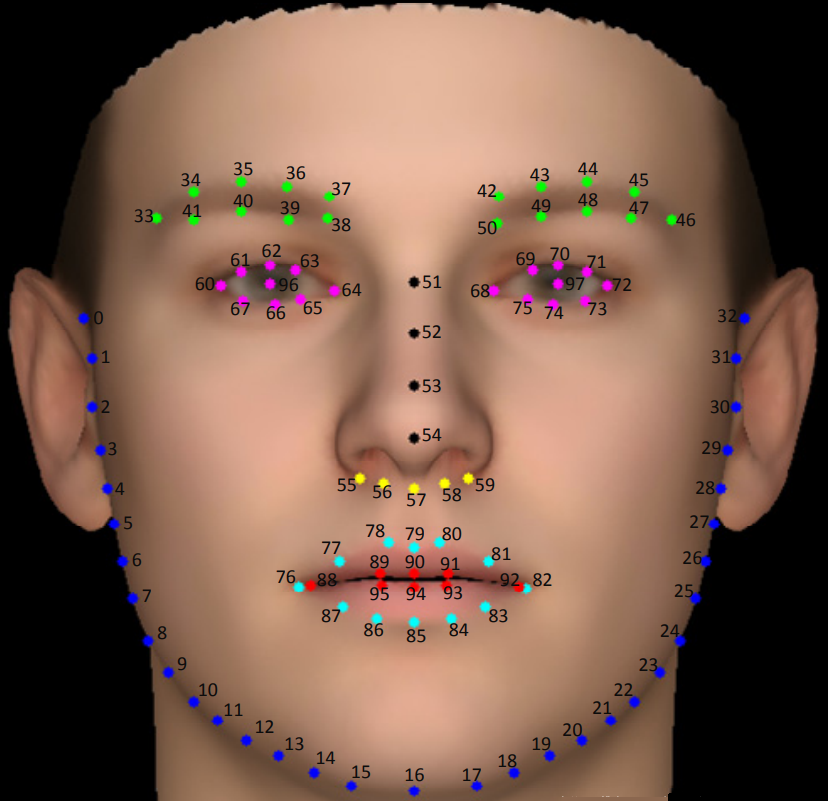
Figure 1-1 Face 98-Keypoint Index Definition
Algorithm performance on the dataset:
| Face Landmark Algorithm | NME(%) |
| 300W | 2.78 |
| COFW | 3.08 |
| AFLW | 1.42 |
The execution efficiency on CSUN RV1126B is as follows:
| Algorithm Type | Model Size | Execution Efficiency |
| face_detect | 44.23MB | 17ms |
| face_landmark98 | 10.88MB | 23ms |
2. Quick Start
2.1 Preparing the Development Environment
If you are reading this document for the first time, refer to Getting Started / Preparing and Updating the Development Compilation Environment, and deploy the compilation environment according to the related steps.
On the Ubuntu system on the PC side, run the run script to enter the Docker development environment. The steps are as follows:
cd ~/linuxshare/work/rv1126b/jp/embedded/images/develop_environment./run.sh 2204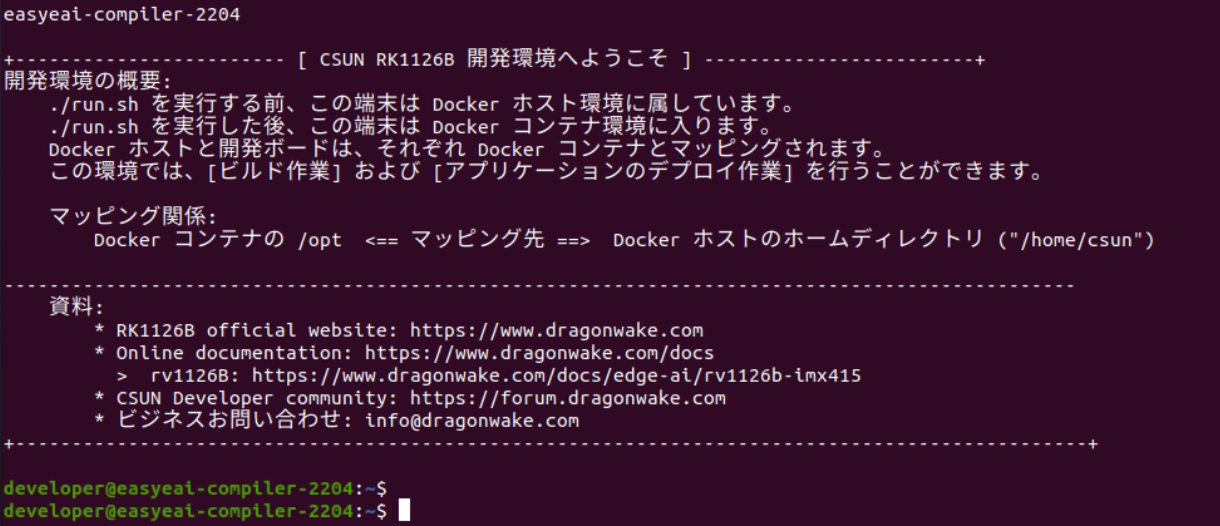
Figure 2-1 Starting the Docker Development Environment
2.2 Downloading the Source Code
In the Docker development environment, create a management directory for storing the source code repository.
cd /opt/linuxshare/work/rv1126b/jp/AI/demo/ai-algorithmUse the git tool to clone the remote repository into the management directory.
git clone https://github.com/csunltd/rv1126b-ai-toolkit.git※ Even when downloading from the GitHub web page, download the entire repository. Do not download only the directory corresponding to this sample.
※ If the repository has already been downloaded, skip this step.
2.3 Model Deployment
To run the algorithm Demo, first download the human keypoint recognition algorithm model.
Download link:
Face Detection Model:
https://dl.dragonwake.com/download/rv1126b/AI/demo/01_face-detect.zip
Face Keypointrecognitionmodel:
https://dl.dragonwake.com/download/rv1126b/AI/demo/11_face_landmark98.zip
Then copy the downloaded face detection model and face keypoint recognition model to the Release/ directory.
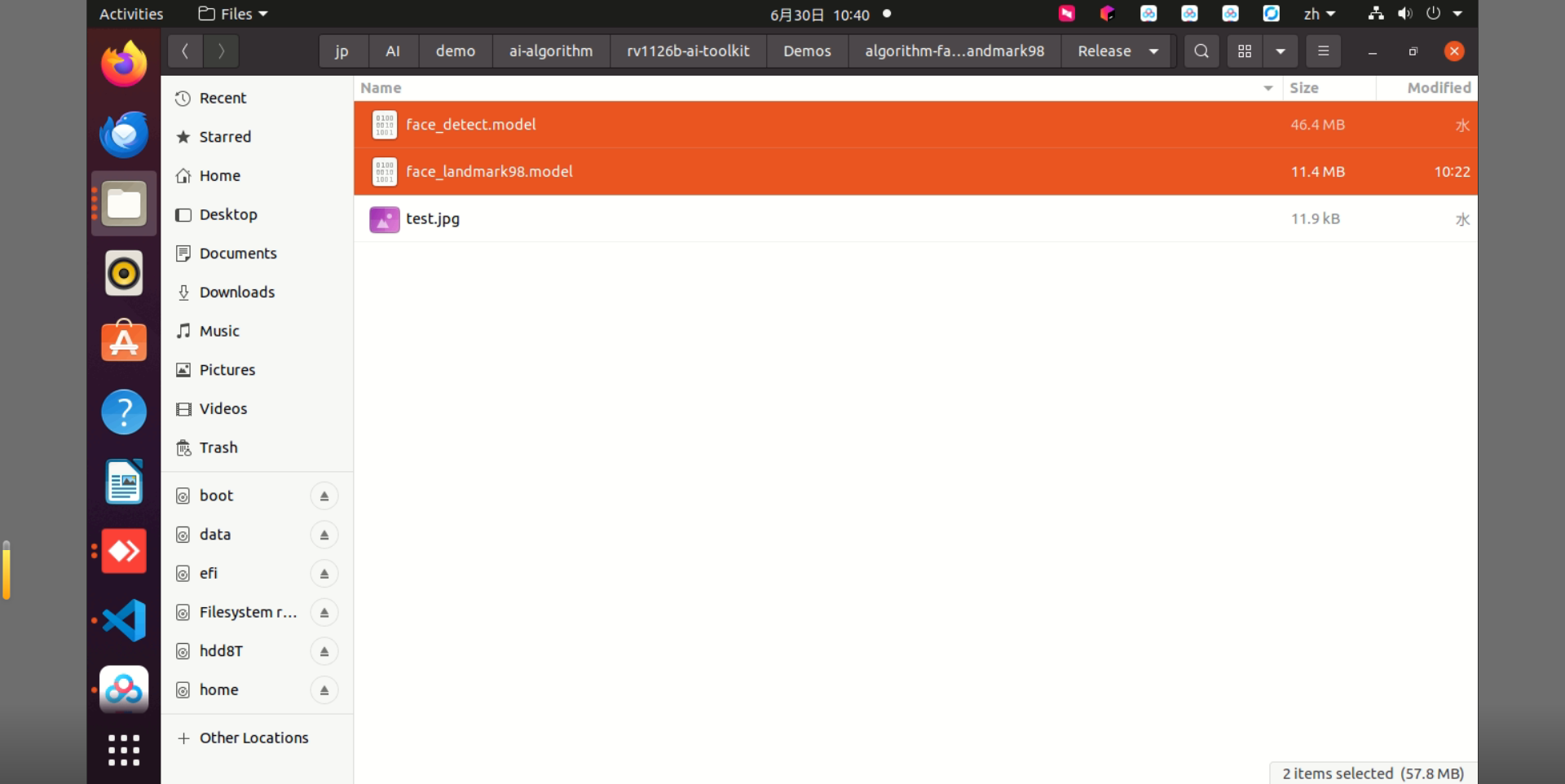
Figure 2-2 Files in the Release Directory
2.4 Building the Sample
Move to the directory containing the sample and execute the build. The specific commands are as follows:
cd rv1126b-ai-toolkit/Demos/algorithm-face_landmark98/./build.sh cpres* Because the dependent libraries are located on the development board, keep /mnt mounted during cross-compilation.
sudo mount -t nfs -o vers=3,proto=tcp,mountproto=tcp,nolock,retrans=5,timeo=5 192.168.10.85:/ /mnt* When the cpres parameter is specified for the build.sh script, all resources in the Release/ directory are copied to the development board.
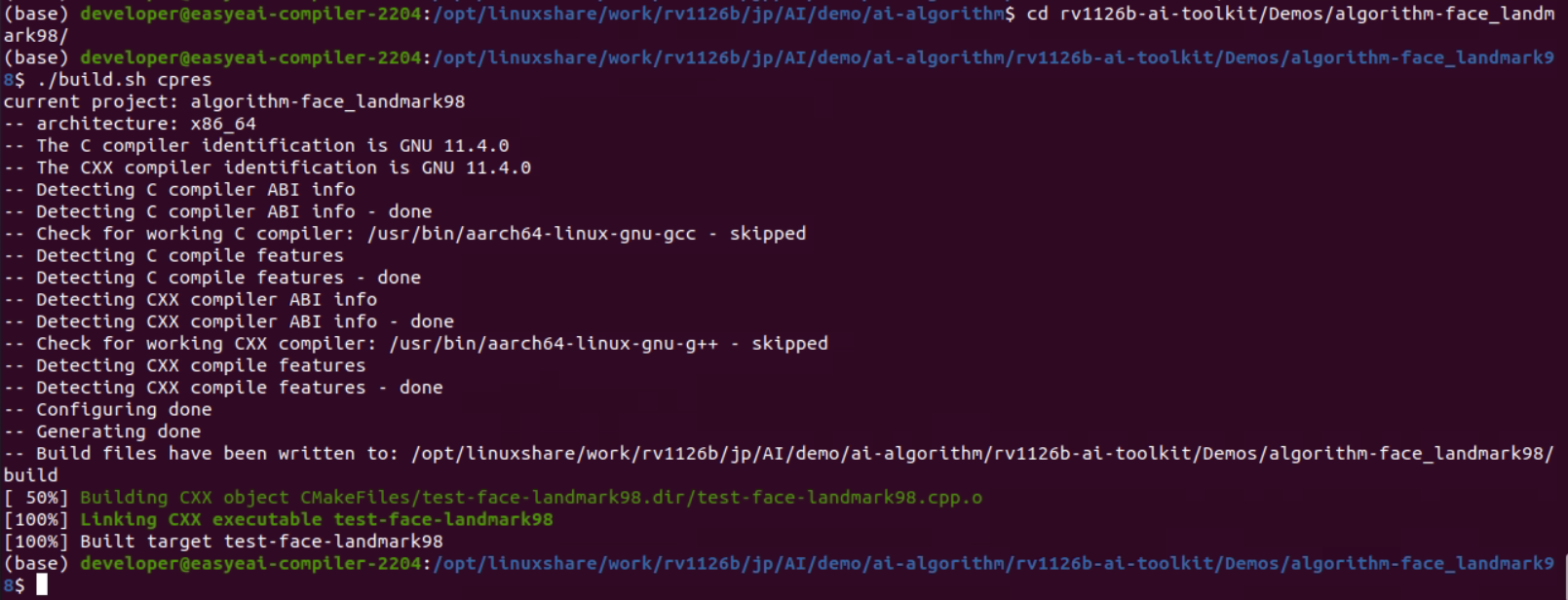
Figure 2-3 Sample Build Result
2.5 Sample Execution and Results
Copy the compiled files to the board.
cp Release/\* /mnt/userdata/Demo/algorithm-face_landmark98/※ If you build with ./build.sh cpres, the files are copied automatically.
Enter the backend of the development board through serial debugging or SSH debugging, and move to the sample deployment directory as follows:
cd /userdata/Demo/algorithm-face_landmark98/The command for running the sample is as follows:
./test-face-landmark98 test.jpg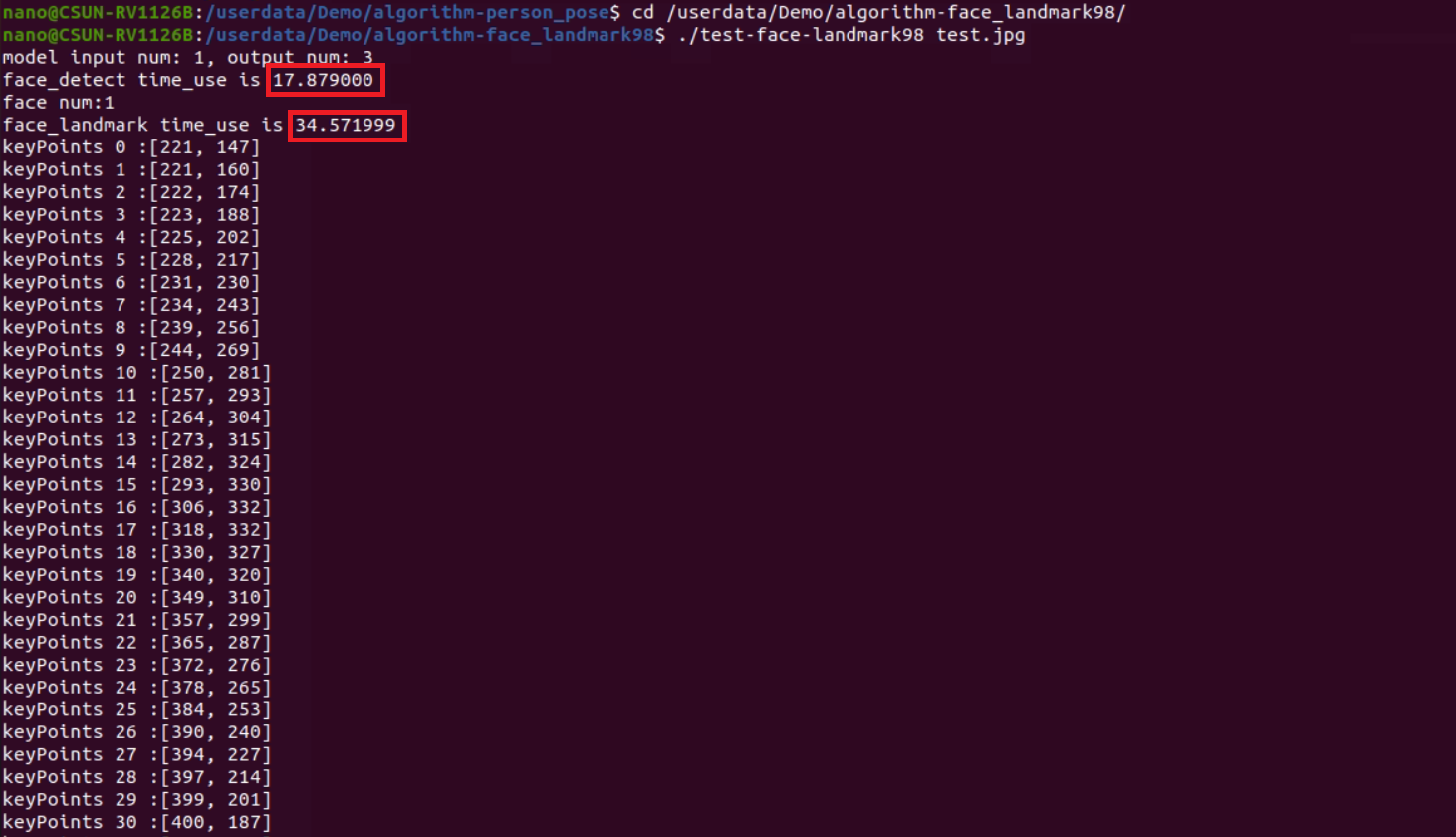
Figure 2-4 Sample Execution Result
In the Docker development environment, copy the test Result Image from the board.
cp /mnt/userdata/Demo/algorithm-face_landmark98/result.jpg .
Figure 2-5 Command for Copying the Result Image
The recognition result is shown in the following figure.
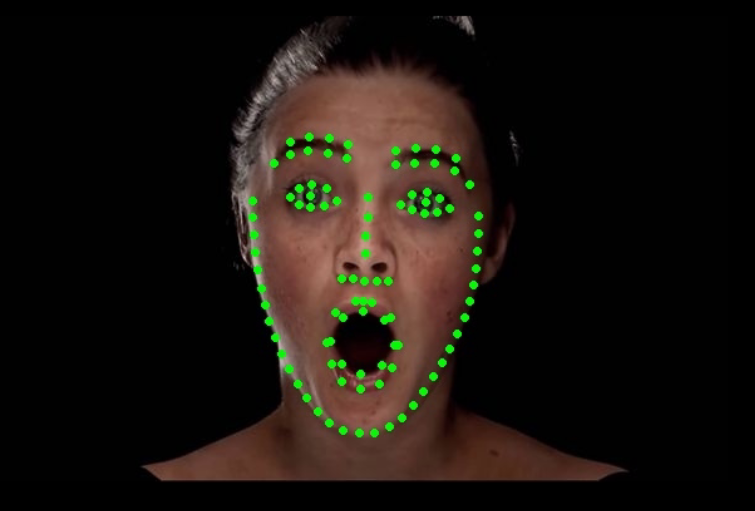
Figure 2-6 Face 98-Keypoint Recognition Result Image
For detailed API descriptions and API calls (the source code of this sample), refer to the following.
3. Face DetectionAPI Description
3.1 Reference Method
To allow users to call the EASY EAI API library directly from a local project, this list shows the libraries and header files that need to be linked to the project, making it easy for users to add them directly.
| Item | Description |
| Header File Directory | easyeai-api/algorithm/face_detect |
| Library File Directory | easyeai-api/algorithm/face_detect |
| Library Link Parameter | -lface_detect |
3.2 Face Detection Initialization Function
The face detection initialization function prototype is as follows.
int face_detect_init(rknn_context \*ctx, const char \*path)The details are as follows.
| Function Name: face_detect_init() | |
| Header File | face_detect.h |
| Input Parameter | ctx:rknn_context handle |
| Input Parameter | path:algorithm model path |
| Return Value | Return value on success: 0 |
| Return value on failure: -1 | |
| Notes | None |
3.3 Face DetectionExecution Function
The prototype of the face detection execution function face_detect_run is as follows.
int face_detect_run(rknn_context ctx, cv::Mat &input_image, std::vector\<det\> &result)The details are as follows.
| Function Name:face_detect_run() | |
| Header File | face_detect.h |
| Input Parameter | ctx:rknn_context handle |
| Input Parameter | input_image:image data input(cv::Mat is an OpenCV type) |
| Output Parameter | result:object detection box output |
| Return Value | Return value on success: 0 |
| Return value on failure: -1 | |
| Notes | None |
3.4 Face DetectionRelease Function
The prototype of the face detection release function is as follows.
int face_detect_release(rknn_context ctx)The details are as follows.
Function Name:face_detect_release ()
| Header File | face_detect.h |
| Input Parameter | ctx:rknn_context handle |
| Return Value | Return value on success: 0 |
| Return value on failure: -1 | |
| Notes | None |
4. Face 98-Point Landmark API Description
4.1 Reference Method
To allow users to call the EASY EAI API library directly from a local project, the libraries and header files that need to be linked in this project are listed below. Users can add them directly.
| Item | Description |
| Header File Directory | easyeai-api/algorithm_api/face_landmark98 |
| Library File Directory | easyeai-api/algorithm_api/face_landmark98 |
| Library Link Parameter | -lface_landmark98 |
4.2 Face 98-Point Landmark Initialization Function
The face 98-point landmark initialization function prototype is as follows.
int face_landmark98_init(rknn_face_landmark_context_t \*p_face_landmark, const char \*p_model_path)The details are as follows.
| Function Name: face_landmark98_init() | |
| Header File | face_landmark98.h |
| Input Parameter | p_face_landmark: rknn_face_landmark_context_t handle |
| Input Parameter | p_model_path:algorithm model path |
| Return Value | Return value on success: 0 |
| Return value on failure: -1 | |
| Notes | None |
4.3 Face 98-Point Landmark Execution Function
The face_landmark98_run function prototype is as follows.
std::vector\<cv::Point\> face_landmark98_run(cv::Mat image, rknn_face_landmark_context_t \*p_face_landmark)The details are as follows.
| Function Name:face_landmark98_run () | |
| Header File | face_landmark98.h |
| Input Parameter | p_face_landmark: rknn_face_landmark_context_t handle |
| Input Parameter | image:image data input(cv::Mat is an OpenCV type) |
| Return Value | std::vector<cv::Point>: face landmark coordinates output by the algorithm |
| Notes | None |
4.4 Face 98-Point Landmark Release Function
The face 98-point landmark release function prototype is as follows.
int face_landmark98_release(rknn_face_landmark_context_t\* p_face_landmark)The details are as follows.
| Function Name:face_landmark98_release () | |
| Header File | face_landmark98.h |
| Input Parameter | p_face_landmark: rknn_face_landmark_context_t handle |
| Return Value | Return value on success: 0 |
| Return value on failure: -1 | |
| Notes | None |
5. Human Keypoint Recognition Sample
The sample directory is Demos/algorithm-face_landmark98/test-face-landmark98.cpp, and the operation flow is as follows.
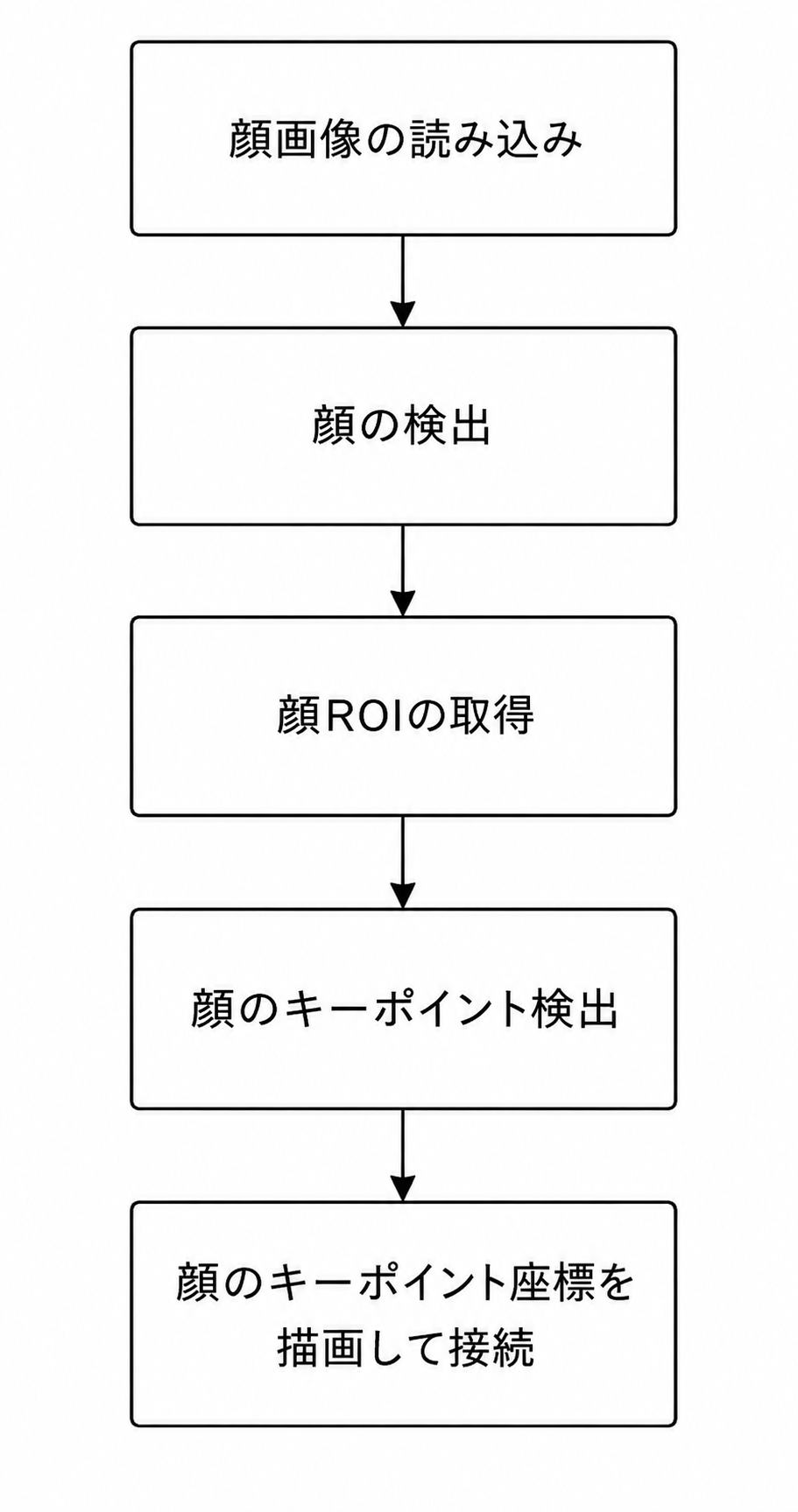
Figure 5-1 Face 98-Keypoint Recognition Algorithm Processing flow
The reference sample is as follows.
#include <stdio.h>#include <stdint.h>#include <stdlib.h>#include <fstream>#include <iostream>#include <vector>#include <fstream>#include <atomic>#include <queue>#include <thread>#include <mutex>#include <chrono>#include <sys/time.h>#include <sys/stat.h>#include <dirent.h>#include <unistd.h>
#include <opencv2/opencv.hpp>
#include <unistd.h>#include <sys/syscall.h>#include "face_detect.h"#include "face_landmark98.h"
using namespace std;using namespace cv;


int main(int argc, char **argv){
  if( argc != 2) {    printf("./test-face-landmark98 xxx.jpg \n");    return -1;  }
  struct timeval start;  struct timeval end;  float time_use=0;
  rknn_context detect_ctx;  std::vector<det> result;  int ret;
  cv::Mat src;  src = cv::imread(argv[1], 1);

  face_detect_init(&detect_ctx, "./face_detect.model");
  /* 顔ランドマーク位置推定を初期化します */  rknn_face_landmark_context_t face_landmark;
  ret = face_landmark98_init(&face_landmark, "./face_landmark98.model");  if( ret < 0) {    printf("face_mask_judgement_init fail! ret=%d\n", ret);    return -1;  }

  gettimeofday(&start,NULL);  face_detect_run(detect_ctx, src, result);
  gettimeofday(&end,NULL);  time_use=(end.tv_sec-start.tv_sec)*1000000+(end.tv_usec-start.tv_usec);//マイクロ秒  printf("face_detect time_use is %f\n",time_use/1000);
  printf("face num:%d\n", (int)result.size());
  for (int i = 0; i < (int)result.size(); i++)  {    int x = (int)(result[i].box.x);    int y = (int)(result[i].box.y);    int w = (int)(result[i].box.width);    int h = (int)(result[i].box.height);    int max = (w > h)?w:h;
    // 画像の切り出し範囲が境界を超えていないか確認します    if( (x < 0) || (y < 0) || ((x +max) > src.cols) || ((y +max) > src.rows) ) {      continue;    }
    // 顔位置    cv::Rect rect(x, y, w, h);    cv::Mat face_roi =src(rect).clone();
    gettimeofday(&start,NULL);    std::vector<cv::Point> keys = face_landmark98_run(&face_landmark, face_roi);
    gettimeofday(&end,NULL);    time_use=(end.tv_sec-start.tv_sec)*1000000+(end.tv_usec-start.tv_usec);//マイクロ秒    printf("face_landmark time_use is %f\n",time_use/1000);
    // 元画像上の位置    for (int i = 0; i < (int)keys.size(); i++) {      keys[i].x += rect.x;      keys[i].y += rect.y;    }
    for (int i = 0; i < (int)keys.size(); i++)    {      printf("keyPoints %d :[%d, %d]\n", i, keys[i].x, keys[i].y);      cv::circle(src, keys[i], 2, CV_RGB(0, 255, 0), 2);    }
    //cv::rectangle(src, rect, CV_RGB(0, 255, 0), 2);
  }
  cv::imwrite("result.jpg", src);
  /* 顔検出を解放します */  face_detect_release(detect_ctx);
  /* 顔ランドマーク位置推定を解放します */  face_landmark98_release(&face_landmark);
  return 0;}