
RKLLM AI Model Deployment Guide
Revision History
| NO | Version | Revision Details | Date |
|---|---|---|---|
| 1 | Ver1.0 | New document | 2026/06/22 |
The information in this document may be changed without prior notice for document improvement. Please refer to the company website for the latest version.
Reproduction in any form without written permission from Nissho Technology Co., Ltd. is strictly prohibited.
1. AImodel deployment
DeepSeek-R1は、MagicCube Quant社のAI企業であるDeepSeekが開発したinferenceモデルです。DeepSeek-R1は、強化学習を用いて事後学習を行うことでinference能力を向上させ、特にnumber学的inference、codeinference、自然言語inferenceといった複雑なタスクにおいて優れた性能を発揮します。その卓越したinference能力と効率的なtextgeneration技術by、世界の人工知能分野で広く注目を集めています。
This document、主にCSUN RV1126Bboard上でDeepSeek-R1をオフラインでexecutionするmethodexplains。RV1126Bは、エッジAIにおける優れたエネルギー効率と極めて高いコストパフォーマンスを誇り、AI導入に最適な選択肢となります。
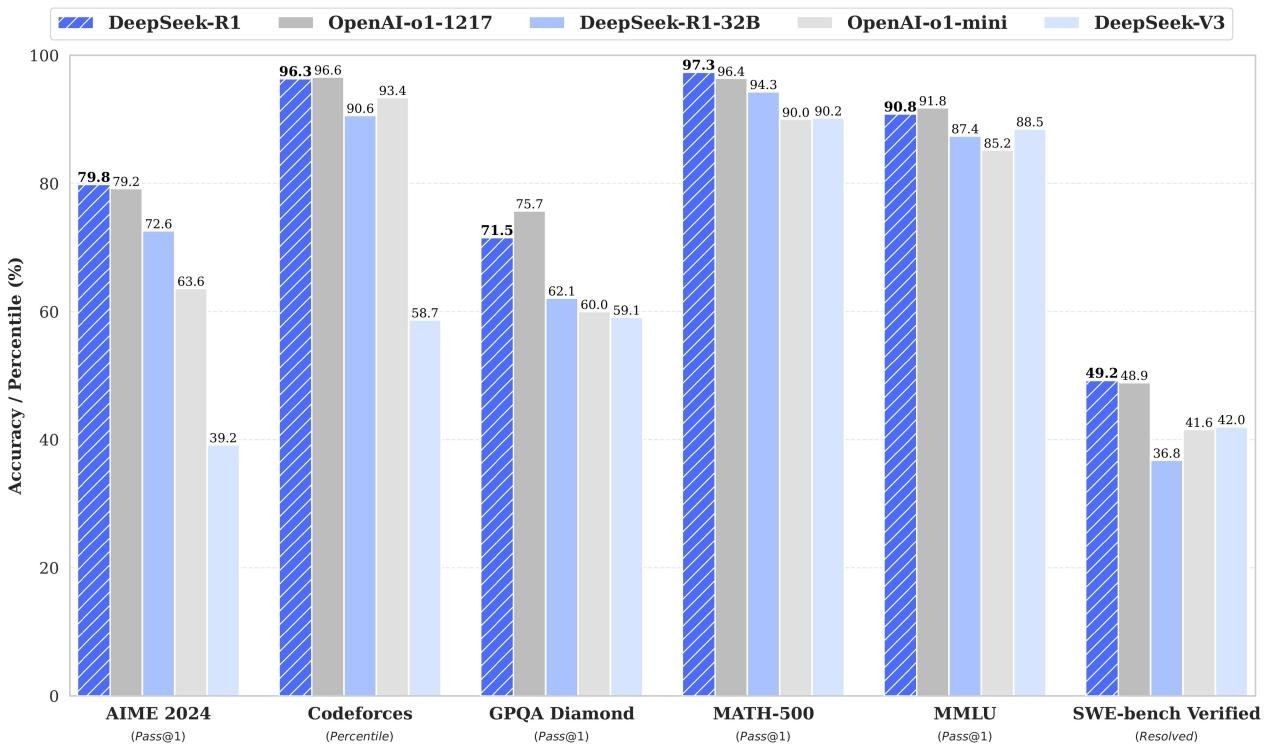
Figure:Benchmark comparison between DeepSeek-R1 and representative models
CSUN RV1126Bboardを正常に動作させるには、最低でも2GBのRAMが必要であることにnoteください。
2. quick start
2.1 preparation
2.1.1. hardware preparation
RV1126Bboard、Type-Cdataケーブル、LANケーブルを用意し、MobaXtermでsshよりRV1126Bboardにログインしましょう。詳しくは入門ガイドを参照ください。
LANケーブルで接続:
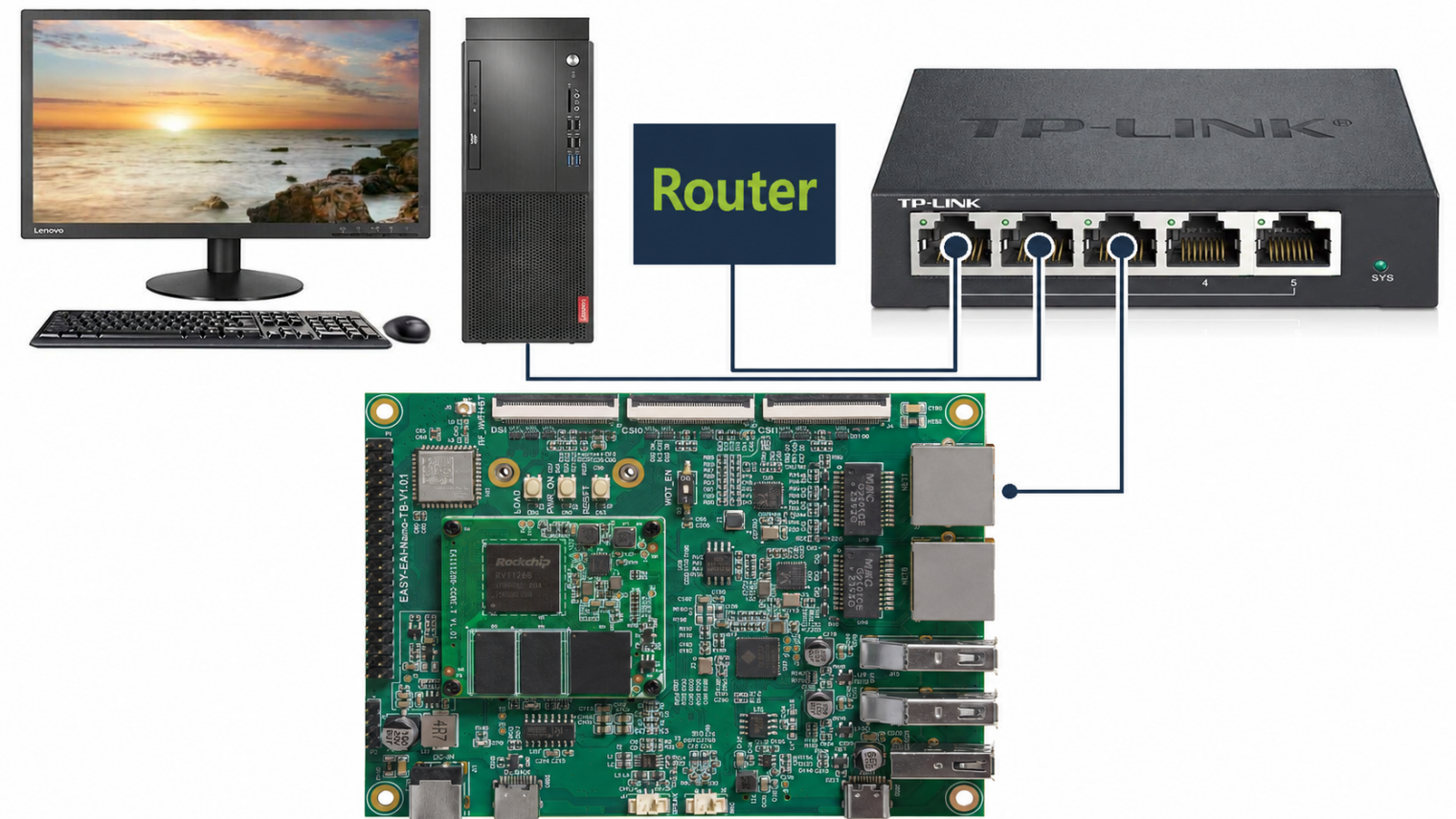
Figure:LAN connection topology for the RV1126B board
シリアルケーブル(Tpye C)で接続:
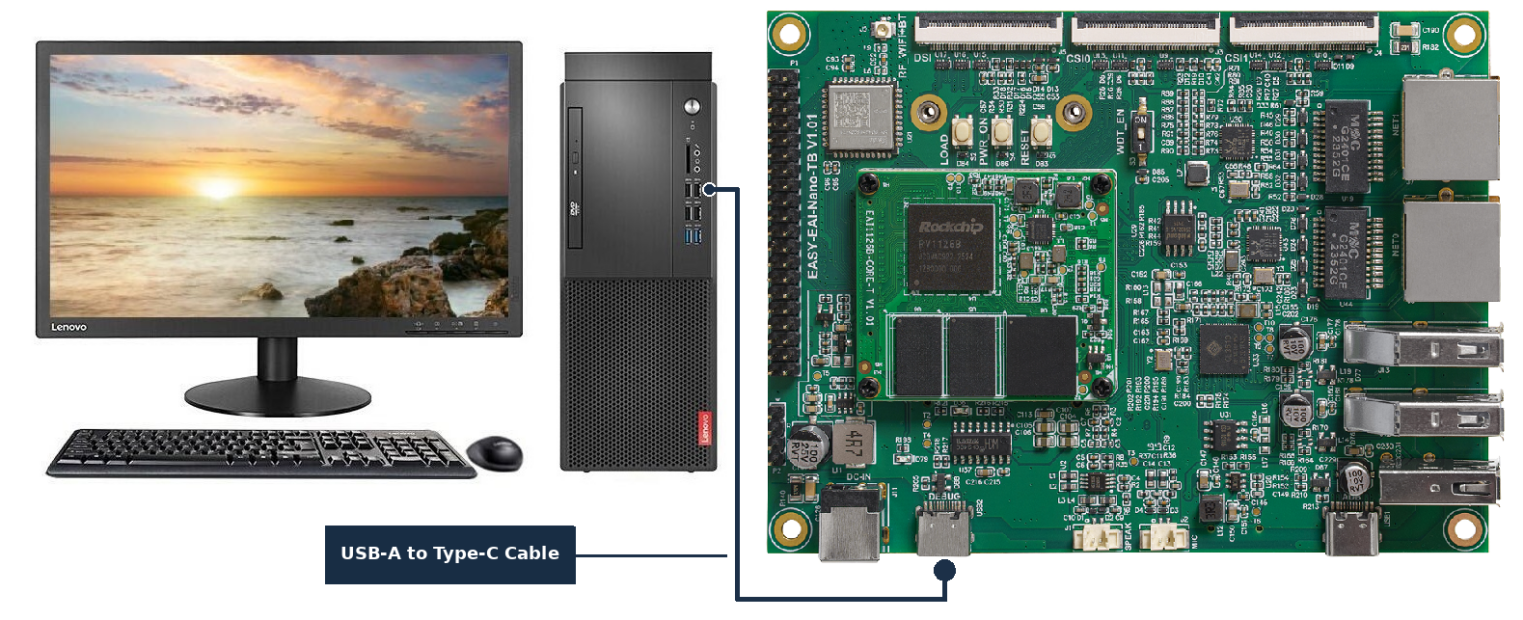
Figure:Type-C serial connection for the RV1126B board
2.1.2. development environment preparation
本書を初めて読むwhenは、『入門ガイド』を参照し、記載されたprocedureに従ってコンパイル環境を構築してください。
PC側のUbuntusystemで run スクリプトをexecutionし、RV1126Bコンパイル環境に入ります。procedureはas follows。
cd ~/develop_environment./run.sh 2204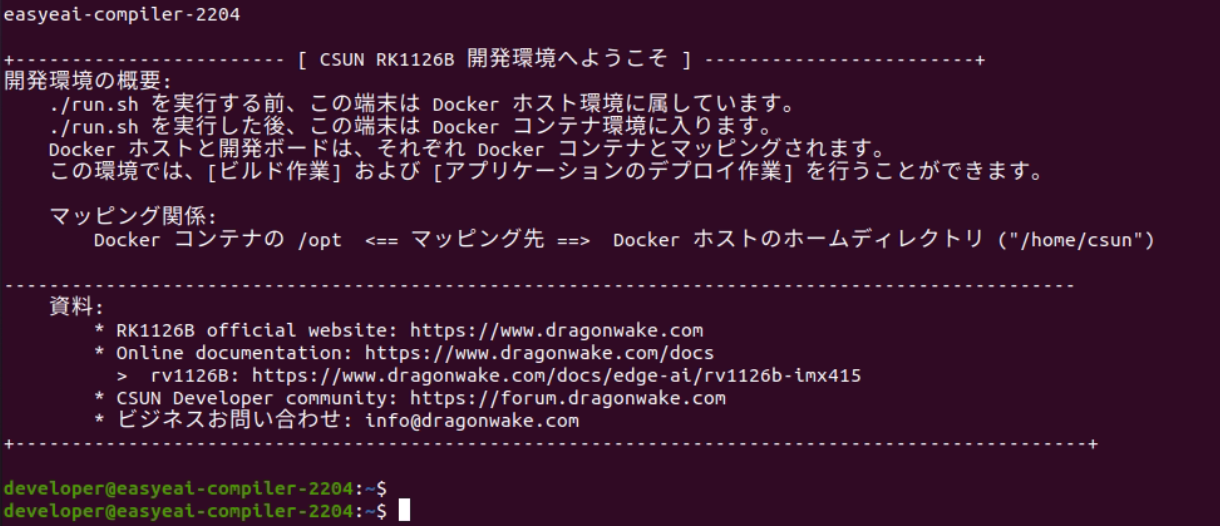
Figure:Terminal screen after entering the EASY-EAI development environment
2.2 source code compilation
1) Googleドライブfromダウンload:
https://drive.google.com/drive/folders/1nsL3pk75dyZHF_39KCKVoSevMq2F6Be9?usp=sharing

Figure:Google Drive folder for the AI model deployment package
ダウンloadしたパッケージをDocker開発環境に移動した後、the followingのコマンドをexecutionして展開します。
| tar -xvf deepseek-demo.tar.bz2 |
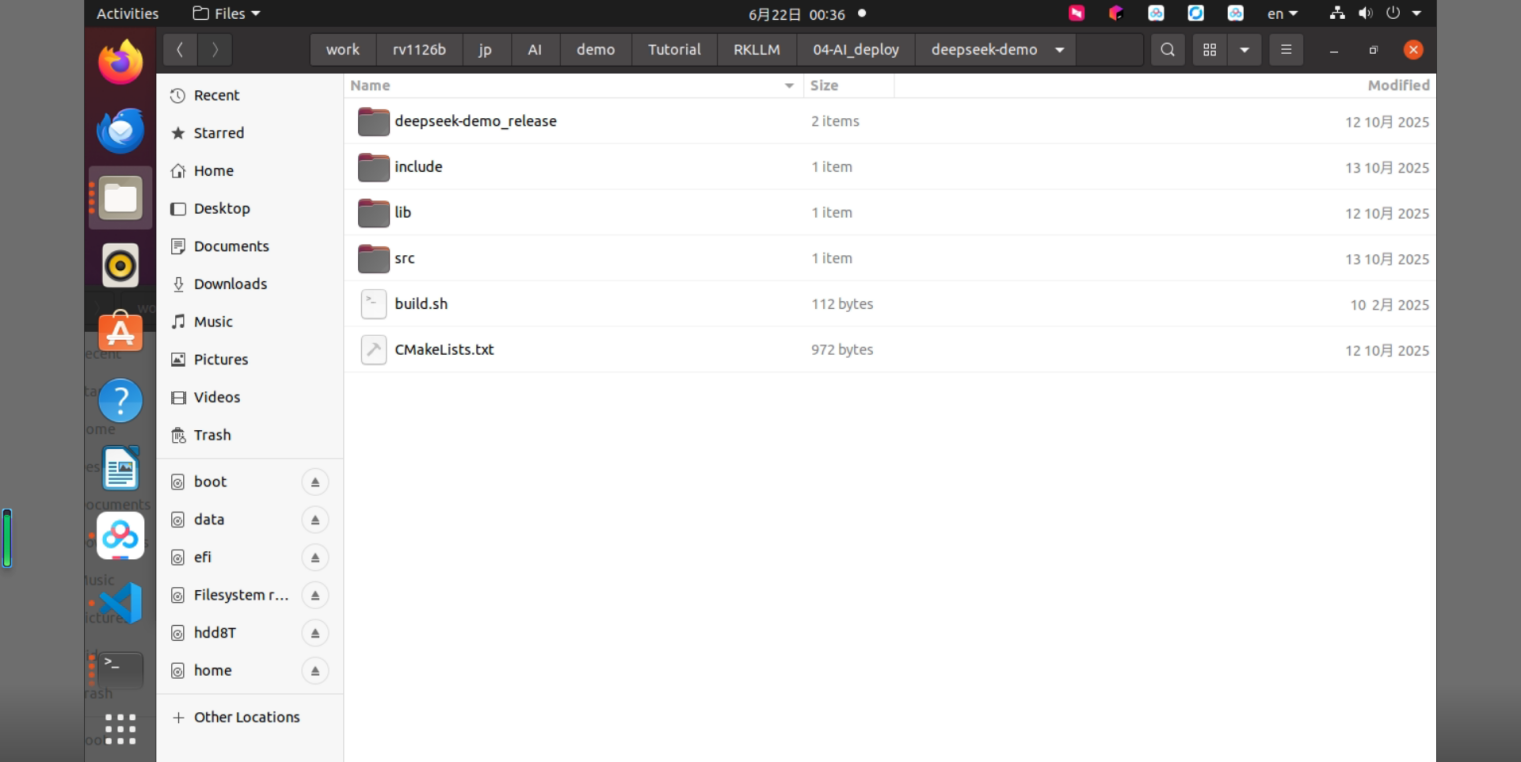
Figure:deepseek-demo source directory structure
-
サンプルコンパイル:
Docker開発環境で対象サンプルdirectoryへ移動し、buildをexecutionします。具体的なコマンドはthe followingの通りです。
cd/opt/linuxshare/work/rv1126b/jp/AI/demo/Tutorial/RKLLM/04-AI_deploy/deepseek-demo./build.sh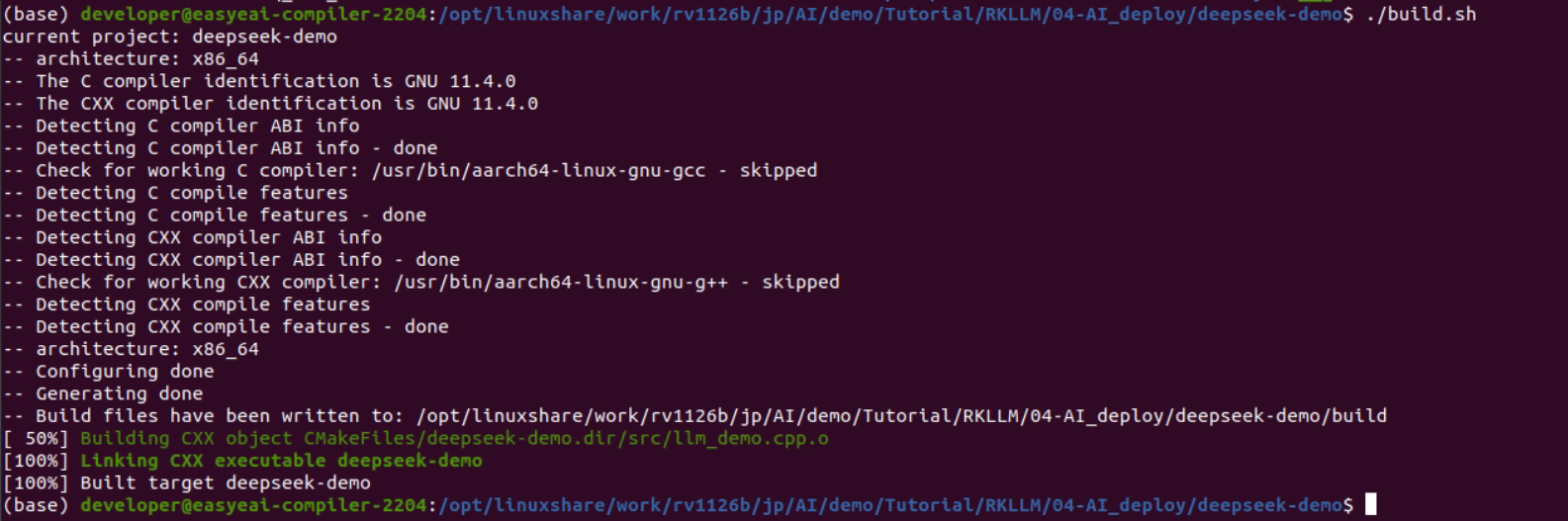
Figure:Terminal output when building the deepseek-demo sample program
続いて、executionfileを含む deepseek-demo_release/ directoryをdevelopment boardの /userdata directoryへコピーします。
sudo mount -t nfs -overs=3,proto=tcp,mountproto=tcp,nolock,retrans=5,timeo=5 192.168.10.85://mntcp deepseek-demo_release/ /mnt/userdata/ -rfさらに、librkllmrt.so もdevelopment board側の /usr/lib 環境へ同期します。
| cp lib/librkllmrt.so /mnt/usr/lib |

Figure:Terminal output for copying the executable and librkllmrt.so to the board
2.3 development boardでlarge language modelをexecution
シリアルデバッグalsoは SSH デバッグでdevelopment boardへログインし、サンプルのデプロイ先directoryへ移動します。
| cd /userdata/deepseek-demo_release/ |

Figure:Checking the deepseek-demo_release directory on the board
サンプルのexecutionコマンドはthe followingの通りです。
ulimit -HSn 102400sudo ./deepseek-demo deepseek_r1_rv1126b_w4a16.rkllm 10242048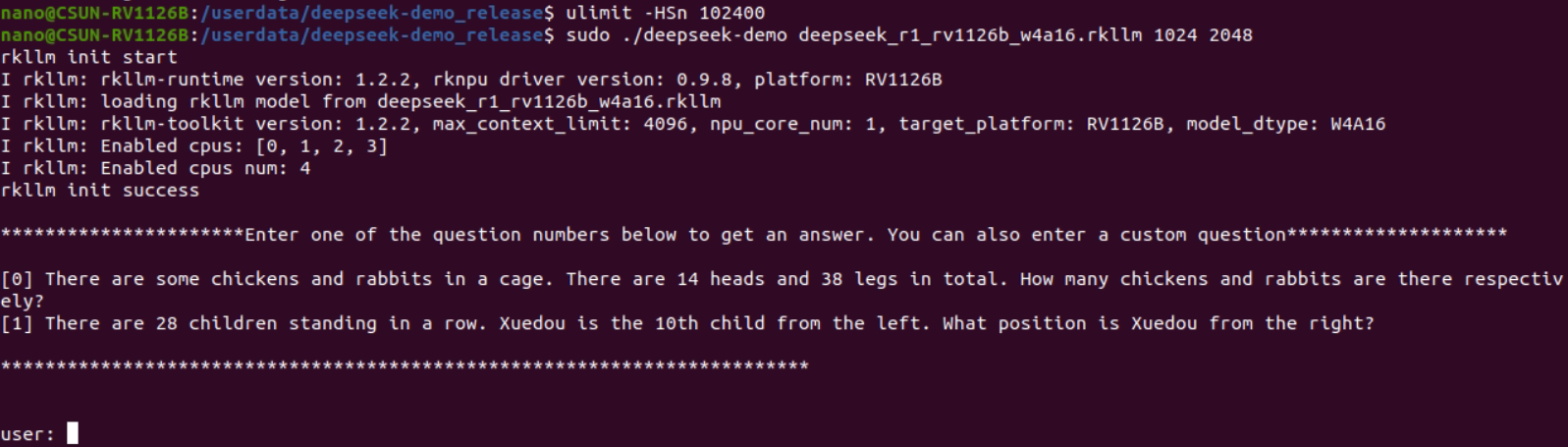
Figure:Terminal output when starting the RKLLM demo on the board
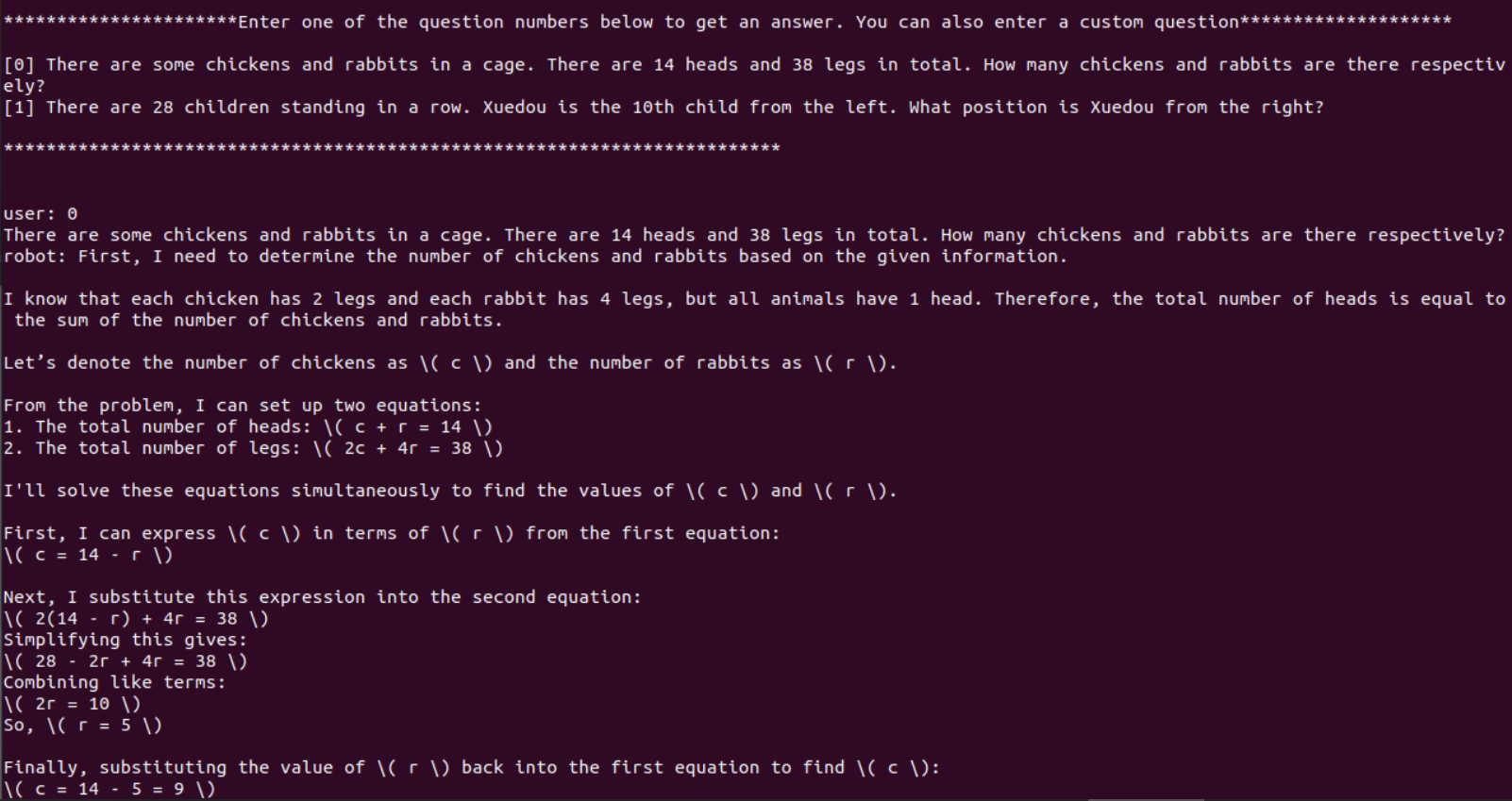
Figure:Terminal output showing DeepSeek-R1 generating an answer on the board
注:RV1126Bスペックより軽量AIモデルを行えますが、LLMのwhen、少ないparameterしか動作していません。however、LLMは少ないparameterのwhen、効果は良くないです。本章では、LLM動作例asdescriptionします。
3. RKLLMアルゴリズムサンプル
サンプルの実装fileは deepseek-demo/src/llm_demo.cpp です。処理flowはthe followingの通りです。
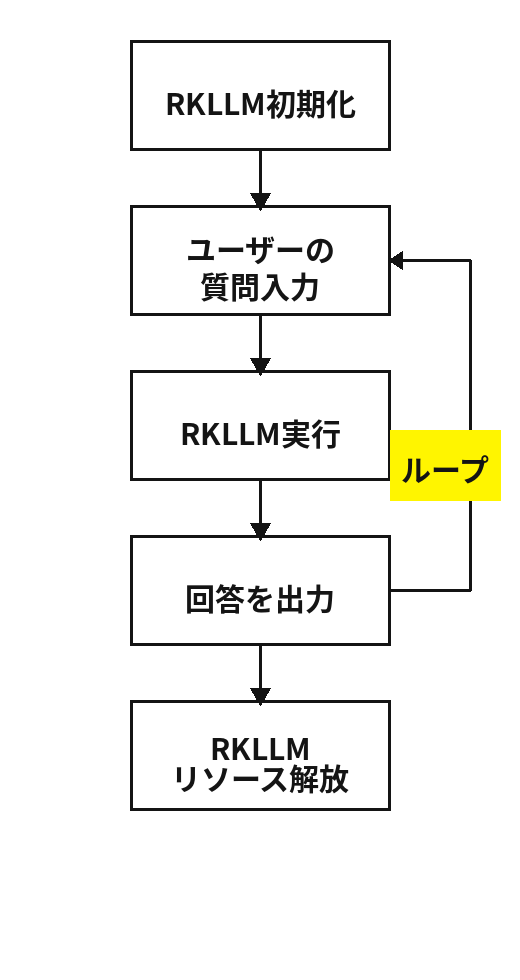
Figure:Processing flow of the RKLLM demo program
具体的なcodeはthe followingの通りです。
// Copyright (c) 2025 by Rockchip Electronics Co., Ltd. AllRights Reserved.//// Licensed under the Apache License, Version 2.0 (the"License");// you may not use this file except in compliance with theLicense.// You may obtain a copy of the License at//// http://www.apache.org/licenses/LICENSE-2.0//// Unless required by applicable law or agreed to in writing,software// distributed under the License is distributed on an "AS IS"BASIS,// WITHOUT WARRANTIES OR CONDITIONS OF ANY KIND, either express orimplied.// See the License for the specific language governing permissionsand// limitations under the License.#include <string.h>#include <unistd.h>#include <string>#include "rkllm.h"#include <fstream>#include <iostream>#include <csignal>#include <vector>using namespace std;LLMHandle llmHandle = nullptr;void exit_handler(int signal){ if (llmHandle != nullptr) { { cout << "Program is exiting" << endl; LLMHandle _tmp = llmHandle; llmHandle = nullptr; rkllm_destroy(_tmp); } } exit(signal);}int callback(RKLLMResult *result, void *userdata, LLMCallStatestate){ if (state == RKLLM_RUN_FINISH) { printf("\n"); } else if (state == RKLLM_RUN_ERROR) { printf("\\run error\n"); } else if (state == RKLLM_RUN_NORMAL) { /*================================================================================================================ When the GET_LAST_HIDDEN_LAYER function is used, the callbackinterface returns the memory pointer last_hidden_layer, the token countnum_tokens, and the hidden-layer size embd_size These three parameters can be used to obtain the data inlast_hidden_layer Note: The data must be obtained in the current callback. Ifit is not obtained in time, this pointer will be released in the nextcallback
===============================================================================================================*/ if (result->last_hidden_layer.embd_size != 0 &&result->last_hidden_layer.num_tokens != 0) { int data_size = result->last_hidden_layer.embd_size *result->last_hidden_layer.num_tokens * sizeof(float); printf("\ndata_size:%d",data_size); std::ofstream outFile("last_hidden_layer.bin",std::ios::binary); if (outFile.is_open()) { outFile.write(reinterpret_cast<constchar*>(result->last_hidden_layer.hidden_states), data_size); outFile.close(); std::cout << "Data saved to output.binsuccessfully!" << std::endl; } else { std::cerr << "Failed to open the file forwriting!" << std::endl; } } printf("%s", result->text); } return 0;}int main(int argc, char **argv){ if (argc < 4) { std::cerr << "Usage: " << argv[0] << "model_path max_new_tokens max_context_len\n"; return 1; } signal(SIGINT, exit_handler); printf("rkllm init start\n"); // Set parameters and initialize RKLLMParam param = rkllm_createDefaultParam(); param.model_path = argv[1]; // Set sampling parameters param.top_k = 1; param.top_p = 0.95; param.temperature = 0.8; param.repeat_penalty = 1.1; param.frequency_penalty = 0.0; param.presence_penalty = 0.0; param.max_new_tokens = std::atoi(argv[2]); param.max_context_len = std::atoi(argv[3]); param.skip_special_token = true; param.extend_param.base_domain_id = 0; param.extend_param.embed_flash = 1; int ret = rkllm_init(&llmHandle, ¶m, callback); if (ret == 0){ printf("rkllm init success\n"); } else { printf("rkllm init failed\n"); exit_handler(-1); } vector<string> pre_input; pre_input.push_back("There are some chickens and rabbits in acage. There are 14 heads and 38 legs in total. How many chickens andrabbits are there respectively?"); pre_input.push_back("There are 28 children standing in a row.Xuedou is the 10th child from the left. What position is Xuedou from theright?"); cout << "\n**********************Enter one of the questionnumbers below to get an answer. You can also enter a customquestion********************\n" << endl; for (int i = 0; i < (int)pre_input.size(); i++) { cout << "[" << i << "] " <<pre_input[i] << endl; } cout <<"\n*************************************************************************\n" << endl; RKLLMInput rkllm_input; memset(&rkllm_input, 0, sizeof(RKLLMInput)); // Initializeall contents to 0
// Initialize the infer parameter structure RKLLMInferParam rkllm_infer_params; memset(&rkllm_infer_params, 0, sizeof(RKLLMInferParam)); //Initialize all contents to 0 // 1. Initialize and set LoRA parameters if LoRA is used // RKLLMLoraAdapter lora_adapter; // memset(&lora_adapter, 0, sizeof(RKLLMLoraAdapter)); // lora_adapter.lora_adapter_path ="qwen0.5b_fp16_lora.rkllm"; // lora_adapter.lora_adapter_name = "test"; // lora_adapter.scale = 1.0; // ret = rkllm_load_lora(llmHandle, &lora_adapter); // if (ret != 0) { // printf("\nload lora failed\n"); // } // Load the second LoRA // lora_adapter.lora_adapter_path ="Qwen2-0.5B-Instruct-all-rank8-F16-LoRA.gguf"; // lora_adapter.lora_adapter_name = "knowledge_old"; // lora_adapter.scale = 1.0; // ret = rkllm_load_lora(llmHandle, &lora_adapter); // if (ret != 0) { // printf("\nload lora failed\n"); // } // RKLLMLoraParam lora_params; // lora_params.lora_adapter_name = "test"; // Specify the LoRAname used for inference // rkllm_infer_params.lora_params = &lora_params; // 2. Initialize and set Prompt Cache parameters if Prompt Cacheis used // RKLLMPromptCacheParam prompt_cache_params; // prompt_cache_params.save_prompt_cache = true; // Whether to save prompt cache // prompt_cache_params.prompt_cache_path = "./prompt_cache.bin"; // Specify the cache file path if prompt cache needs to be saved // rkllm_infer_params.prompt_cache_params =&prompt_cache_params;
// rkllm_load_prompt_cache(llmHandle, "./prompt_cache.bin"); //Load the cached cache rkllm_infer_params.mode = RKLLM_INFER_GENERATE; // By default, the chat operates in single-turn mode (no contextretention) // 0 means no history is retained, each query is independent rkllm_infer_params.keep_history = 0; //The model has a built-in chat template by default, whichdefines how prompts are formatted //for conversation. Users can modify this template using thisfunction to customize the //system prompt, prefix, and postfix according to their needs.
// rkllm_set_chat_template(llmHandle, "", "<|User|>","<|Assistant|>");
while (true) { std::string input_str; printf("\n"); printf("user: "); std::getline(std::cin, input_str); if (input_str == "exit") { break; } if (input_str == "clear") { ret = rkllm_clear_kv_cache(llmHandle, 1, nullptr,nullptr); if (ret != 0) { printf("clear kv cache failed!\n"); } continue; } for (int i = 0; i < (int)pre_input.size(); i++) { if (input_str == to_string(i)) { input_str = pre_input[i]; cout << input_str << endl; } } rkllm_input.input_type = RKLLM_INPUT_PROMPT; rkllm_input.role = "user"; rkllm_input.prompt_input = (char *)input_str.c_str(); printf("robot: "); // To use normal inference, set rkllm_infer_mode toRKLLM_INFER_GENERATE or leave the parameter unset rkllm_run(llmHandle, &rkllm_input,&rkllm_infer_params, NULL); } rkllm_destroy(llmHandle); return 0;}