
QR Code Generation
1.1. QR Code Overview
A QR code is also called a two-dimensional barcode (2D code). The commonly used type is QR Code. QR stands for Quick Response. It is an encoding method that has become very popular on mobile devices in recent years. Compared with traditional barcodes (Bar Code), it can store more information and represent more data types. A QR code has a total of 40 sizes, which are officially called versions. Version 1 is a 21 x 21 matrix, Version 2 is a 25 x 25 matrix, and Version 3 is a 29 x 29 matrix. Each time the version increases by 1, the size increases by 4. The calculation formula is (V-1)*4 + 21, where V is the version number. The maximum is Version 40, and (40-1)*4+21 = 177, so the maximum size is a 177 x 177 square. QR codes have a certain error-correction capability. This error-correction function is mainly implemented using the Reed-Solomon error correction algorithm.
QR code structure:
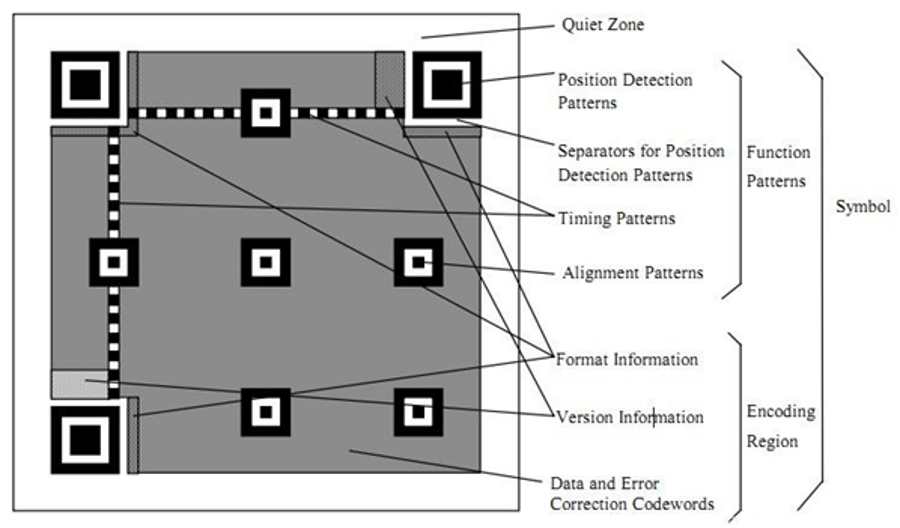
1.1. QR Code Overview Figure 1
1.2. Quick Start
1.2.1 Preparing the Development Environment
If you are reading this document for the first time, please first read “Start Guide/Preparing the Development Environment/Preparing and Updating the Easy-Eai Compilation Environment” and follow the steps there to set up the compilation environment.
Run the run script on the Ubuntu system on your PC to enter the EASY-EAI compilation environment. The details are as follows.
cd ~/develop_environment./run.sh 22041.2.2 Downloading the Source Code and Compiling the Sample
In the EASY-EAI compilation environment, create a directory for managing the source code repository.
cd /optmkdir EASY-EAI-Toolkitcd EASY-EAI-Toolkithttps://dl.dragonwake.com/download/rv1126b/embedded/EASY-EAI-Toolkit-1126B/Demos.zip
Download the Demos.zip compressed file from the link above, upload it to the /opt/EASY-EAI-Toolkit directory of the virtual machine, and decompress it. Go to the corresponding sample directory and perform the compilation operation. The specific commands are as follows.
cd EASY-EAI-Toolkit-1126B/Demos/common-qrcode/./build.sh💡 Note: Because the dependent libraries are deployed on the board, keep /mnt mounted during cross-compilation.
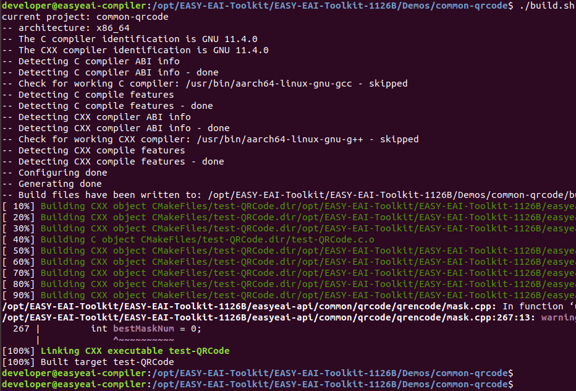
1.2.2 Downloading the Source Code and Compiling the Sample Figure 3
1.2.3 Running the Sample
Enter the board backend through serial debugging or SSH debugging, and go to the location where the sample is stored, as shown below.
cd /userdata/Demo/common-qrcodeThe command for running the sample is as follows.
./test-QRCode1.2.4 Execution Result
The execution result is as follows.
After running the test program, an image named “QRCode.png” is generated.

1.2.4 Execution Result Figure 4
Return to the [Compilation Window] and use the eog command to open the image directly.
eog /mnt/userdata/Demo/common-qrcode/QRCode.png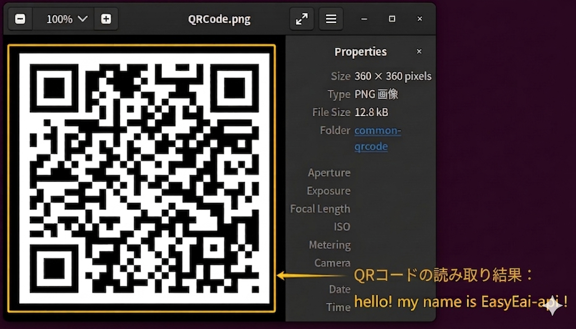
1.2.4 Execution Result Figure 5
If the EASY-EAI compilation environment prompts that the eog command cannot be found, install it using the following operations.
sudo apt-get updatesudo apt-get install eogAlternatively, you can copy the image from the board to the PC.
cp /mnt/userdata/Demo/common-qrcode/QRCode.png ./ReleaseFor a detailed API description and API calls (the source code of this sample), refer to the following description.
1.3. QR Code Generation API Description
The EASY EAI api encapsulates a QR code generation tool. A QR code image can be generated simply by passing in information, allowing users to easily generate QR code images for their own applications.
1.3.1 Include/Reference Method
The EASY EAI api library is located in the easyeai-api directory of this repository. To allow customers to directly call the EASY EAI api library in their local projects, the libraries, header files, and other items that need to be linked in the project are listed below.
| Description | CMake Entry | Makefile Entry |
|---|---|---|
| api.cmake | ${common_root}/qrcode/api.cmake | None |
| Header File Directory | ${QRCODE_INCLUDE_DIRS} | -I ../../easyeai-api/common/qrcode |
| Source File Directory | ${QRCODE_SOURCE_DIRS} | ../../easyeai-api/common/qrcode |
| Library File Directory | None | None |
| Library Link Parameters | ${QRCODE_LIBS} | None |
The path of the API source code is: EASY-EAI-Toolkit-1126B/easyeai-api/common/qrcode/ Users can view the implementation of the interfaces through the source code and can also directly modify the source code.
1.3.2 QR Code Generation Operation
The prototype of the QR code generation function is as follows.
long StrToQRCode(const char \*file, const char \*pStr);The specific description is shown in the table below.
| Function Name: StrToQRCode() | Details |
|---|---|
| Header File | easyeai-api/common/qrencode/qrcode.h |
| Input Parameters | file: save path of the QR code image to be generated (including the directory) Example: /userdata/myQRCode.png pStr: string required for QR code generation |
| Return Value | Returns 0 on success Returns -1 on failure |
| Notes | None |
1.4. Usage Example
The code path for the usage example of the QR code operation API is as follows:
EASY-EAI-Toolkit-1126B/Demos/common-qrcode/test-QRCode.c
StrToQRCode(QRCODE_PATH, "hello! my name is EasyEai-api !");