
Application Dependency Library Installation
1.1. File System Dependency Library Installation
1.1. 1 Introduction
During Linux development, you may often encounter missing commands or dependency libraries. This is usually because they are not preinstalled in the system.
1.1. 2 Preparation Before Installation
Enter the board environment and operate the board through commands.
Ensure that the development board can access the Internet.
1.1.3 Software Installation via apt
Using the dos2unix tool as an example, the installation procedure is shown below.
When attempting to use this command, the system reports that the command cannot be found.

1.1.3 Software Installation via apt Figure1
First, use the update command to synchronize the apt repositories (the default repository source on the development board is the USTC mirror).
sudo apt-get update
1.1.3 Software Installation via apt Figure2
Then install dos2unix using the install command.
sudo apt-get install dos2unix -y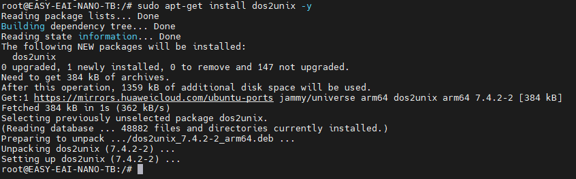
1.1.3 Software Installation via apt Figure3
1.1.4 Verifying the Installation Result
Type dos2 and press the Tab key. If auto-completion works, the dos2unix command has been recognized by the system.
Finally, use the —version parameter to check the dos2unix version.
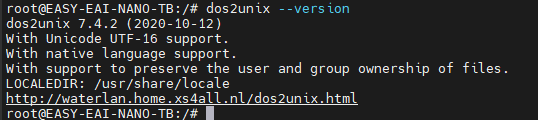
1.1.4 Verifying the Installation Result Figure4
1.1.5 Third-Party Software Installation
In some cases, software from official sources may not meet the application’s requirements.