
INI File Operations
1.1. INI File Overview
INI is short for “Initialization File”, which means an initialization file. An INI file is a common format for storing configuration files on Windows systems, and it is now also widely used as a configuration file format on Linux. An INI file consists of a “Section”, a “Key”, and a “Value”. A “Section” is represented by enclosing it in square brackets [], such as [Section1 Name]. This indicates the beginning of a paragraph. Since an INI file may be shared across the entire project, “Sections” must be used to distinguish parameter areas for different purposes. A “Key” and “Value” pair is represented as KeyName=value and is separated by the equals sign =. Comments in an INI file are represented by a semicolon ;, and all characters after the semicolon are treated as comments until the end of that line. An example is as follows. Note that the value type can only be int or string.
; comment text Example of INI file data format (configuration file contents)[Section1 Name]KeyName1=value1KeyName2=value2...[Section2 Name]KeyName21=value21KeyName22=value221.2. Quick Start
1.2.1 Preparing the Development Environment
Run the run script on the Ubuntu system of the PC to enter the EASY-EAI compilation environment. Details are as follows.
cd ~/develop_environment./run.sh 22041.2.2 Downloading the Source Code and Compiling the Sample
In the EASY-EAI compilation environment, create a directory to manage the source code repository.
cd /optmkdir EASY-EAI-Toolkitcd EASY-EAI-Toolkithttps://dl.dragonwake.com/download/rv1126b/embedded/EASY-EAI-Toolkit-1126B/Demos.zip
Download the Demos.zip compressed file from the link above, upload it to the /opt/EASY-EAI-Toolkit directory of the virtual machine, and decompress it. Move to the corresponding sample directory and perform the compilation operation. The specific commands are as follows.
cd EASY-EAI-Toolkit-1126B/Demos/common-ini/./build.sh💡 Note: Since the dependent libraries are placed on the board, make sure to keep /mnt mounted during cross-compilation.
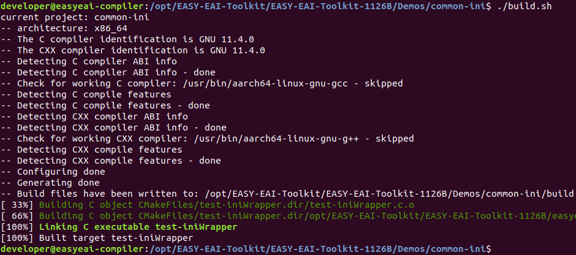
1.2.2 Downloading the Source Code and Compiling the Sample Figure 7
1.2.3 Running the Sample
Enter the board background through serial debugging or SSH debugging, and move to the location where the sample is placed. As follows.
cd /userdata/Demo/common-iniThe command to run the sample is as follows.
./test-iniWrapper1.2.4 Execution Result
The execution result is as follows.
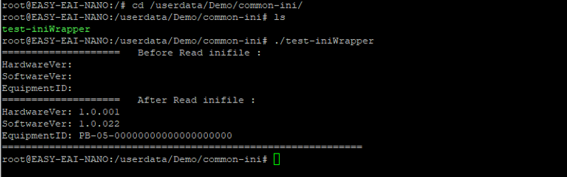
1.2.4 Execution Result Figure 8
For a detailed explanation of the APIs and API calls (the source code of this sample), refer to the following description.
1.3. INI File API Description
1.3.1 Include/Reference Method
The EASY EAI API library is located in the easyeai-api directory of this repository. To enable customers to directly call the EASY EAI API library in local projects, the libraries, header files, and other items that need to be linked in the project are listed below.
| Description | Description in CMake | Description in Makefile |
|---|---|---|
| api.cmake | ${common_root}/ini/api.cmake | None |
| Header file directory | ${INI_INCLUDE_DIRS} | -I ../../easyeai-api/common/ini |
| Source file directory | ${INI_SOURCE_DIRS} | ../../easyeai-api/common/ini |
| Library file directory | None | None |
| Library link parameters | ${INI_LIBS} | None |
The path of the API source code is EASY-EAI-Toolkit-1126B/easyeai-api/common/ini/. Users can check the interface implementation through the source code, and can also modify the source code directly.
1.3.2 Reading Integer Data from an INI File
The function prototype is as follows.
int32_t ini_read_int(const char \*file, const char \*pcSection, const char \*pcKey, int \*pVal);The specific description is as follows.
| Function name: ini_read_int() | Details |
|---|---|
| Header file | easyeai-api/common/ini/ini_wrapper.h |
| Input parameters | file: path of the configuration file pcSection: section that contains the parameter pcKey: key of the parameter pVal: int-type pointer used to store the read parameter value |
| Return value | Returns 0 on success Returns -1 on failure |
| Notes | None |
1.3.3 Writing Integer Data to an INI File
The function prototype is as follows.
int32_t ini_write_int(const char \*file, const char \*pcSection, const char \*pcKey, int Val);The specific description is as follows.
| Function name: ini_write_int() | Details |
|---|---|
| Header file | easyeai-api/common/ini/ini_wrapper.h |
| Input parameters | file: path of the configuration file pcSection: section that contains the parameter pcKey: key of the parameter Val: int-type parameter value to write |
| Return value | Returns 0 on success Returns -1 on failure |
| Notes | If the configuration file does not exist, it will be created automatically. |
1.3.4 Reading String Data from an INI File
The function prototype is as follows.
int32_t ini_read_string(const char \*file, const char \*pcSection, const char \*pcKey, char \*pcStr, int len);The specific description is as follows.
| Function name: ini_read_string() | Details |
|---|---|
| Header file | easyeai-api/common/ini/ini_wrapper.h |
| Input parameters | file: path of the configuration file pcSection: section that contains the parameter pcKey: key of the parameter pcStr: string pointer used to store the read parameter value len: maximum length of the buffer used to store the parameter (number of bytes) |
| Return value | Returns 0 on success Returns -1 on failure |
| Notes | None |
1.3.5 Writing String Data to an INI File
The function prototype is as follows.
int32_t ini_write_string(const char \*file, const char \*pcSection, const char \*pcKey, const char \*pcStr);The specific description is as follows.
| Function name: ini_write_string() | Details |
|---|---|
| Header file | easyeai-api/common/ini/ini_wrapper.h |
| Input parameters | file: path of the configuration file pcSection: section that contains the parameter pcKey: key of the parameter pcStr: pointer to the string data to write |
| Return value | Returns 0 on success Returns -1 on failure |
| Notes | If the configuration file does not exist, it will be created automatically. |
1.4. Usage Example of INI File Operation Functions
The code path used is EASY-EAI-Toolkit-1126B/Demos/common-ini/test-iniWrapper.c, and the program logic is as follows.
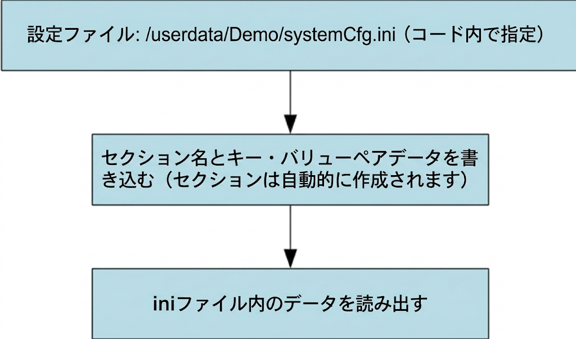
1.4. Usage Example of INI File Operation Functions Figure 9