
BASE64 Encoding/Decoding
1.1. Overview of BASE64 Encoding/Decoding
Base64 is one of the most commonly used encoding methods for transferring 8-bit byte code over networks. It is a method for representing binary data based on 64 printable characters. The EASY EAI API encapsulates and provides BASE64 encoding/decoding tools so that users can easily package data with BASE64.
1.2. Quick Start
1.2.1 Preparing the Development Environment
On the Ubuntu system of the PC, execute the run script to enter the EASY-EAI compilation environment. The details are as follows.
cd ~/develop_environment./run.sh 22041.2.2 Downloading the Source Code and Compiling the Sample
In the EASY-EAI compilation environment, create a directory for managing the source code repository.
cd /optmkdir EASY-EAI-Toolkitcd EASY-EAI-Toolkithttps://dl.dragonwake.com/download/rv1126b/embedded/EASY-EAI-Toolkit-1126B/Demos.zip
Download the Demos.zip compressed file from the link above, upload it to the /opt/EASY-EAI-Toolkit directory of the virtual machine, and extract it. Enter the corresponding sample directory and perform the compilation operation. The specific commands are as follows.
cd EASY-EAI-Toolkit-1126B/Demos/common-base64/./build.sh💡 Note: Because the dependent libraries are placed on the board, be sure to keep /mnt mounted during cross-compilation.
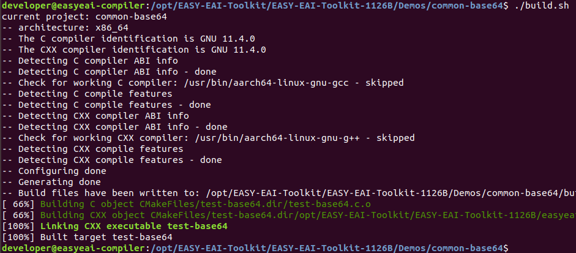
1.2.2 Downloading the Source Code and Compiling the Sample Figure 17
1.2.3 Running the Sample
Enter the board background through serial debugging or SSH debugging, and move to the location where the sample is placed. The operation is as follows.
cd /userdata/Demo/common-base64The command for running the sample is as follows.
./test-base641.2.4 Execution Result
The execution result is as follows.
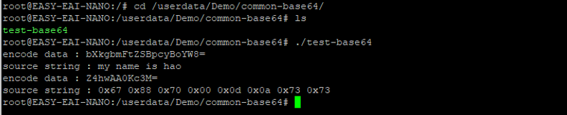
1.2.4 Execution Result Figure 18
1.3. Description of the BASE64 Encoding/Decoding API
1.3.1 Include/Reference Method
The EASY EAI API library is located in the easyeai-api directory of this repository. To allow users to directly call the EASY EAI API library in a local project, the libraries, header files, and other items that need to be linked in the project are listed below.
| Description | Description in CMake | Description in Makefile |
|---|---|---|
| api.cmake | ${common_root}/base64/api.cmake | None |
| Header file directory | ${BASE64_INCLUDE_DIRS} | -I ../../easyeai-api/common/base64 |
| Source file directory | ${BASE64_SOURCE_DIRS} | ../../easyeai-api/common/base64 |
| Library file directory | None | None |
| Library link parameters | ${BASE64_LIBS} | None |
The path of the API source code is EASY-EAI-Toolkit-1126B/easyeai-api/common/base64/. Users can view the implementation of the interfaces through the source code and can also directly modify the source code.
1.3.2 BASE64 Encoding Operation
The prototype of the encoding function is as follows.
int32_t base64_encode(char \*out_data, const char\* in_data, unsigned int in_len);The specific description is as follows.
| Function name: base64_encode() | Details |
|---|---|
| Header file | easyeai-api/common/base64/base64.h |
| Input parameters | out_data: BASE64 data after encoding in_data: original data before encoding in_len: length of the part of the original data to be encoded |
| Return value | Length of the BASE64 string generated after encoding |
| Notes | In general, the encoded data size increases by at least 1/3 compared with the data before encoding. Specifically, it becomes 4/3 of the size obtained by rounding the input data size up to a multiple of 3. |
1.3.3 BASE64 Decoding Operation
The prototype of the decoding function is as follows.
int32_t base64_decode(char \*out_data, unsigned int out_len, const char\* encoded_string);The specific description is as follows.
| Function name: base64_decode() | Details |
|---|---|
| Header file | easyeai-api/common/base64/base64.h |
| Input parameters | out_data: decoded data out_len: maximum length of the memory used to store the decoded data encoded_string: data to be decoded (string) |
| Return value | Length of the data obtained after decoding |
| Notes | None |
1.4. Usage Example of the BASE64 Operation API
The sample code path is EASY-EAI-Toolkit-1126B/Demos/common-base64/test-base64.c.
Example 1: BASE64-encode a string, and then decode the obtained encoded data again.
char *cStr = "my name is hao";char base64_data[1024] = {0};char src_string[1024] = {0};memset(base64_data, 0, sizeof(base64_data));base64_encode(base64_data, cStr, strlen(cStr));printf("encode data : %s\n", base64_data);base64_decode(src_string, sizeof(src_string), base64_data);printf("source string : %s\n", src_string);Example 2: Verify the case where the data contains 0x00, and confirm that the restored data is not truncated at the position of 0x00.
char num_data[8] = {0x67, 0x88, 0x70, '\0', '\r', '\n', 0x73,0x73};char decode_data[8] = {0};memset(base64_data, 0, sizeof(base64_data));base64_encode(base64_data, num_data, sizeof(num_data));printf("encode data : %s\n", base64_data);base64_decode(decode_data, sizeof(decode_data), base64_data);printf("source string : 0x%02x 0x%02x 0x%02x 0x%02x 0x%02x 0x%02x0x%02x 0x%02x\n",decode_data[0], decode_data[1], decode_data[2], decode_data[3],decode_data[4], decode_data[5], decode_data[6],decode_data[7]);