
RKLLM Large Language Model Introduction
Revision History
| NO | Version | Revision Details | Date |
|---|---|---|---|
| 1 | Ver1.0 | New document | 2026/06/20 |
The information in this document may be changed without prior notice for document improvement. Please refer to the company website for the latest version.
Reproduction in any form without written permission from Nissho Technology Co., Ltd. is strictly prohibited.
1. RKLLM overview
1.1 RKLLM toolchainintroduction
1.1.1 RKLLM-Toolkitfunctionintroduction
RKLLM-Toolkitは、computer上でlarge language modelのquantizationと変換を行うin order toの開発キットです。このツールが提供するPythonインターフェースby、the followingのfunctionを簡単にexecutioncan。
(1) model conversion:Hugging FaceandGGUF形式のlarge language model(LLM)をRKLLMモデルに変換するfunctionをsupports。currentサポートされているモデルには、LLaMA、Qwen、Qwen2、Qwen3、Phi-2、Phi-3、ChatGLM3、Gemma、Gemma2、Gemma3、Gemma3n、InternLM2、TeleChat2、MiniCPM-S、MiniCPM、MiniCPM3、MiniCPM4が含まれます。変換されたRKLLMモデルは、Rockchip NPUプラットフォームにloadして使用can。
(2) quantizationfunction:浮動小number点モデルを固定小number点モデルにquantizationするfunctionをsupports。currentサポートされているquantizationタイプはthe followingのとおりです。
a. w4a16;
b. w4a16ブロックquantization(32、64、128ブロックに対応);
c. w8a8;
d. w8a8ブロックquantization(128、256、512ブロックに対応);
1.1.2 RKLLMruntimefunctionのoverview
RKLLMruntimeは、RKLLMtoolkitによって変換されたRKLLMモデルをloadし、boardレベルでNPUドライバを呼び出すことで、Rockchip NPU上でのRKLLMモデルのinferenceを高速化する役割を担います。RKLLMモデルのinference中、userはinferenceparameterを定義したり、さまざまなtextgenerationmethodを定義したり、定義済みのcallbackfunctionを通じてモデルのinference結果を継続的に取得したりcan。
1.2 RKLLM開発プロセスのoverview
RKLLMの開発プロセスは、主にmodel conversionとオンboard展開・運用という2つの部分from構成されます。
(1) model conversion:
この段階では、userfrom提供されたHugging Face形式のlarge language modelを、Rockchip NPUプラットフォーム上での効率的なinferenceのin order toにRKLLM形式に変換します。このステップにはthe followingの内容が含まれます。
-
オリジナルモデルの取得:
-
Hugging Face形式のopen-sourcelarge language model
-
2. 自己学習済みlarge language model(saveされたモデル構造がHugging Faceプラットフォーム上のモデル構造と一致しているis required)
3. GGUFモデル(current、q4_0とfp16型のみをサポート)。
b. モデルのload:`rkllm.load_huggingface()`functionを使用してHugging Face形式のモデルをloadし、`rkllm.load_gguf()`functionを使用してGGUFモデルをloadします。
c. モデルquantization設定:`rkllm.build()`functionを使用してRKLLMモデルを構築します。
構築プロセス中に、ハードウェア上でのモデルのパフォーマンスを向上させるin order toにモデルquantizationをexecutionするかどうか、also、異なる最適化レベルとquantizationタイプを選択can。
d. モデルのexport:`rkllm.export_rkllm()`functionを使用して、RKLLMモデルを.rkllm形式のfileasexportし、後続のデプロイメントにis used。
(2) オンboardデプロイメントと運用:
この段階では、モデルの実際のデプロイメントと運用describes。通常、the followingのprocedureが含まれます。
a. モデルのinitialization:RKLLMモデルをRockchip NPUプラットフォームにloadし、必要なtextgenerationmethodを定義するin order toに対応するモデルparameterを設定し、リアルタイムinference結果を受信するin order toのcallbackfunctionを事前に定義して、inferenceの準備をします。
b. model inference:inference操作をexecutionし、inputdataをモデルに渡してmodel inferenceをexecutionします。userは、事前に定義されたcallbackfunctionを通じてinference結果を継続的に取得can。
c. モデルのrelease:inference処理が完了したら、モデルリソースをreleaseし、他のタスクがNPUの計算リソースを引き続き利用できるようにします。
これら2つのステップがRKLLM開発プロセス全体を構成しており、大規模な言語モデルをRockchip NPU上で効率的に変換、デバッグ、そして最終的にデプロイできることを保証します。
1.3 downloading materials
本マニュアルに必要の資料及びソースcodeはthe link belowfromダウンloadしてください。
GoogleドライブfromLLMモデル関連downloading materials:
https://drive.google.com/drive/folders/1nsL3pk75dyZHF_39KCKVoSevMq2F6Be9?usp=sharing
ドライブfolderの構成は下図通りです。
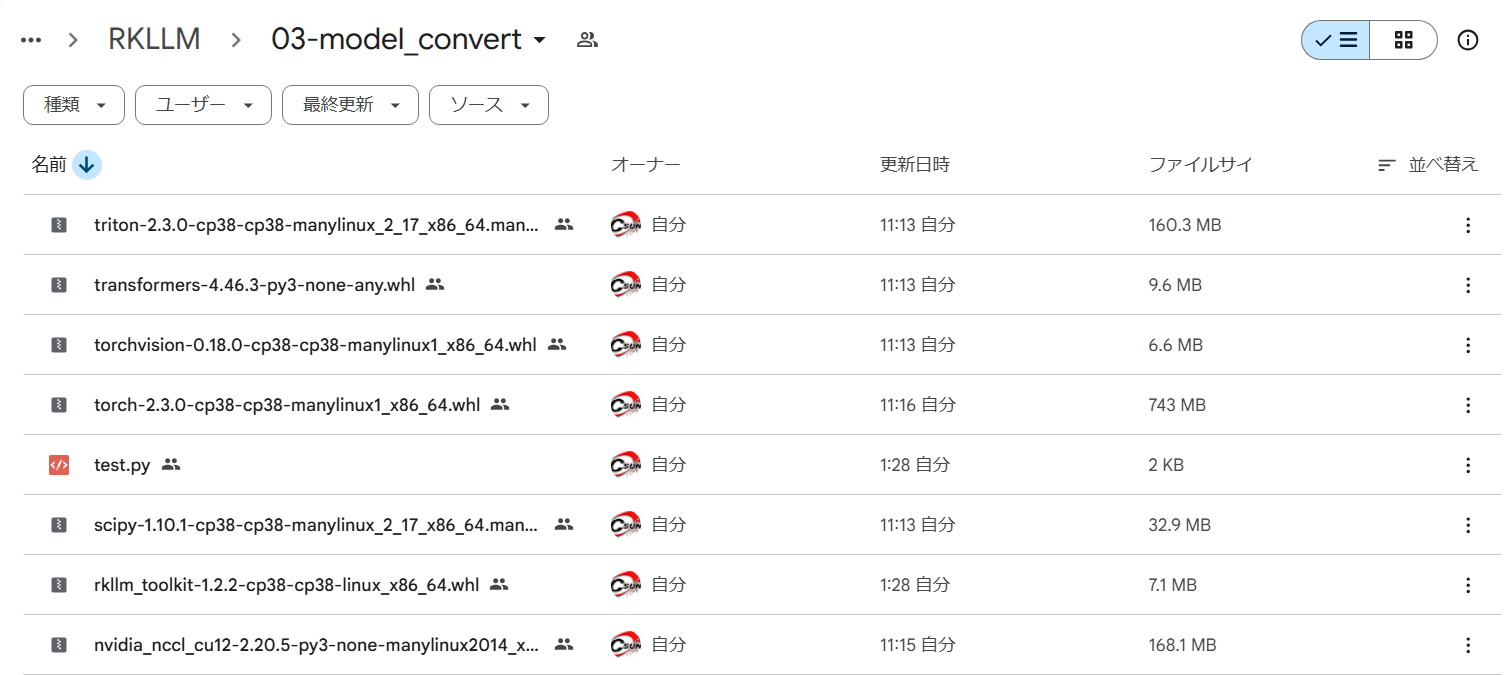
Figure:Example package folder for installing RKLLM-Toolkit
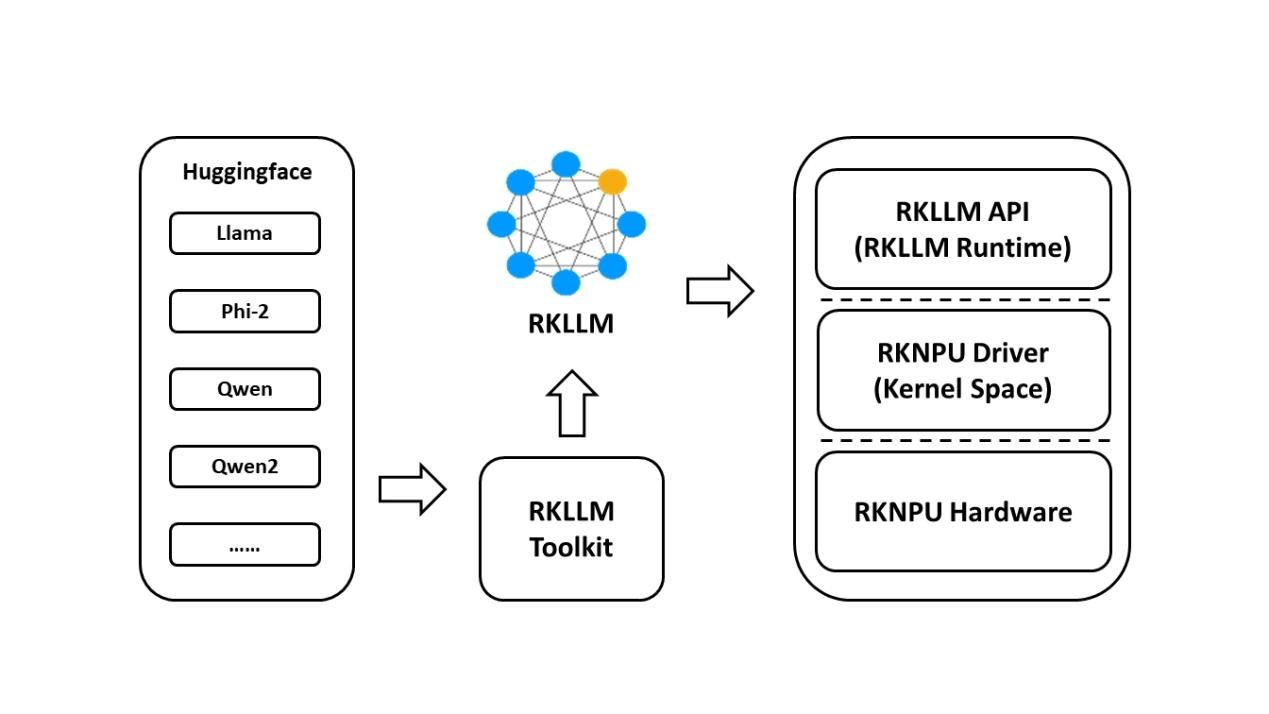
Figure:Overall RKLLM toolchain from RKLLM-Toolkit to RKLLM Runtime / RKNPU