
YOLOv11-track Training and Deployment Guide
Document Information
| Item | Description |
|---|---|
| Document Title | YOLOv11-track Training and Deployment Guide |
| Company | CSUN / Nissho Technology Corporation |
| Website | http://www.dragonwake.com |
| info@dragonwake.com | |
| Created Date | 2026/06/08 |
| Overview | This document explains the YOLOv11 + ByteTrack workflow and how to deploy it on the CSUN RV1126B development board. |
| Copyright | copyright@2026 Nissho Technology Corporation |
Revision History
| No. | Version | Description | Date |
|---|---|---|---|
| 1 | Ver1.0 | Initial release | 2026/06/08 |
The information in this document may be changed without prior notice for document improvement. For the latest version, please refer to the company website.
Reproduction of this document in any form is strictly prohibited without written permission from Nissho Technology Corporation.
1. YOLOv11 track overview
YOLOv11 is the latest real-time object detection model in the Ultralytics YOLO series. It redefines the potential of state-of-the-art accuracy, speed, and efficiency. Compared with previous YOLO versions, YOLOv11 has evolved significantly and introduces important improvements in its architecture and training methods, making it flexible for a wide range of computer vision tasks.
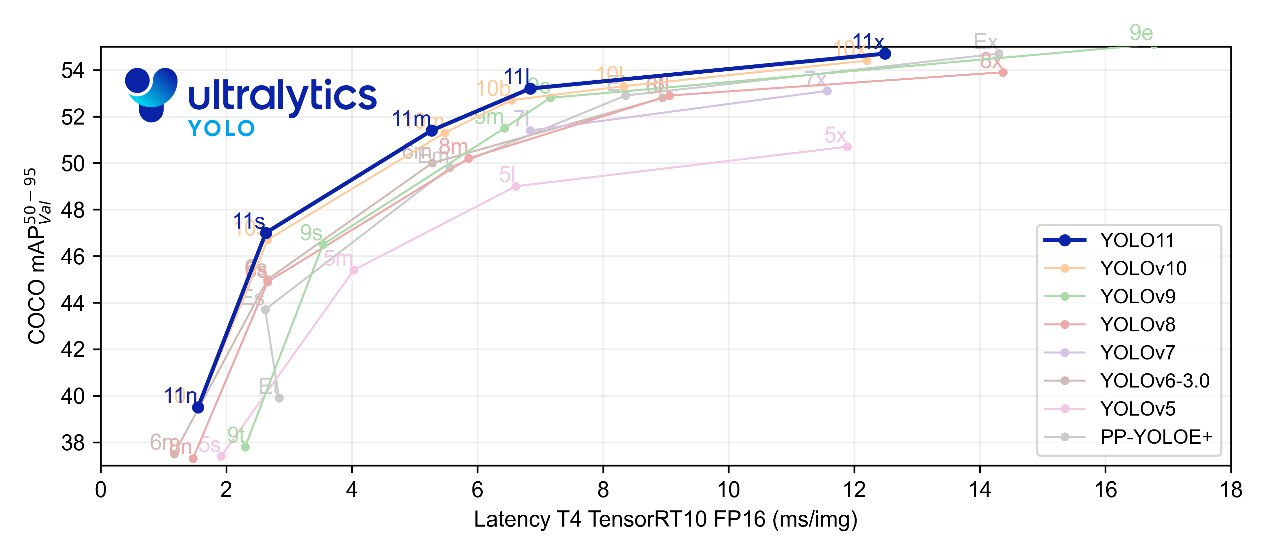
Figure 1-1 Accuracy and latency comparison between YOLOv11 and previous YOLO models
ByteTrack is a multi-object tracking method based on the tracking-by-detection approach and a simple, efficient data association mechanism. It uses the similarity between detection boxes and track trajectories. While keeping high-score detection results, it removes background from low-score detection results and recovers true objects from difficult samples such as occlusion and blur. This reduces missed detections and improves trajectory continuity. ByteTrack can be easily applied to multiple state-of-the-art MOT methods and can improve the IDF1 metric by 1 to 10 points. On MOT17, it achieves 80.3 MOTA, 77.3 IDF1, and 63.1 HOTA at 30 FPS.
This document explains the YOLOv11 + ByteTrack workflow and how to deploy it on the CSUN RV1126B development board.
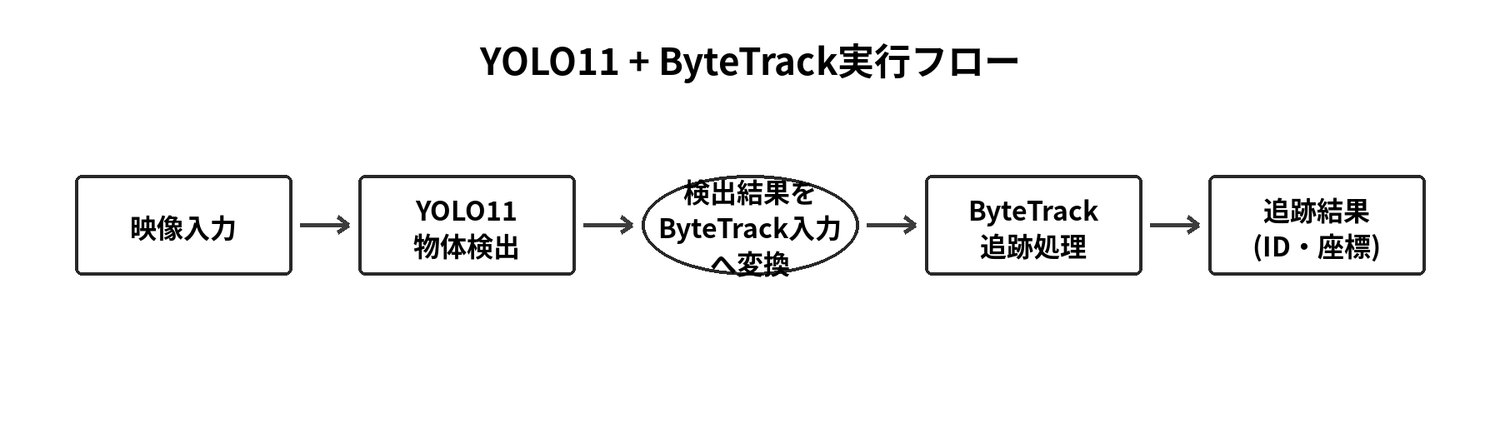
Figure 1-2 YOLOv11 + ByteTrack execution workflow
In the workflow above, video frames are input to the YOLOv11 detection algorithm, and YOLOv11 detects object information, including coordinates and confidence scores. The YOLOv11 output is then converted into ByteTrack input objects, and the ByteTrack tracking algorithm outputs the tracking results, including object IDs and coordinates.
As shown in the workflow diagram, YOLOv11 and ByteTrack are independent of each other. Therefore, YOLOv11 can be replaced with any object detection algorithm. In addition, ByteTrack is not limited to pedestrian tracking; it can track vehicles, animals, and other arbitrary targets.
2. Download materials
Download the materials and source code required for this manual from the following link.
https://dl.dragonwake.com/download/rv1126b/AI/demo/yolov11/AIDemo_yolov11-track_All.zip
The extracted directory structure is as follows.
AIDemo_yolov11-track_All/└── 04-AI_deploy Source code for AI model deployment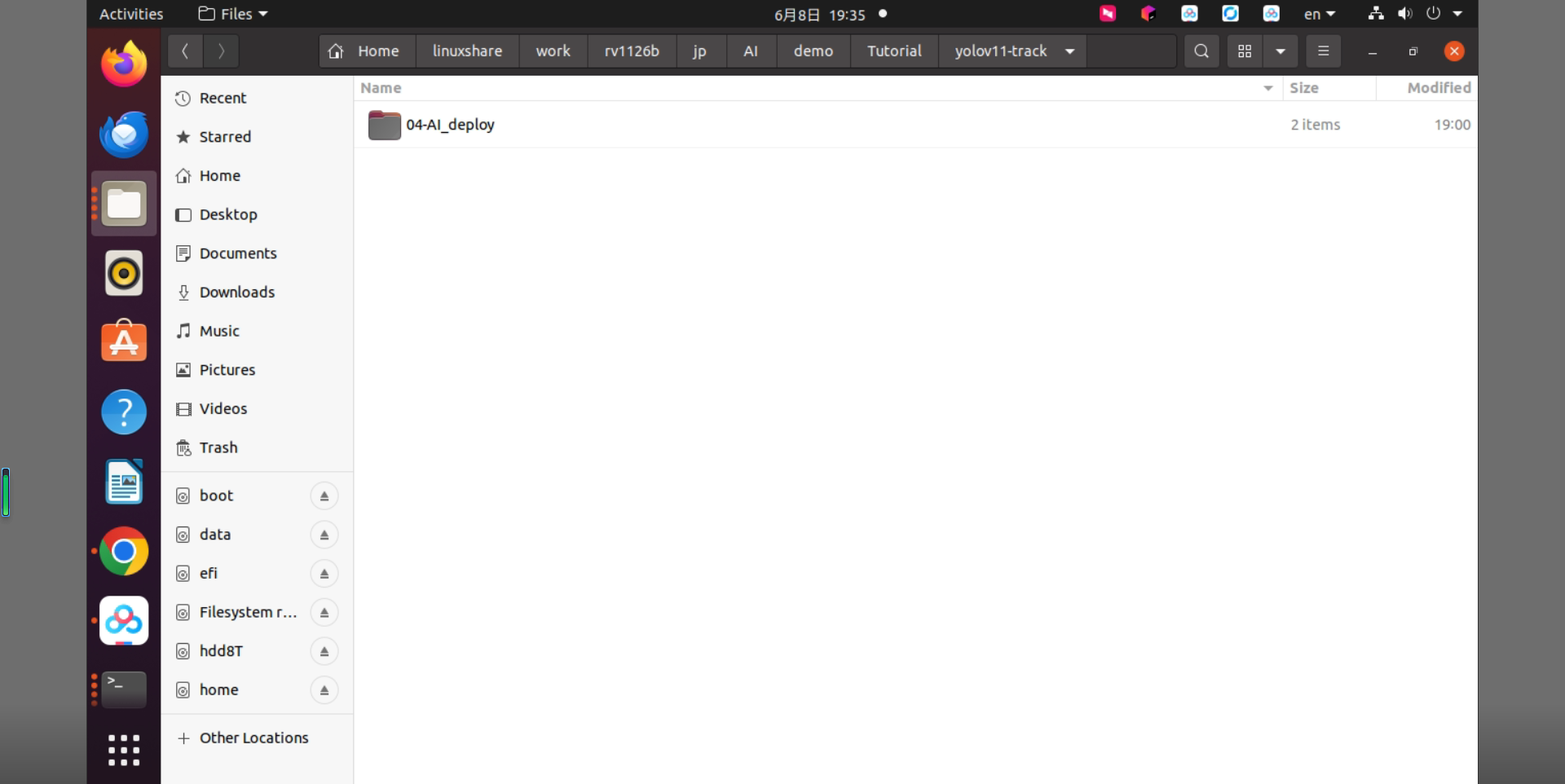
Figure 2-1 Directory example after extracting the YOLOv11-track materials
3. YOLOv11 model training
3.1 YOLOv11 training
For YOLOv11 training, refer to the YOLOv11 Training & Deployment Guide.
3.2 ByteTrack algorithm
ByteTrack is an efficient object tracking algorithm released in 2021. It achieved breakthrough results on the MOT17 dataset, with MOTA exceeding 80 and an inference speed of up to 30 FPS. The key idea is to distinguish high-confidence detection boxes from low-confidence detection boxes and keep the low-confidence boxes for later confirmation, effectively addressing occlusion and reducing ID Switch.
The core ideas of ByteTrack are as follows.
- It distinguishes high-confidence detection boxes from low-confidence detection boxes and applies different processing according to the confidence score.
- It does not discard low-confidence detection boxes. Instead, it keeps them so that later processing can reconfirm whether they should enter the confirm state.
When a target is occluded, its detection confidence decreases. When the target reappears, the confidence increases. During the occlusion stage, the tracked target is matched with low-confidence detections. During reappearance, it is matched with high-confidence detections.
The ByteTrack processing flow is shown below.
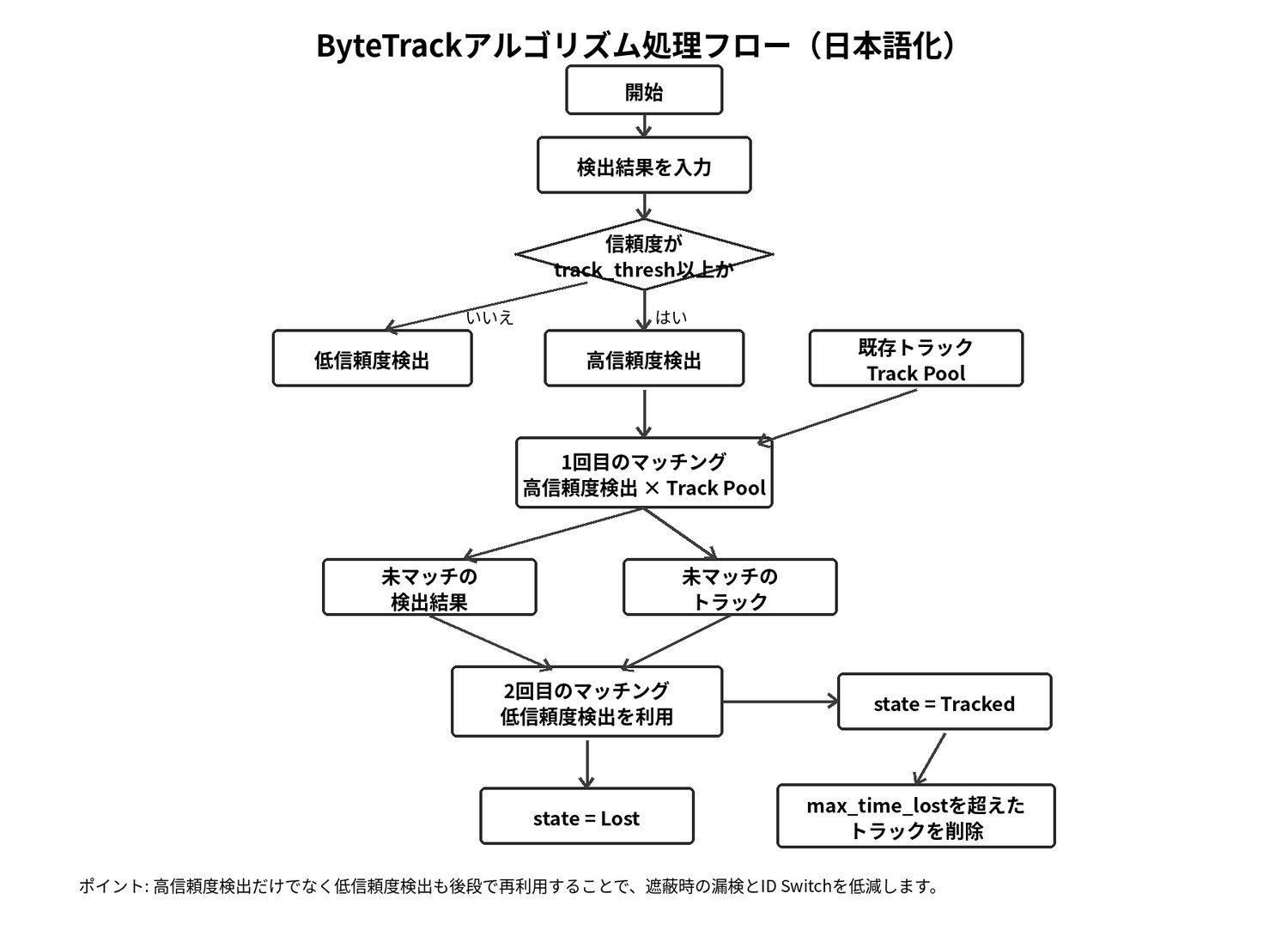
Figure 3-1 ByteTrack algorithm processing flow
4. YOLOv11-track model deployment
4.1 Deployment example description
This section explains how to deploy the YOLOv11-track model on the RV1126B development board. This model is a sample model that has only undergone simple training, and its accuracy is not guaranteed.
4.2 Preparation
4.2.1 Hardware preparation
Prepare the RV1126B development board, a Type-C data cable, and a LAN cable, and log in to the RV1126B development board through SSH using MobaXterm. For details, refer to the Getting Started Guide.
Connect using a LAN cable.
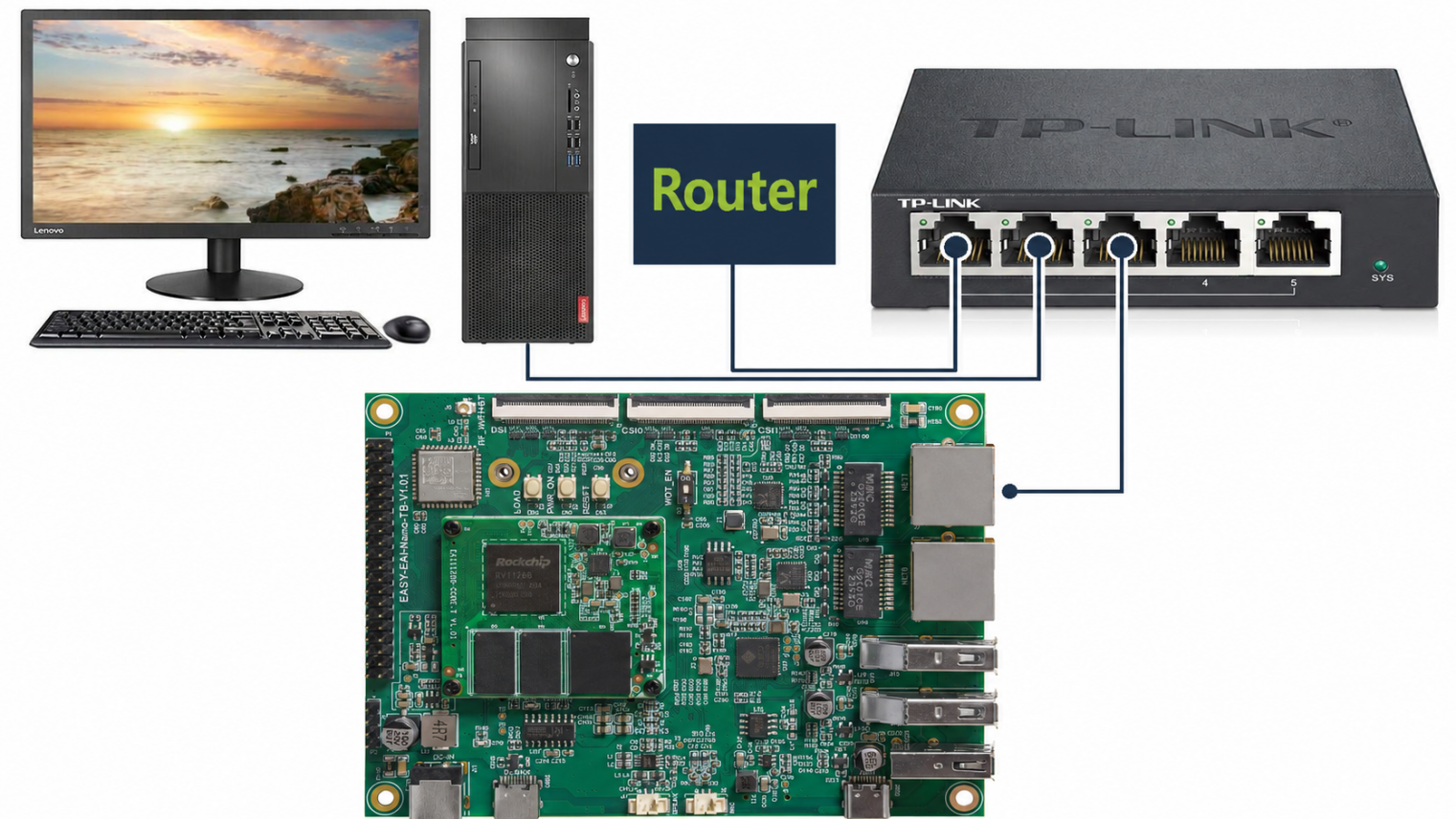
Figure 4-1 Connection topology for the RV1126B development board using a LAN cable
Connect using a serial cable (Type-C).
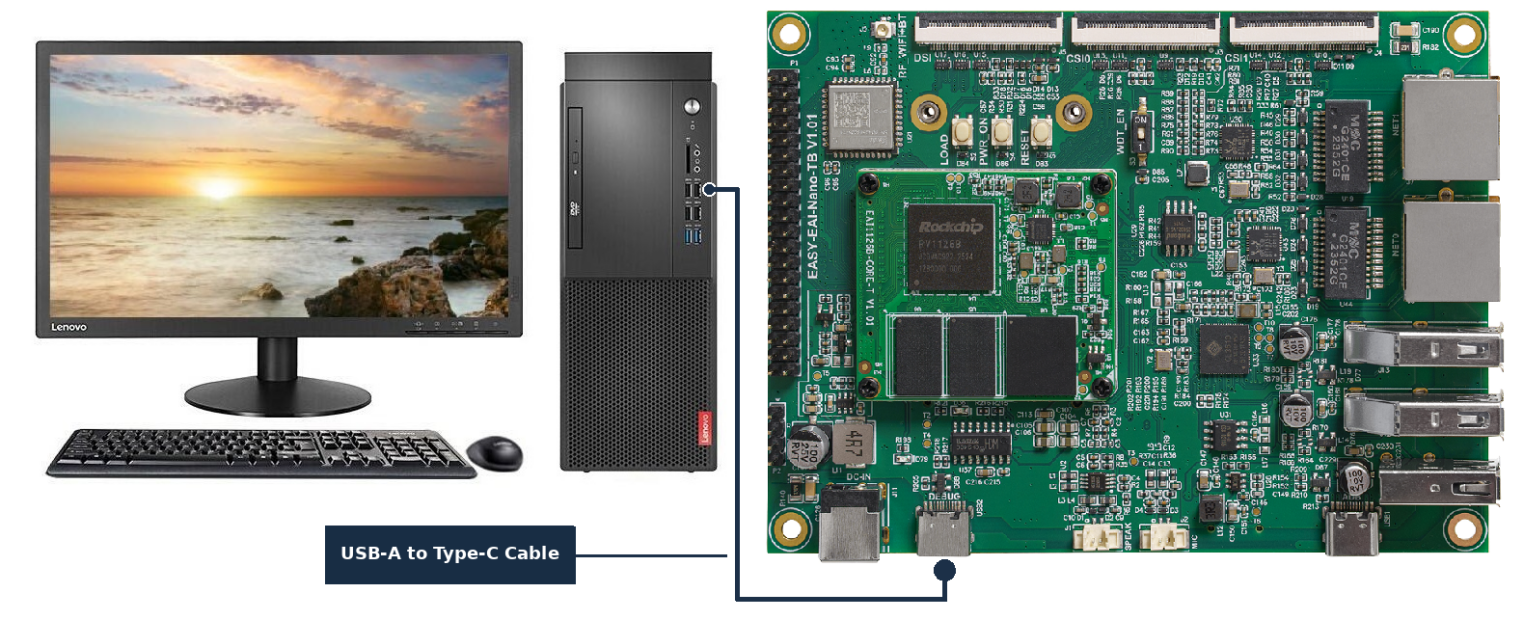
Figure 4-2 Connection topology for the RV1126B development board using a Type-C serial cable
4.2.2 Development environment preparation
If you are reading this document for the first time, refer to the Getting Started Guide and follow the described steps to set up the compilation environment.
On the Ubuntu system of the PC, run the run script to enter the RV1126B compilation environment. The steps are as follows.
cd ~/develop_environment./run.sh 2204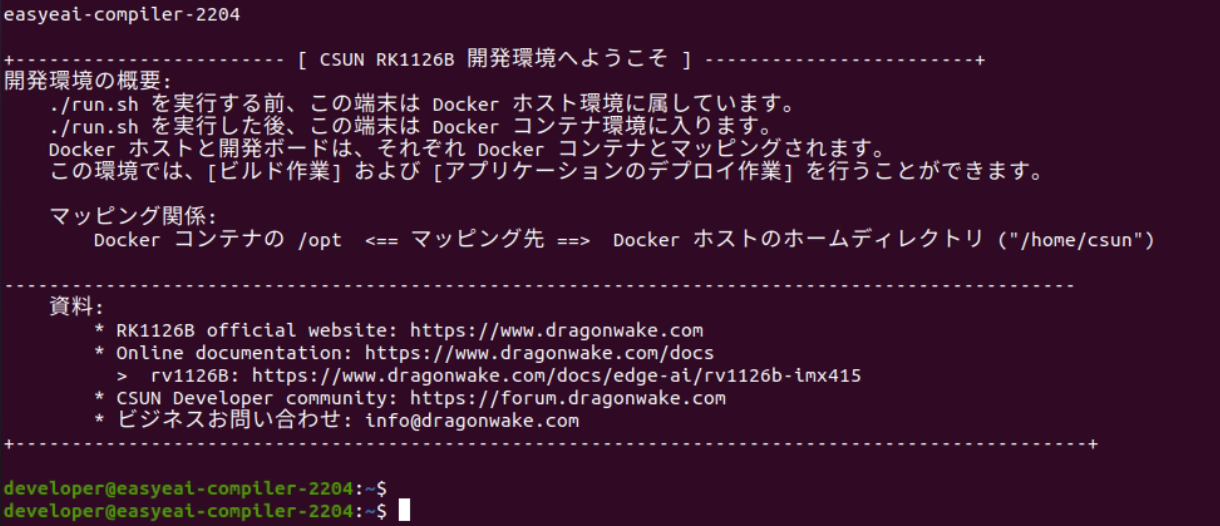
Figure 4-3 Startup screen of the RV1126B Docker development environment
4.2.3 Installing board-dependent libraries
Log in to the board through serial or SSH. This tracking algorithm depends on the libeigen3-dev library, so install it on the board in advance.
sudo apt-get updatesudo apt-get install libeigen3-dev4.3 Building the sample program
After moving the downloaded package to the RV1126B Docker development environment, run the following commands to extract it.
cd /opt/linuxshare/work/rv1126b/jp/AI/demo/Tutorial/yolov11-track/04-AI_deploytar -xJf yolov11_track_C_demo.tar.xzAfter download and extraction, the directory is shown below.
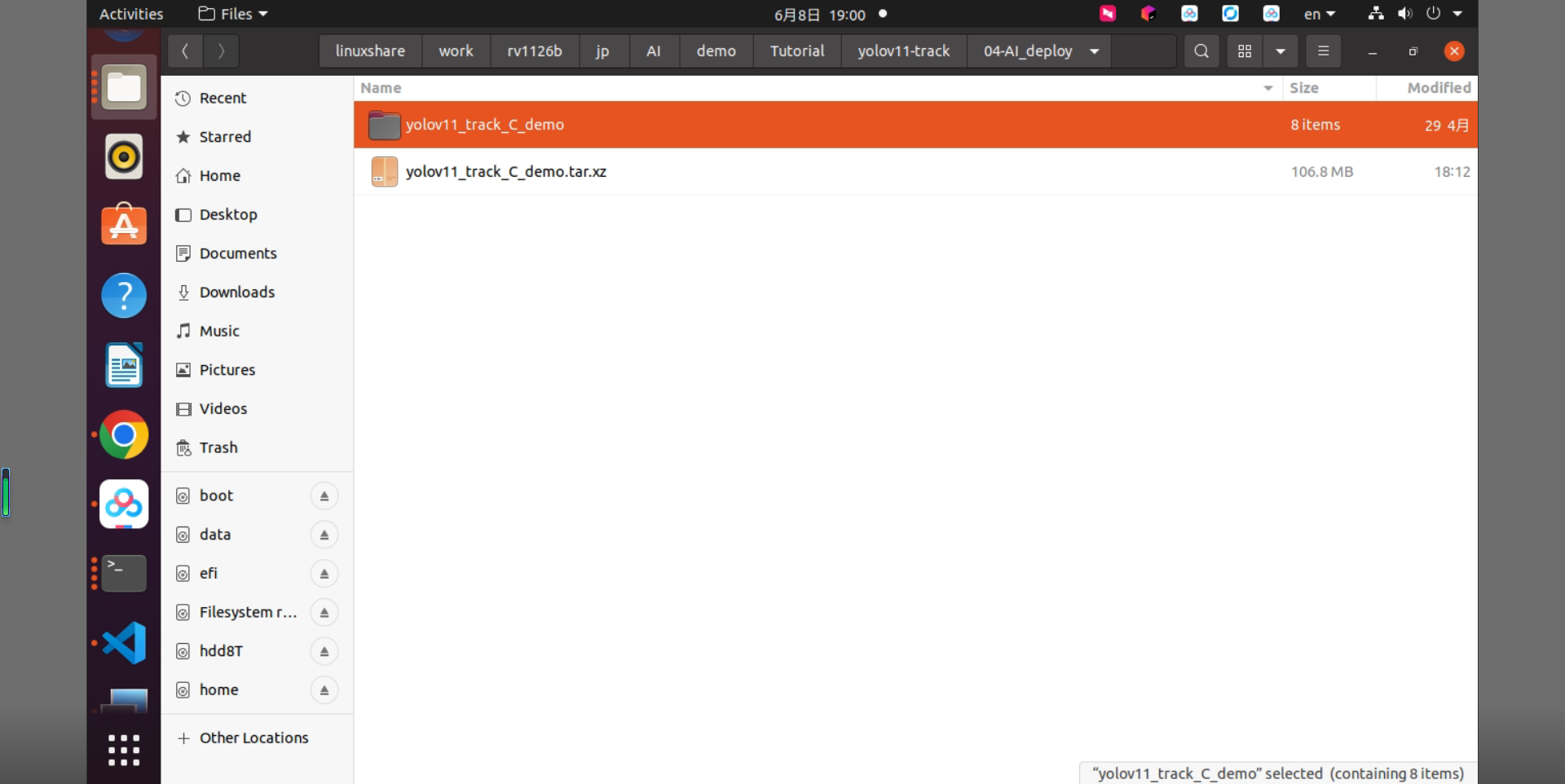
Figure 4-4 Directory after extracting the YOLOv11-track sample program
In the RV1126B Docker development environment, enter the directory where the sample program was extracted and execute the build operation. The specific commands are as follows.
sudo mount -t nfs -o vers=3,proto=tcp,mountproto=tcp,nolock,retrans=5,timeo=5 192.168.11.85:/ /mntcd /opt/linuxshare/work/rv1126b/jp/AI/demo/Tutorial/yolov11-track/04-AI_deploy/yolov11_track_C_demo/./build.sh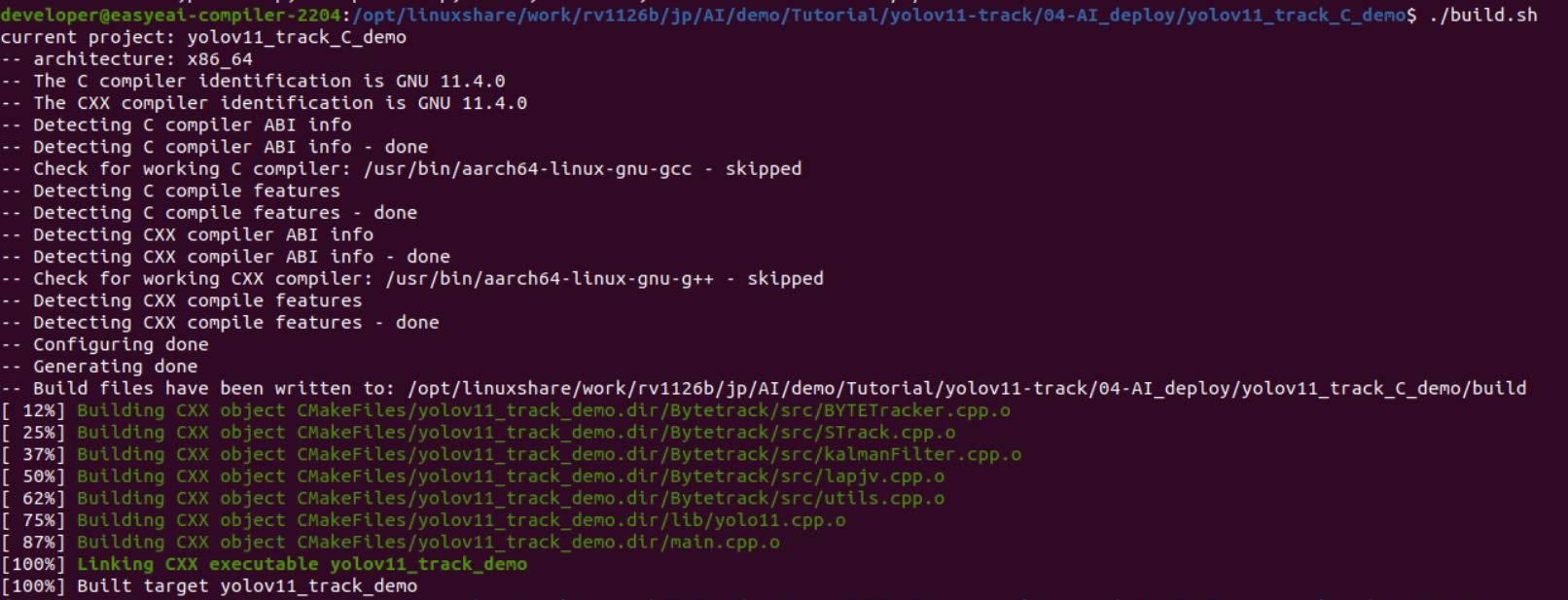
Figure 4-5 Successful build screen of the YOLOv11-track sample program
After compilation succeeds, copy the executable program directory yolov11_track_demo_release/ to the /userdata directory of the RV1126B development board.
cp yolov11_track_demo_release/ /mnt/userdata/ -rf4.4 Running the YOLOv11-track model on the development board
Enter the board-side shell through serial debugging or SSH debugging, and move to the deployment directory of the sample program. The command is as follows.
cd /userdata/yolov11_track_demo_release/Run the sample program with the following commands.
chmod 777 yolov11_track_demosudo ./yolov11_track_demo yolov11s_rv1126b.rknn test.mp4The execution result is shown below.
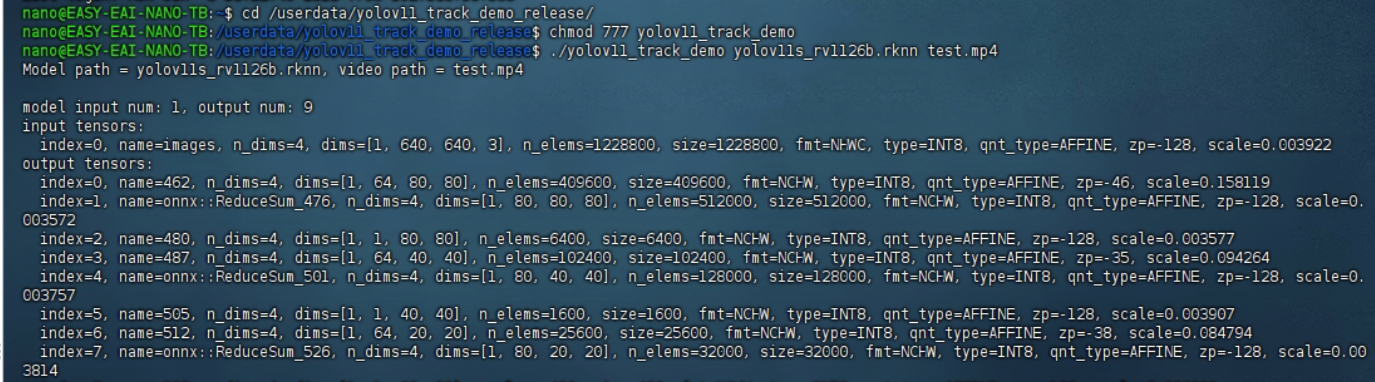
Figure 4-6 YOLOv11-track model execution result on the RV1126B board
The algorithm execution status is shown below.
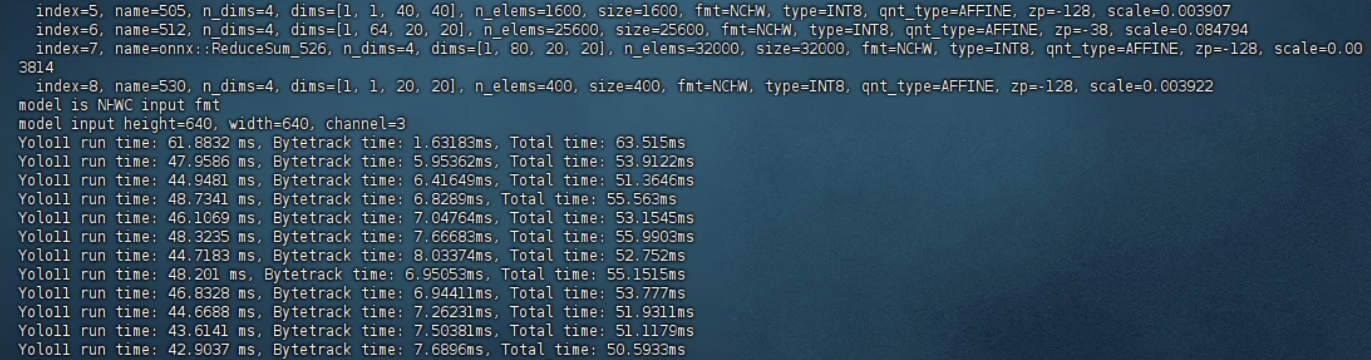
Figure 4-7 Runtime logs of YOLOv11 detection and ByteTrack tracking
From the RV1126B compilation environment, use the following command to obtain the test result.
cp /mnt/userdata/yolov11_track_demo_release/output.avi .
Figure 4-8 Example command for retrieving the output video output.avi from the RV1126B board
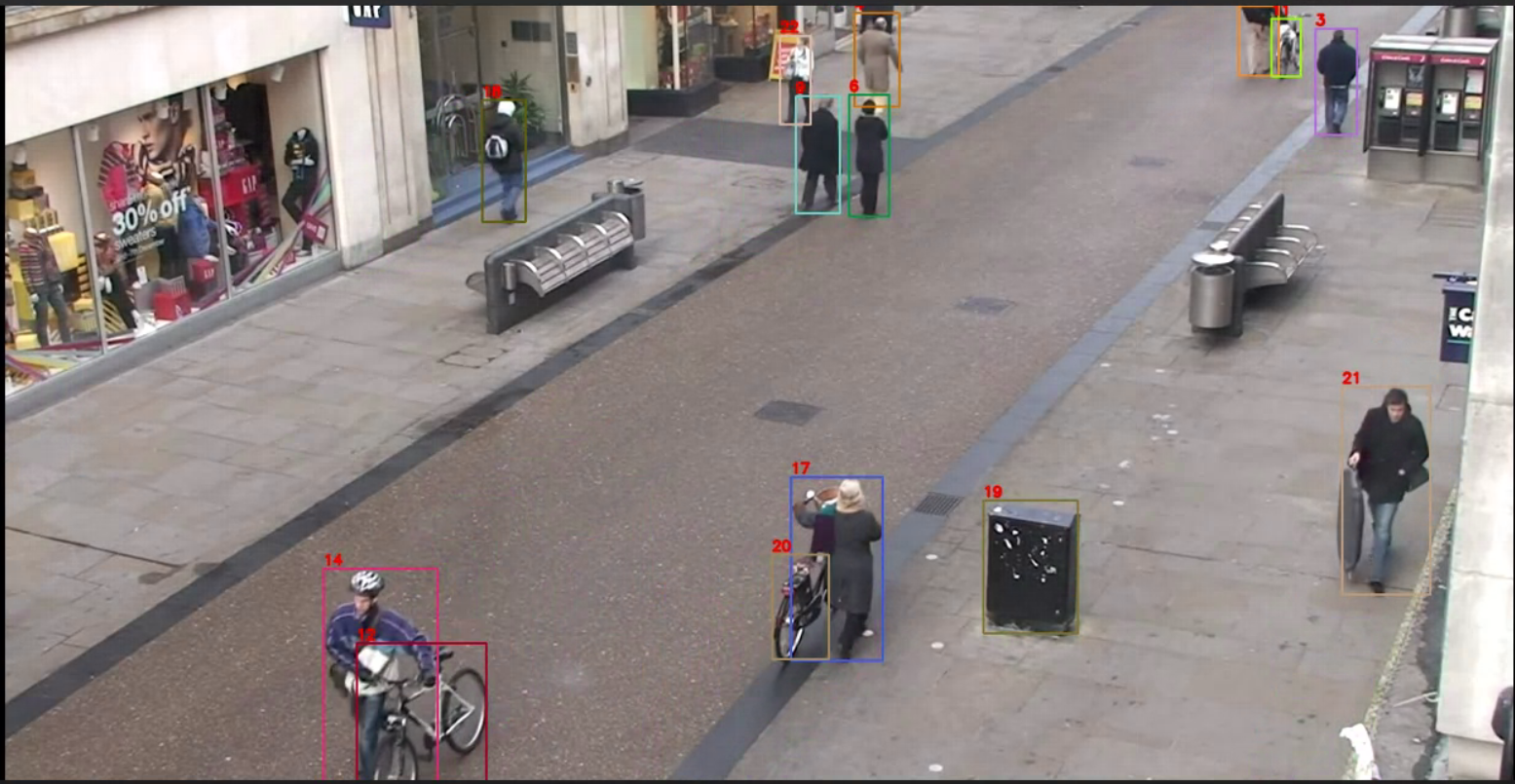
Figure 4-9 Object detection and tracking result of the YOLOv11-track model
The YOLOv11-track model has now been successfully executed on the board.