
System Operations - Thread/Process Operations
1.1. Overview of Multithreading
The concepts of processes and threads are one of the biggest differences between operating systems (OS) and common microcontrollers. In a multitasking system, system resources can be divided so that different tasks can run independently. From a macro perspective, it appears that multiple applications are running at the same time (for example, playing music while viewing a web browser). This is the key reason for introducing processes and threads.
1.2. Quick Start
1.2.1 Preparing the Development Environment
If you are reading this document for the first time, please first read “Getting Started/Preparing the Development Environment/Preparing and Updating the Easy-Eai Compilation Environment” and follow the steps described there to set up the compilation environment.
On the Ubuntu system of the PC, run the run script to enter the EASY-EAI compilation environment. The details are as follows.
cd ~/develop_environment./run.sh 22041.2.2 Downloading the Source Code and Compiling the Sample
In the EASY-EAI compilation environment, create a directory for managing the source code repository.
cd /optmkdir EASY-EAI-Toolkitcd EASY-EAI-Toolkithttps://dl.dragonwake.com/download/rv1126b/embedded/EASY-EAI-Toolkit-1126B/Demos.zip
Download the Demos.zip archive from the link above, upload it to the /opt/EASY-EAI-Toolkit directory of the virtual machine, and decompress it. Go to the corresponding sample directory and perform the compilation operation. The specific commands are as follows.
cd EASY-EAI-Toolkit-1126B/Demos/common-system_opt/./build.sh💡 Note: Because the dependent libraries are placed on the board, be sure to keep /mnt mounted during cross-compilation.
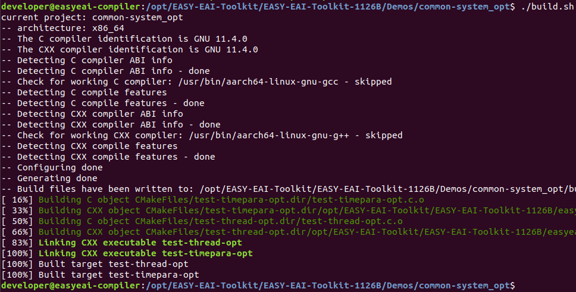
1.2.2 Downloading the Source Code and Compiling the Sample Figure 27
1.2.3 Running the Sample
Enter the board background through serial debugging or SSH debugging, and go to the location where the sample is stored. It is as follows.
cd /userdata/Demo/common-system_opt
1.2.3 Running the Sample Figure 28
The command for running the sample is as follows.
./test-thread-opt1.2.4 Execution Result
The execution result is as follows.
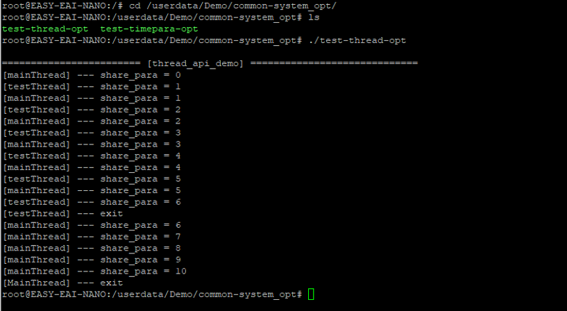
1.2.4 Execution Result Figure 29
For a detailed description of the APIs and the API calls (the source code of this sample), refer to the following descriptions.
1.3. Thread Operation API Description
1.3.1 Include/Reference Method
The EASY EAI api library is located in the easyeai-api directory of this repository. To allow customers to directly call the EASY EAI api library in their local projects, the libraries and header files that need to be linked in the project are listed below.
| Description | CMake Description | Makefile Description |
|---|---|---|
| api.cmake | ${common_root}/system_opt/api.cmake | None |
| Header File Directory | ${SYSTEM_OPT_INCLUDE_DIRS} | -I ../../easyeai-api/common/system_opt |
| Source File Directory | ${SYSTEM_OPT_SOURCE_DIRS} | ../../easyeai-api/common/system_opt |
| Library File Directory | None | None |
| Library Link Parameters | ${SYSTEM_OPT_LIBS} | None |
The path of the API source code is EASY-EAI-Toolkit-1126B/easyeai-api/common/system_opt/. Users can view the implementation of the interfaces through the source code and can also modify the source code directly.
1.3.2 Thread Task Prototype
The prototype of a thread task is as follows. A thread task is the smallest unit of program execution and is defined as follows.
typedef void \*(\*ThreadEntryPtrType)(void \*);1.3.3 Thread Creation Function
The prototype of the thread creation function is as follows.
int32_t CreateNormalThread(ThreadEntryPtrType entry, void \*para, pthread_t \*pid);The specific description is as follows.
| Function Name: CreateNormalThread() | Details |
|---|---|
| Header File | easyeai-api/common/system_opt/system_opt.h |
| Input Parameters | entry: the execution function that serves as the thread body para: the parameter passed to the thread (used as a shared variable) pid: pointer to the newly created pthread_t object |
| Return Value | Returns -1 when creation fails Returns 0 when creation succeeds |
| Notes | The pid variable is used to store the thread ID allocated by the system. Passing NULL will cause the program to terminate abnormally. |
1.3.4 Executing Shell Commands - Calling system()
The prototype of the function for executing shell commands is as follows.
int32_t exec_cmd_by_system(const char \*cmd);This function is implemented by calling system(). The specific description is as follows.
| Function Name: exec_cmd_by_system() | Details |
|---|---|
| Header File | easyeai-api/common/system_opt/system_opt.h |
| Input Parameters | cmd: shell command |
| Return Value | If fork fails, the system() function returns -1 If exec succeeds and the command exits normally, it returns the value returned by the command through exit or return. |
| Notes | 1. To obtain more useful information when an error occurs, it is recommended to monitor the errno value after system() is executed. 2. Notes on asynchronous (non-blocking) execution: To move the command to the background, add & and redirect the output at the same time. Otherwise, it will be executed in blocking mode. |
1.3.5 Executing Shell Commands - Calling popen()
The prototype of the function for executing shell commands is as follows.
int32_t exec_cmd_by_popen(const char \*cmd, char \*result);This function is implemented by calling popen(), and it can obtain the execution result. The specific description is as follows.
| Function Name: exec_cmd_by_popen() | Details |
|---|---|
| Header File | easyeai-api/common/system_opt/system_opt.h |
| Input Parameters | cmd: shell command result: after the shell command is executed, the returned result is stored in this memory area |
| Return Value | Returns -1 when the call fails Returns 0 when the call succeeds (the result has been written normally to result) |
| Notes | If command execution fails, the child process prints the error message to standard error output, so the parent process cannot obtain it. If you need to capture the error message, redirect the child process’s error output to standard output (2>&1). This allows the parent process to obtain the error information. Example: exec_cmd_by_popen(“ls 2>&1”, result); |
1.4. Usage Example of the Thread Operation API
The path of the code used as a usage example of the thread operation API is as follows:
EASY-EAI-Toolkit-1126B/Demos/common-system_opt/test-thread-opt.c The thread creation case consists of two parts: “thread execution body” and “thread creation operation”.
The thread execution body is as follows.
void *testThreadBody(void *arg){int *share_para = (int *)arg;while(1){printf("[tesThread] --- share_para = %d\n", *share_para);if(*share_para > 10){printf("[tesThread] --- exit\n");break;}sleep(1);}pthread_exit(NULL);}The thread creation operation is as follows. The pId variable is used to store the process (thread) ID, and the share_para variable holds the input parameter.
pthread_t pId;int share_para = 0;if(0 == CreateNormalThread(testThreadBody, &share_para,&pId)){while(1){printf("[mainThread] --- \n");share_para++;sleep(1);}}