
RKLLM AI モデル変換ガイド
修正履歴
| NO | バージョン | 修正内容 | 修正日 |
|---|---|---|---|
| 1 | Ver1.0 | 新規作成 | 2026/06/21 |
この文書の情報は、文書を改善するため、事前の通知なく変更されることがあります。最新版は弊社ホームページからご参照ください。
株式会社日昇テクノロジーの書面による許可のない複製は、いかなる形態においても厳重に禁じられています。
1. AIモデル変換
この章では主に、Hugging Face形式の大規模言語モデル(LLM)の実装方法について説明します。
また、それをRKLLMモデルに変換する方法についても説明します。現在サポートされているモデルには、DeepSeek、LLaMA、Qwen、Qwen2、Phi-2、Phi-3、ChatGLM3、Gemma、InternLM2、MiniCPMなどがあります。この章では、例としてDeepSeek-R1を使用します。
これから、DeepSeek-R1大規模言語モデルをRKLLMモデルに変換する方法について説明します。
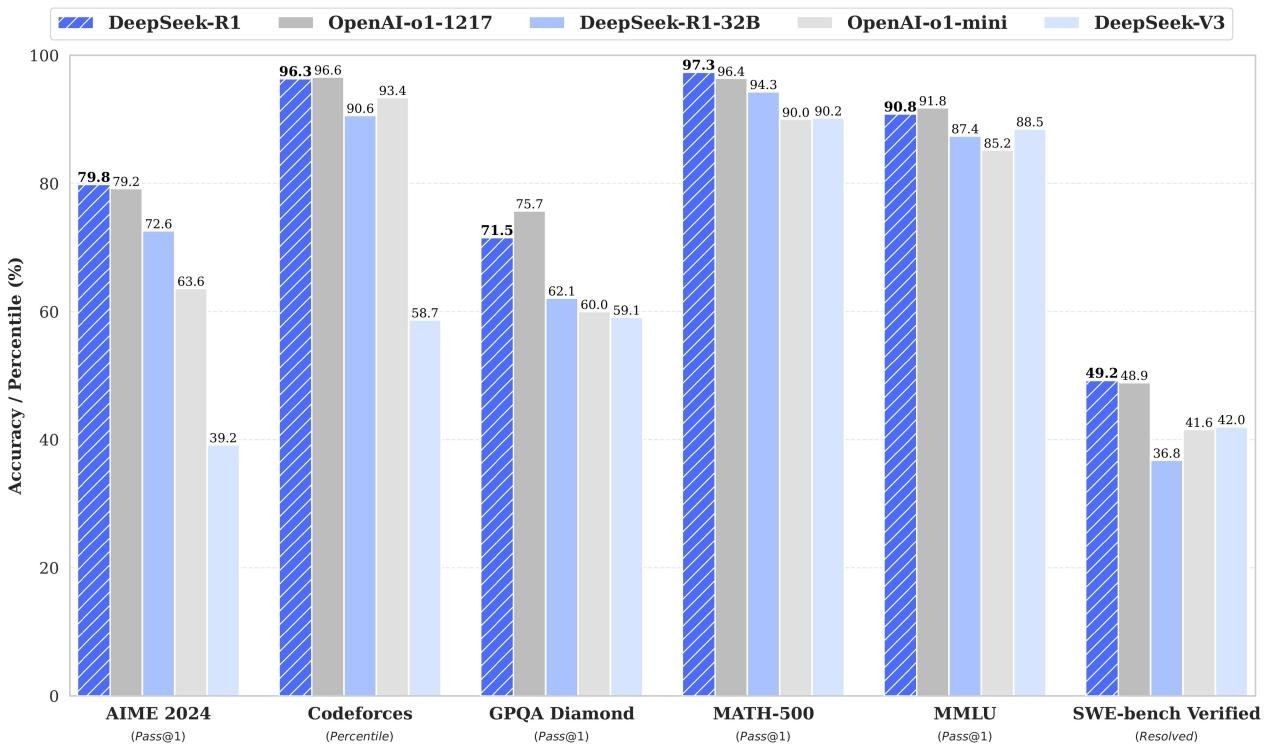
図:DeepSeek-R1 と主要モデルのベンチマーク比較
1.1 モデルダウンロード
このセクションでは、オリジナルのHugging faceモデルと変換されたNPUモデルの2つの大きなモデルファイルを提供します。
Google ドライブフォルダーからダウンロードできます。
https://drive.google.com/drive/folders/1nsL3pk75dyZHF_39KCKVoSevMq2F6Be9?usp=sharing
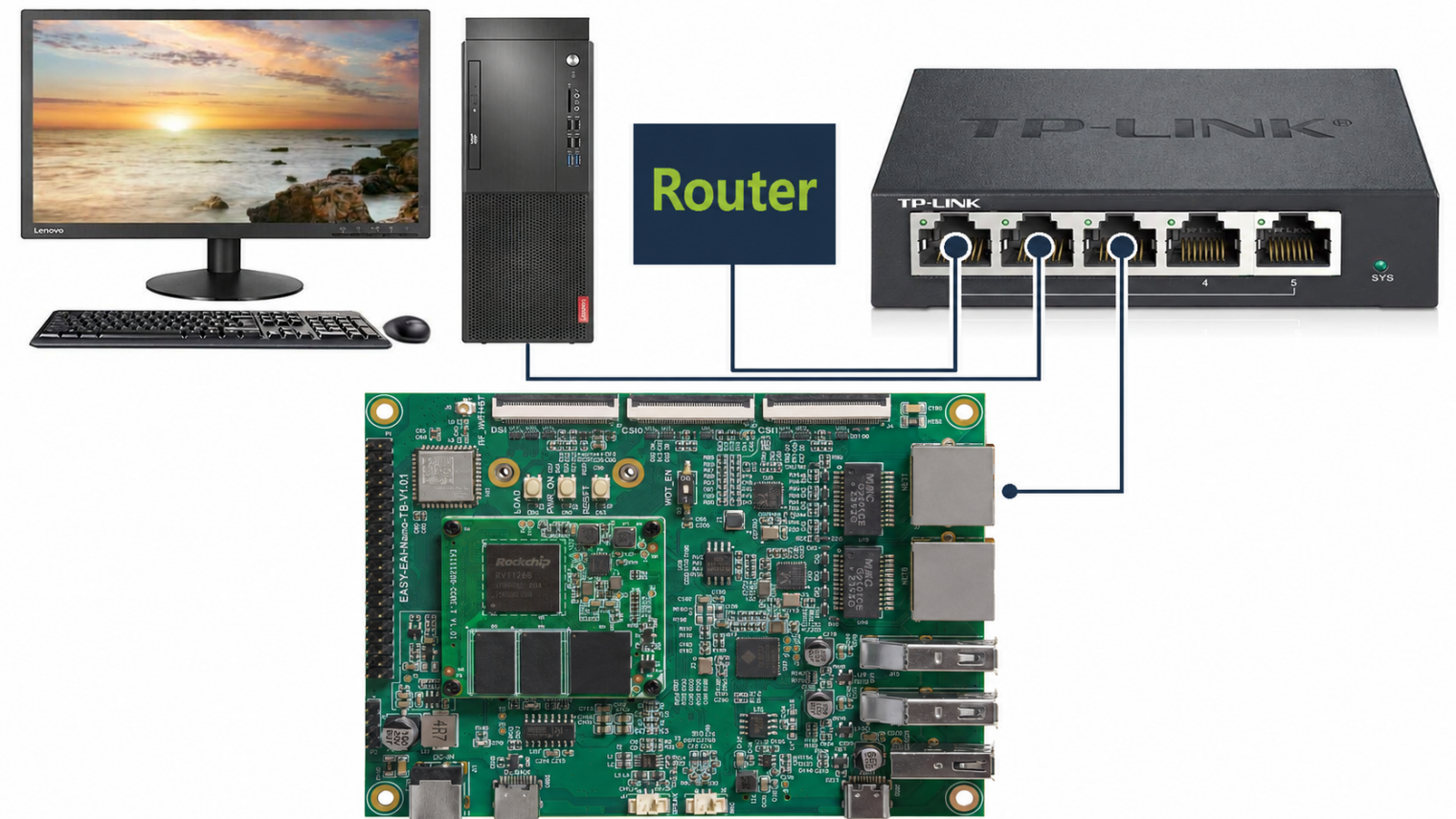
図:RV1126B 基板の LAN 接続構成
1.2 モデル変換
モデルファイルと変換用のPythonスクリプトは同じフォルダーにあります。
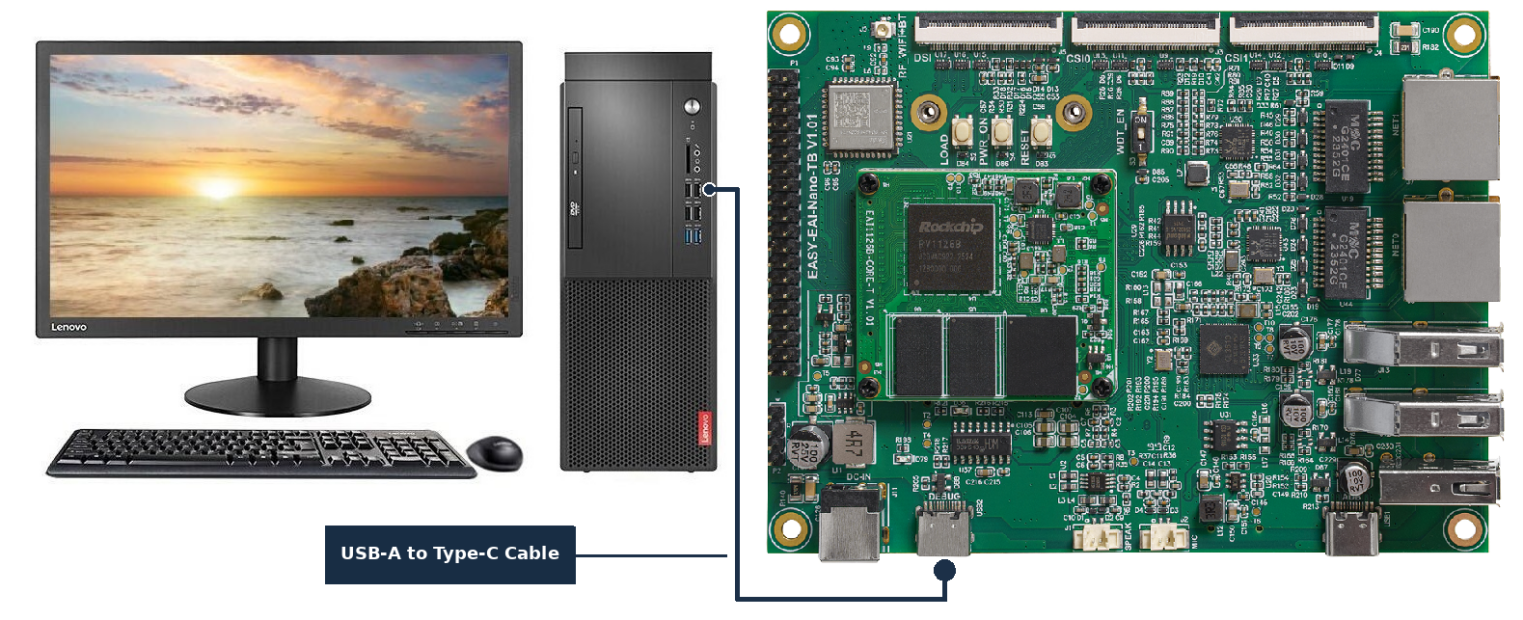
図:RV1126B 基板の Type-C シリアル接続構成
RKLLM-Toolkit環境で、以下のコマンドを実行してモデル変換を実行します。
| python test.py |
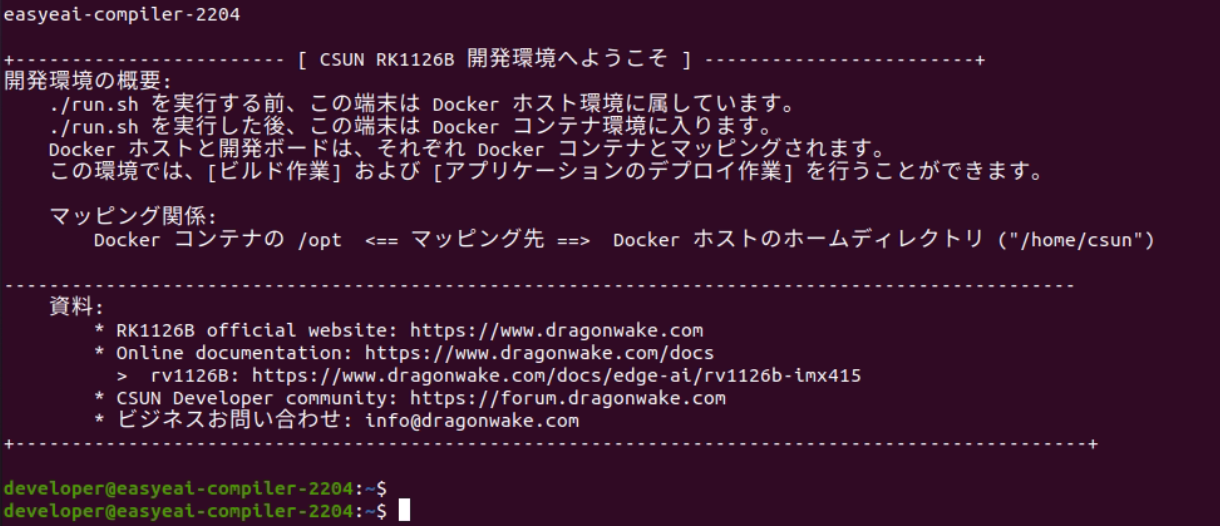
図:EASY-EAI 開発環境起動後の端末画面
モデル変換は成功し、大きなNPUエンコードモデルファイルdeepseek_r1_rv1126b_w4a16.rkllmが生成されました。

図:AI モデルデプロイ用プログラムパッケージの Google ドライブフォルダー
DeepSeek-R1-Distill-Qwen-1.5B モデルの変換に使用される変換スクリプト test.py を以下に示します。
from rkllm.api import RKLLMfrom datasets import load_datasetfrom transformers import AutoTokenizerfrom tqdm import tqdmimport torchfrom torch import nnimport os## os.environ['CUDA_VISIBLE_DEVICES']='1'modelpath = './DeepSeek-R1-Distill-Qwen-1.5B'llm = RKLLM()## Load model## Use 'export CUDA_VISIBLE_DEVICES=2' to specify GPU device## options ['cpu', 'cuda']ret = llm.load_huggingface(model=modelpath, model_lora = None,device='cpu')## ret = llm.load_gguf(model = modelpath)if ret != 0: print('Load model failed!') exit(ret)## Build modeldataset = "./data_quant.json"## Json file format, please note to add prompt in the input,likethis:## [{"input":"Human: !\nAssistant: ","target":"こんにちは!私はAIアシスタントKKです!"},...]qparams = None## qparams = 'gdq.qparams' # Use extra_qparamsret = llm.build(do_quantization=True, optimization_level=1,quantized_dtype='w4a16', quantized_algorithm='normal',target_platform='rv1126b', num_npu_core=1, extra_qparams=qparams,dataset=None)if ret != 0: print('Build model failed!') exit(ret)from rkllm.api import RKLLMfrom datasets import load_datasetfrom transformers import AutoTokenizerfrom tqdm import tqdmimport torchfrom torch import nnimport os## os.environ['CUDA_VISIBLE_DEVICES']='1'modelpath = './DeepSeek-R1-Distill-Qwen-1.5B'llm = RKLLM()## Load model## Use 'export CUDA_VISIBLE_DEVICES=2' to specify GPU device## options ['cpu', 'cuda']ret = llm.load_huggingface(model=modelpath, model_lora = None,device='cpu')## ret = llm.load_gguf(model = modelpath)if ret != 0: print('Load model failed!') exit(ret)## Build modeldataset = "./data_quant.json"## Json file format, please note to add prompt in the input,likethis:## [{"input":"Human: !\nAssistant: ","target":"こんにちは!私はAIアシスタントKKです!"},...]qparams = None## qparams = 'gdq.qparams' # Use extra_qparamsret = llm.build(do_quantization=True, optimization_level=1,quantized_dtype='w4a16', quantized_algorithm='normal',target_platform='rv1126b', num_npu_core=1, extra_qparams=qparams,dataset=None)if ret != 0: print('Build model failed!') exit(ret)## Chat with modelmessages = "<|im_start|>system You are a helpfulassistant.<|im_end|><|im_start|>userこんにちは!\n<|im_end|><|im_start|>assistant"kwargs = {"max_length": 128, "top_k": 1, "top_p": 0.8, "temperature": 0.8, "do_sample": True,"repetition_penalty": 1.1}## print(llm.chat_model(messages, kwargs))## Export rkllm modelret = llm.export_rkllm("./deepseek_r1_rv1126b_w4a16.rkllm")if ret != 0: print('Export model failed!') exit(ret)## Chat with modelmessages = "<|im_start|>system You are a helpfulassistant.<|im_end|><|im_start|>userこんにちは!\n<|im_end|><|im_start|>assistant"kwargs = {"max_length": 128, "top_k": 1, "top_p": 0.8, "temperature": 0.8, "do_sample": True,"repetition_penalty": 1.1}## print(llm.chat_model(messages, kwargs))## Export rkllm modelret = llm.export_rkllm("./deepseek_r1_rv1126b_w4a16.rkllm")if ret != 0: print('Export model failed!') exit(ret)